CloverPit Trainer
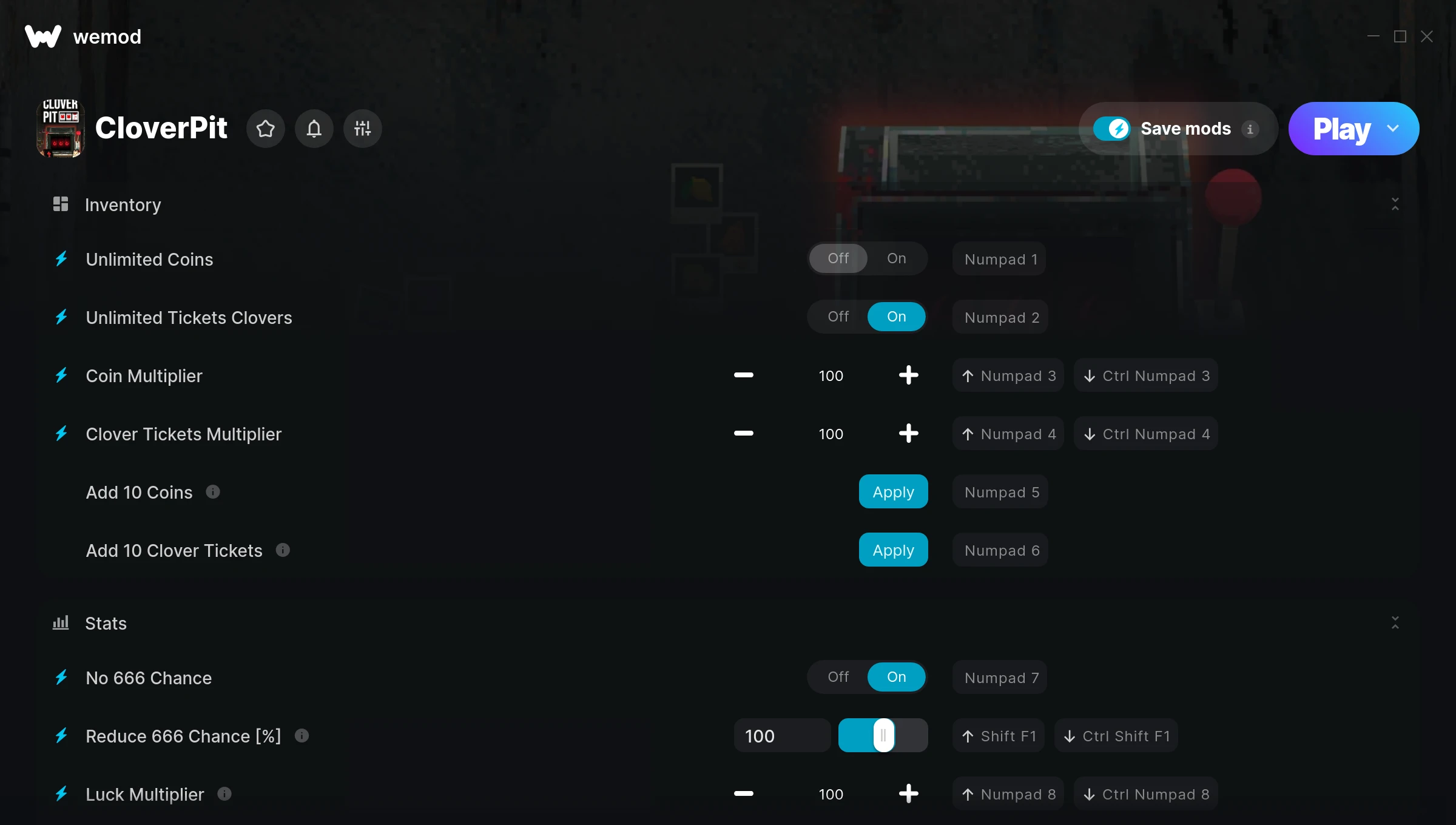
The CloverPit Trainer gives you access to 15 cheats that let you play the game however you want. Struggling with a tough section? Want to skip the grind? Just want to mess around? This trainer has you covered.
Pro tip: start with one or two cheats and see how it feels. Or turn them all on. Your call.
Since its 2025 release, CloverPit has built a loyal following among simulator and strategy fans looking to customize their playthrough.
This is an auto-updating trainer that keeps pace with every game patch automatically. No need to manually grab new versions after updates.
Some of the most popular cheats included in this trainer are Freeze Deadline Rounds Left, Unlimited Coins, Unlimited Tickets Clovers, Coin Multiplier, and many more. These modifications let you customize difficulty, skip grinding, or simply experiment with the game in new ways.
CloverPit Trainer Cheats
This trainer includes 15 cheats covering resources, time.
| # | Cheat | Effect |
|---|---|---|
| 1 | Unlimited Coins | Use your coins as much as you want without limits |
| 2 | Unlimited Tickets Clovers | Remove all limits on your tickets clovers |
| 3 | Coin Multiplier | Boost your coin earnings dramatically |
| 4 | Clover Tickets Multiplier | Boost your clover tickets earnings dramatically |
| 5 | Add 10 Coins | Add extra 10 coins whenever you need it |
| 6 | Add Coins | Give yourself more coins on demand |
| 7 | Add 10 Clover Tickets | Give yourself more 10 clover tickets on demand |
| 8 | Add Clover Tickets | Add extra clover tickets whenever you need it |
| 9 | No 666 Chance | Turn off 666 chance entirely for easier gameplay |
| 10 | Reduce 666 Chance [%] | Tweak the reduce 666 chance [%] mechanic to your advantage |
| 11 | Luck Multiplier | Boost your luck earnings dramatically |
| 12 | Force Luck | Tweak the force luck mechanic to your advantage |
| 13 | No Extra Restock Cost | Turn off extra restock cost entirely for easier gameplay |
| 14 | No Extra Phone Reroll Cost | Completely disable extra phone reroll cost |
| 15 | Freeze Deadline Rounds Left | Keep your deadline rounds left frozen at its current value |
What Can You Do With This Trainer?
Here are some of the standout cheats in this trainer – the ones that really change how you play:
- Unlimited Coins – Remove all limits on your coins
- Unlimited Tickets Clovers – Remove all limits on your tickets clovers
- Coin Multiplier – Boost your coin earnings dramatically
- Clover Tickets Multiplier – Boost your clover tickets earnings dramatically
- Add 10 Coins – Give yourself more 10 coins on demand
And that’s just scratching the surface. The full CloverPit cheat list above has everything you need to play completely on your own terms.
Recommended Cheat Presets
Not sure which cheats to enable? Here are some recommended preset combinations for different playstyles:
Farming Preset
Skip the grind entirely. Max out your loot, XP, and cash without spending hours farming the same enemies over and over.
- Unlimited Coins
- Add 10 Coins
- Add Coins
Download CloverPit Trainer
Download the latest version of this trainer for PC below.
| Version | Creator | Platform | Date Added | Download |
|---|---|---|---|---|
| Auto-Updating Version (Latest) | GreenHouse | Steam, Xbox | 2025-05-14 | Download |
How to Use This Trainer
- Boot Up CloverPit – Start the game like you normally would. Once you’re at the main menu or loaded into your save, you’re ready for the next step.
- Launch WeMod – Fire up the WeMod app and search for “CloverPit”. Hit Play and the overlay will appear over your game with all cheats ready to toggle.
- Switch On Your Cheats – Browse the cheat list in the WeMod overlay and toggle on whatever you want. Effects are instant and reversible.
- Dive In – Everything is ready. Return to CloverPit and enjoy the game your way. Swap cheats around whenever you feel like mixing things up.
Tips & Known Issues
- This is a single-player trainer only. Do not use it in online or multiplayer modes – you will get banned.
- If you’re running other overlays (Discord, NVIDIA, MSI Afterburner), try disabling them if the trainer isn’t responding.
- Steam users may want to turn off the Steam Overlay to prevent it from interfering with the trainer.
- For the trainer to work properly, make sure you launch it with Administrator privileges.
- One of the perks of WeMod is automatic updates. The trainer syncs with game patches behind the scenes.
Frequently Asked Questions
Can I get banned for using this trainer?
Single-player? No risk at all. Online or multiplayer? Do not even think about it. Anti-cheat systems will catch you and you will be banned.
Is this trainer compatible with mods?
In most cases they work fine together. Conflicts only happen when a mod alters the exact same memory values the trainer is trying to modify.
Do I need to restart the game after activating cheats?
Nope. Cheats kick in immediately while the game is running. Just toggle them on and off whenever you want.
How do I use this trainer?
Download the trainer, run it alongside the game, and use the hotkeys to toggle cheats on and off. It really is that simple.
Will the trainer work with the latest game version?
If you’re using the Auto-Updating Version, yes – it patches itself after every game update.
What cheats are included in this trainer?
This trainer packs 15 cheats covering everything from infinite health to unlimited resources and more. The full list is in the table above.
Does this trainer work with Steam?
Fully compatible. This trainer works with Steam, Xbox – just launch the game through whichever launcher you use.