60 Parsecs Trainer
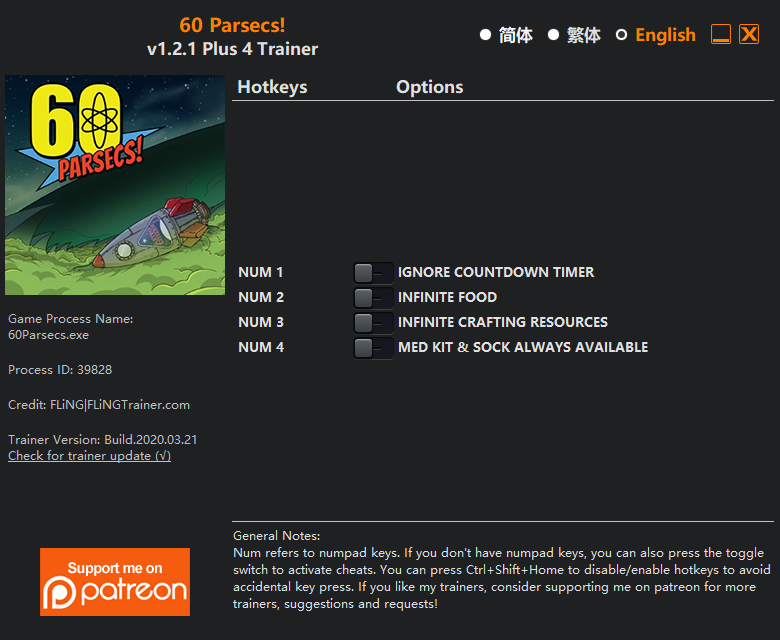
The 60 Parsecs Trainer gives you access to 4 cheats that let you play the game however you want. Struggling with a tough section? Want to skip the grind? Just want to mess around? This trainer has you covered.
Freezing time gives you all the breathing room you need to plan the perfect move. These cheats let you get past the frustrating parts and actually enjoy the game at your own pace.
You already bought the game. Might as well play it exactly the way you want to.
First hitting the scene in 2018, this point-and-click and role-playing (rpg) title keeps attracting players who want more control over their run.
The Auto-Updating Version takes care of compatibility automatically whenever the game is updated. If you’d rather download once and not worry about auto-updates, the Standalone version has you covered.
60 Parsecs Trainer Cheats
This trainer includes 4 cheats covering resources, time.
| # | Cheat | Effect |
|---|---|---|
| 1 | Freeze Timer | Stop any in-game countdown dead in its tracks |
| 2 | Unlimited Food | Your food never runs out or depletes |
| 3 | No Needs | Completely disable needs |
| 4 | Unlimited Resources | Gather and spend resources without worrying about running low |
What Can You Do With This Trainer?
Here are some of the standout cheats in this trainer – the ones that really change how you play:
- Freeze Timer – Stop any in-game countdown dead in its tracks
- Unlimited Food – Use your food as much as you want without limits
- No Needs – Completely disable needs
- Unlimited Resources – Gather and spend resources without worrying about running low
And that’s just scratching the surface. The full cheat list above has everything you need to play the game completely on your own terms.
Download 60 Parsecs Trainer
Download the latest version of this trainer for PC below.
| Version | Creator | Platform | Date Added | Download |
|---|---|---|---|---|
| Auto-Updating Version (Latest) | MrAntiFun | Steam | 2026-01-09 | Download |
| Standalone Version | FLiNG | Steam | 2025-11-24 | Download |
How to Use This Trainer
- Run 60 Parsecs – Get the game running first – load a save or start fresh. The trainer won’t work unless the game is already open.
- Start the Trainer – Got WeMod? Search for “60 Parsecs” in the app and click Play. Using the FLiNG standalone? Run the .exe with Administrator privileges.
- Select and Activate – Choose your cheats from the WeMod overlay and flip them on. Every toggle takes effect right away with no need to reload.
- Jump Back In – You’re good to go. Return to the game and enjoy your modified experience. Toggle cheats on or off anytime as you play.
Tips & Known Issues
- Keep this trainer offline. Single-player only – any online or multiplayer use risks a permanent ban from the game.
- Trainer compatibility depends on game version. If cheats aren’t activating, check that your game is up to date.
- Your antivirus might quarantine the trainer file. This is a known false positive – whitelist the trainer in your security software.
- Steam users may want to turn off the Steam Overlay to prevent it from interfering with the trainer.
- WeMod handles version compatibility automatically. When the game updates, the trainer follows shortly after.
Frequently Asked Questions
Can I use multiple cheats at the same time?
Yes – enable as many as you like simultaneously. Combining cheats is where things get really fun.
How do I use this trainer?
Grab the download, launch the game, then fire up the trainer. Toggle cheats with the hotkeys or the overlay – done.
Is this trainer compatible with mods?
In most cases they work fine together. Conflicts only happen when a mod alters the exact same memory values the trainer is trying to modify.
Will this trainer affect my save files?
Your save files are safe. Cheats only change values in RAM while you play. Just be aware that anything you accomplish with cheats active gets saved like normal progress.
Can I get banned for using this trainer?
As long as you stick to single-player, you’re fine. Using cheats in multiplayer or online modes is a completely different story – don’t do it.
How do I know which version to download?
The Auto-Updating Version is the easiest choice – it handles compatibility on its own. Pick the Standalone if you want a specific build that won’t change.
Does this trainer work with Steam?
It does. This trainer is built to work with the Steam version.