Airport Simulator 2019 Trainer
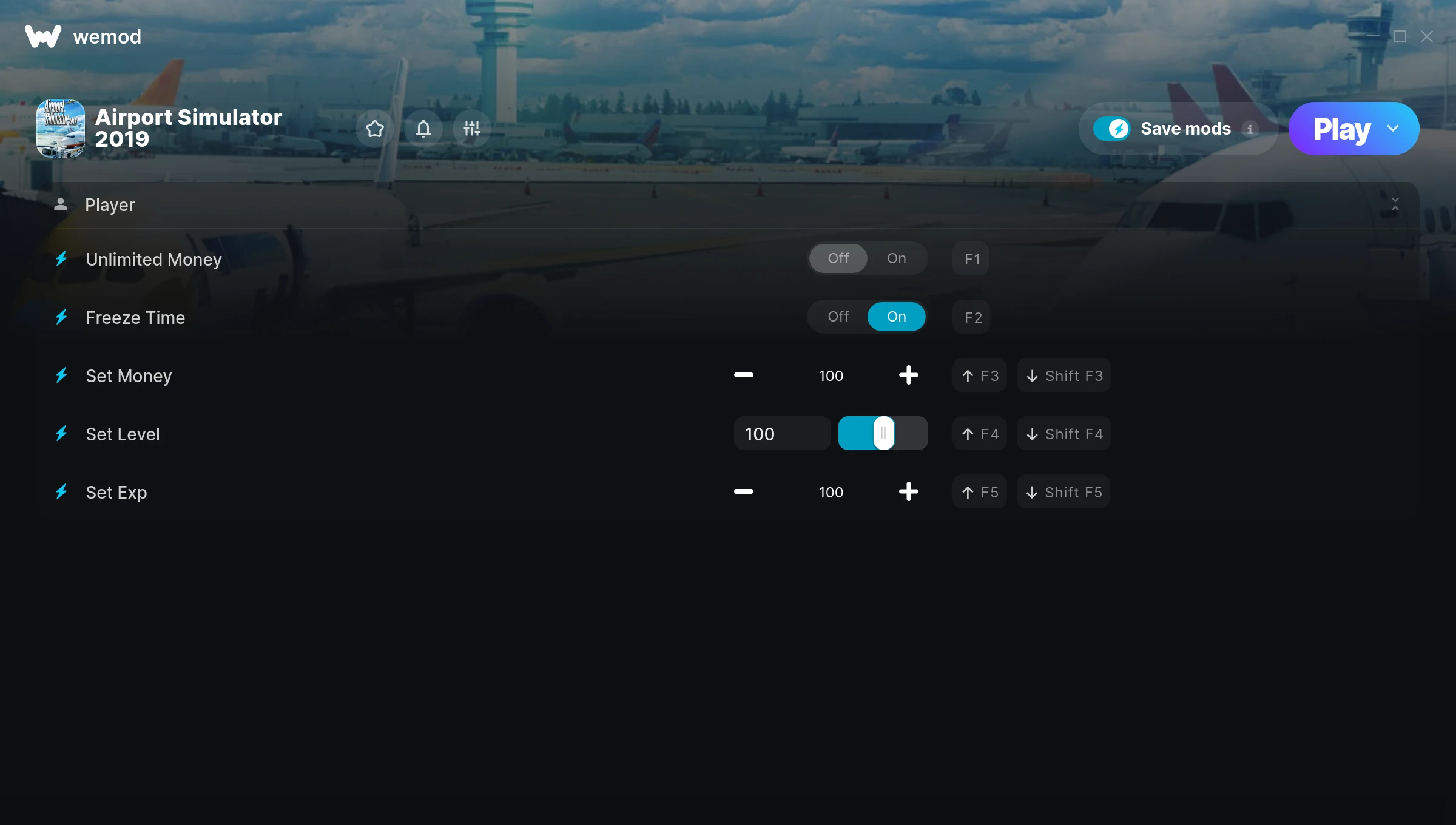
The Airport Simulator 2019 Trainer gives you access to 5 cheats that let you play the game however you want. Struggling with a tough section? Want to skip the grind? Just want to mess around? This trainer has you covered.
Unlimited money removes the grind entirely – just buy what you want and get back to the fun parts. These cheats let you get past the frustrating parts and actually enjoy the game at your own pace.
Whether you want a slight edge or total domination, there’s something here for you.
If you missed Airport Simulator 2019 when it launched in 2018, now’s a great time to jump into this simulator and strategy title.
The best part? This PC trainer auto-updates whenever the game is patched. Zero effort on your part – it stays compatible in the background so you can just play.
Some of the most popular cheats included in this trainer are Unlimited Money, Freeze Time, Set Money, Set Level, and many more. These modifications let you customize difficulty, skip grinding, or simply experiment with the game in new ways.
Airport Simulator 2019 Trainer Cheats
This trainer includes 5 cheats covering resources, experience, time.
| # | Cheat | Effect |
|---|---|---|
| 1 | Unlimited Money | Buy anything you want without thinking about cost |
| 2 | Freeze Time | Keep your time frozen at its current value |
| 3 | Set Money | Pick your own value for money |
| 4 | Set Level | Choose exactly how much level you want |
| 5 | Set Exp | Manually set your exp to any number |
What Can You Do With This Trainer?
Here are some of the standout cheats in this trainer – the ones that really change how you play:
- Unlimited Money – Buy anything you want without thinking about cost
- Freeze Time – Lock your time so it never changes
- Set Money – Adjust money to whatever feels right
- Set Level – Manually set your level to any number
- Set Exp – Adjust exp to whatever feels right
And that’s just scratching the surface. The full Airport Simulator 2019 cheat list above has everything you need to play completely on your own terms.
Recommended Cheat Presets
Not sure which cheats to enable? Here are some recommended preset combinations for different playstyles:
Farming Preset
Skip the grind entirely. Max out your loot, XP, and cash without spending hours farming the same enemies over and over.
- Unlimited Money
- Set Money
- Set Exp
Download Airport Simulator 2019 Trainer
Download the latest version of this trainer for PC below.
| Version | Creator | Platform | Date Added | Download |
|---|---|---|---|---|
| Auto-Updating Version (Latest) | MrAntiFun | Steam | 2026-01-11 | Download |
How to Use This Trainer
- Start Airport Simulator 2019 – Fire up the game and get to the main menu or load your save. The game needs to be running before you open the trainer.
- Start the Trainer – Open WeMod, type “Airport Simulator 2019” in the search bar, and click Play. The overlay pops up in-game and you’re ready to go.
- Switch On Your Cheats – Browse the cheat list in the WeMod overlay and toggle on whatever you want. Effects are instant and reversible.
- Get Back to the Game – Everything is set up. Continue playing Airport Simulator 2019 with your chosen cheats active. Experiment freely – you can change things at any time.
Tips & Known Issues
- This is a single-player trainer only. Do not use it in online or multiplayer modes – you will get banned.
- If cheats aren’t working, check for conflicting overlays. Discord, GeForce Experience, and similar tools can interfere.
- Consider backing up your save files before using cheats, especially if you’re on your main playthrough.
- Cloud gaming services like GeForce NOW or Xbox Cloud Gaming are not compatible with trainers. You need the game running locally on PC.
- WeMod handles version compatibility automatically. When the game updates, the trainer follows shortly after.
Frequently Asked Questions
How often is this trainer updated?
This trainer auto-updates shortly after each game patch, so it stays compatible without you having to do anything.
Will the trainer work with the latest game version?
The auto-updating trainer stays compatible with new patches on its own. If you grabbed the Standalone version, you might need to check for a newer release after big updates.
Is this trainer free to download?
Free as it gets. The download links are right above this section, pick whichever version suits you.
What should I do if the trainer stops working after an update?
If a game patch breaks things, the auto-updating trainer will fix itself automatically – usually within a day or two.
Is this trainer compatible with mods?
Generally, yes. Most mods and trainers operate independently. You might see odd behaviour if a mod directly changes the same stats the trainer controls.
Does this trainer work with Steam?
Yes. The trainer hooks into the game process when launched through Steam.