Brave New Wonders Trainer
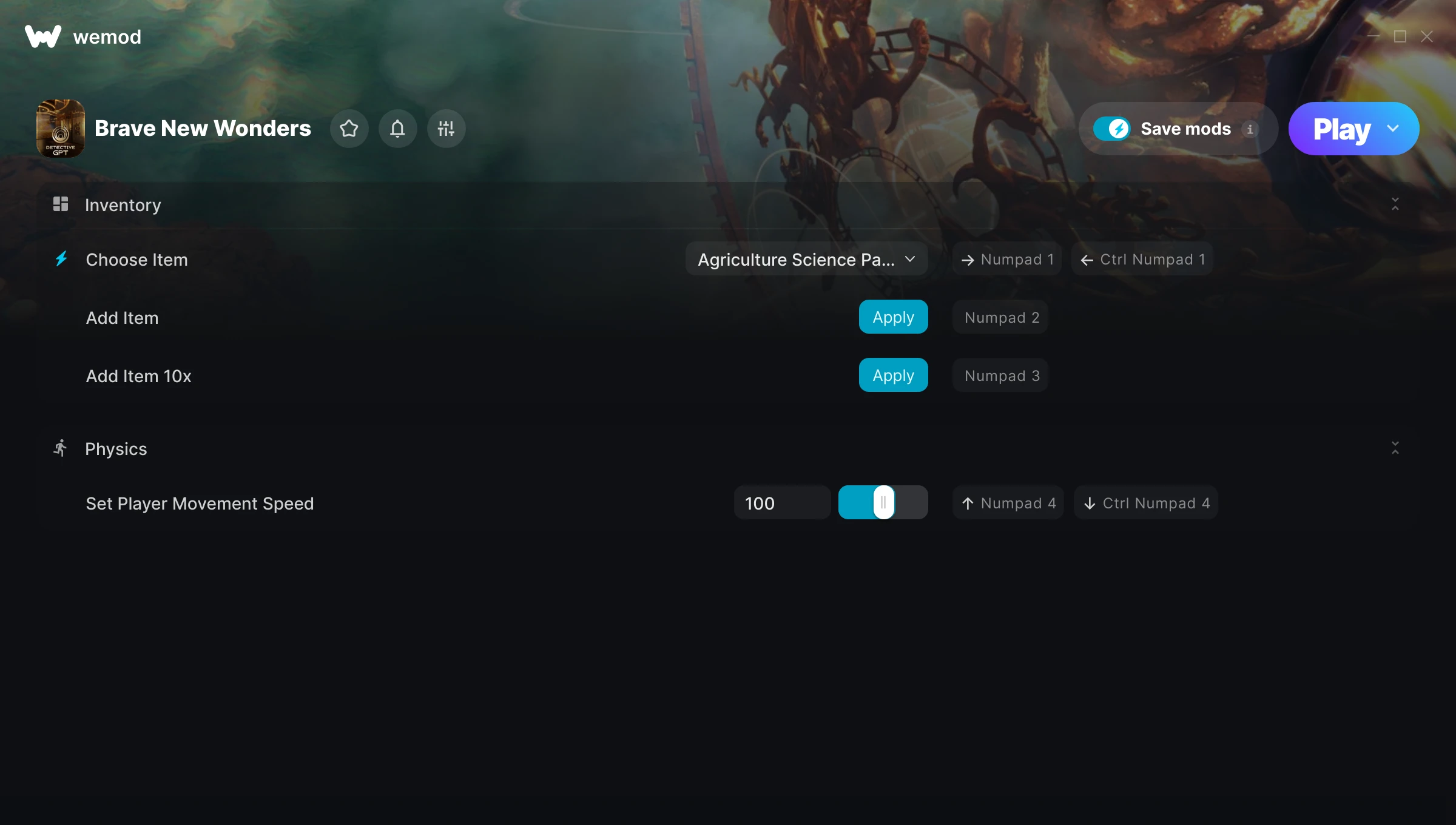
The Brave New Wonders Trainer gives you access to 4 cheats that let you play the game however you want. Struggling with a tough section? Want to skip the grind? Just want to mess around? This trainer has you covered.
There’s a reason trainers have been around since the DOS era. They just make games more fun.
Dropping in 2026, Brave New Wonders brought something different to the simulator and strategy scene and players are still hooked.
This trainer stays in sync with game patches automatically. You’ll never have to worry about downloading a new version after an update – it handles everything behind the scenes.
Brave New Wonders Trainer Cheats
This trainer includes 4 cheats covering movement.
| # | Cheat | Effect |
|---|---|---|
| 1 | Choose Item | Tweak the choose item mechanic to your advantage |
| 2 | Add Item | Give yourself more item on demand |
| 3 | Add Item 10x | Add extra item 10x whenever you need it |
| 4 | Set Player Movement Speed | Choose exactly how much player movement speed you want |
What Can You Do With This Trainer?
Here are some of the standout cheats in this trainer – the ones that really change how you play:
- Choose Item – Tweak the choose item mechanic to your advantage
- Add Item – Add extra item whenever you need it
- Add Item 10x – Add extra item 10x whenever you need it
- Set Player Movement Speed – Manually set your player movement speed to any number
And that’s just scratching the surface. The full Brave New Wonders cheat list above has everything you need to play completely on your own terms.
Download Brave New Wonders Trainer
Download the latest version of this trainer for PC below.
| Version | Creator | Platform | Date Added | Download |
|---|---|---|---|---|
| Auto-Updating Version (Latest) | GreenHouse | Steam | 2026-09-18 | Download |
How to Use This Trainer
- Get Into Brave New Wonders – Launch the game, get past the splash screens, and load into gameplay. Once you can see your character or the main menu, move to step 2.
- Open the Trainer – Open the WeMod app and search for “Brave New Wonders”. Click Play to launch the overlay. WeMod will detect the game and enable all available cheats.
- Flip On the Cheats – In the WeMod overlay, toggle the cheats you’re interested in. They apply immediately to your game session.
- Start Playing – That’s all there is to it. Dive back in and enjoy Brave New Wonders with your cheats running. Feel free to adjust them anytime mid-game.
Tips & Known Issues
- This trainer is strictly for single-player gameplay. Anti-cheat software in online modes will flag and ban your account.
- This trainer is for the PC version of the game only. PlayStation, Xbox, and Switch are not supported.
- Running into problems? Other overlay software (Discord, NVIDIA ShadowPlay) can conflict with trainers. Try turning them off.
- If this is your primary save, consider making a backup first. Cheats won’t corrupt data, but it’s good to have a safety net.
- WeMod handles version compatibility automatically. When the game updates, the trainer follows shortly after.
Frequently Asked Questions
Will this trainer affect my save files?
It won’t corrupt your saves. The trainer works in memory only – but keep in mind that any progress made with cheats enabled will be saved normally.
Is this trainer free to download?
Free as it gets. The download links are right above this section, pick whichever version suits you.
How do I use this trainer?
Just download the trainer and open it while the game is running. Each cheat has a toggle – flip them on or off as you play.
Is this trainer compatible with mods?
In most cases they work fine together. Conflicts only happen when a mod alters the exact same memory values the trainer is trying to modify.
Will the trainer work with the latest game version?
If you’re using the Auto-Updating Version, yes – it patches itself after every game update.
Can I get banned for using this trainer?
Not in single-player – that’s what trainers are designed for. Never use them in online or multiplayer though, that will get you banned.
Does this trainer work with Steam?
Yes, it works with the Steam version of the game.