Capes Trainer
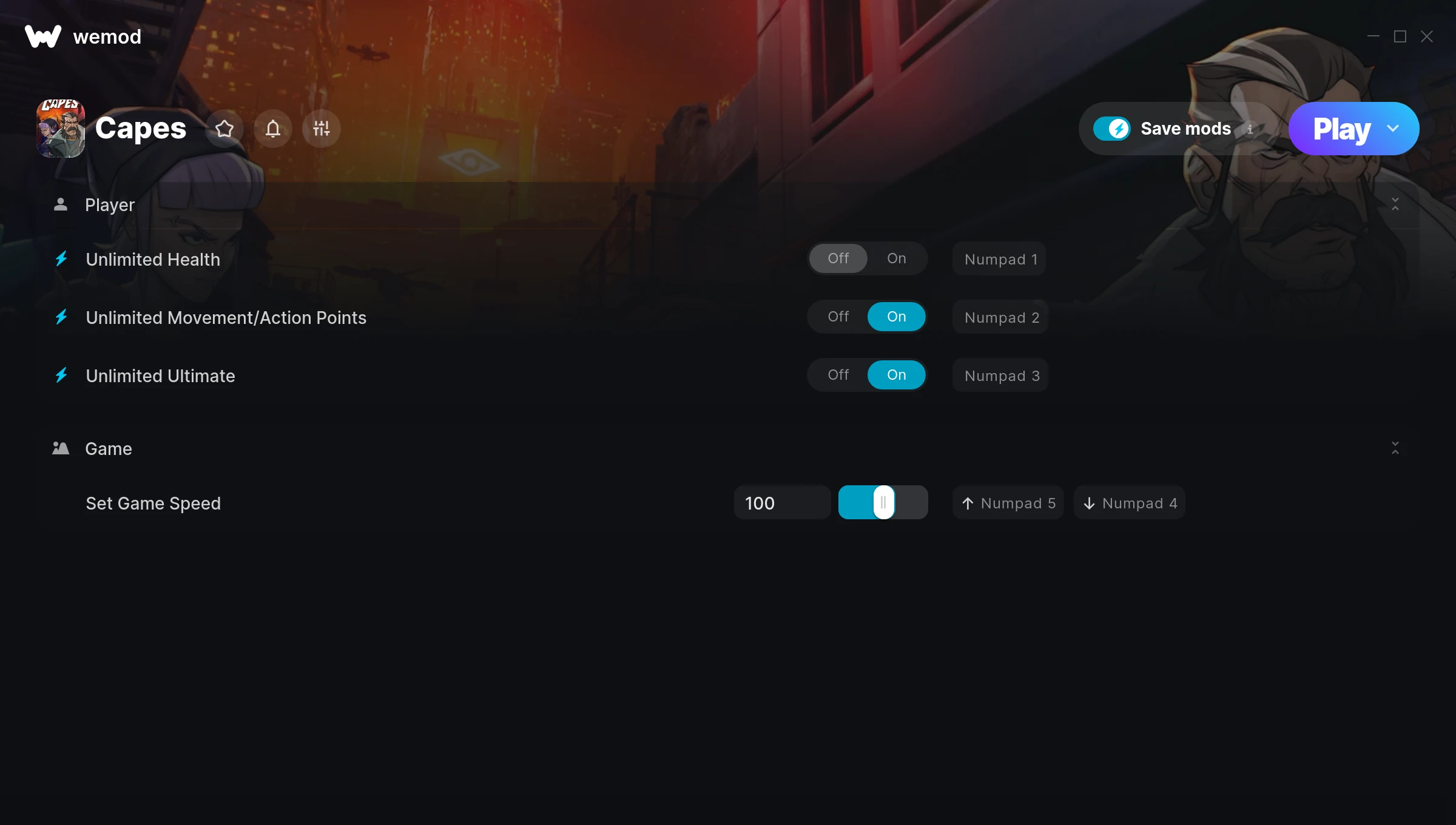
The Capes Trainer gives you access to 4 cheats that let you play the game however you want. Struggling with a tough section? Want to skip the grind? Just want to mess around? This trainer has you covered.
We’ve seen people sink hundreds of hours into this game with cheats on. It hits different.
A puzzle and simulator title that first dropped in 2017, Capes still draws players who want to tweak the experience to their liking.
This is an auto-updating trainer that keeps pace with every game patch automatically. No need to manually grab new versions after updates.
Capes Trainer Cheats
This trainer includes 4 cheats covering health, movement, time.
| # | Cheat | Effect |
|---|---|---|
| 1 | Unlimited Health | Your health stays maxed out no matter what hits you |
| 2 | Unlimited Movement/Action Points | Your movement/action points never runs out or depletes |
| 3 | Unlimited Ultimate | Your ultimate never runs out or depletes |
| 4 | Set Game Speed | Speed up or slow down the entire game to your liking |
What Can You Do With This Trainer?
Here are some of the standout cheats in this trainer – the ones that really change how you play:
- Unlimited Health – Your health stays maxed out no matter what hits you
- Unlimited Movement/Action Points – Use your movement/action points as much as you want without limits
- Unlimited Ultimate – Use your ultimate as much as you want without limits
- Set Game Speed – Speed up or slow down the entire game to your liking
And that’s just scratching the surface. The full Capes cheat list above has everything you need to play completely on your own terms.
Download Capes Trainer
Download the latest version of this trainer for PC below.
| Version | Creator | Platform | Date Added | Download |
|---|---|---|---|---|
| Auto-Updating Version (Latest) | STiNGERR | Steam | 2025-06-15 | Download |
How to Use This Trainer
- Fire Up Capes – Open the game and let it load fully. Whether you’re continuing a save or starting new, just make sure it’s running.
- Launch WeMod – Fire up the WeMod app and search for “Capes”. Hit Play and the overlay will appear over your game with all cheats ready to toggle.
- Turn On Cheats – Pick the cheats you want from the WeMod overlay and switch them on. They kick in instantly and you can toggle them off anytime.
- Dive In – Everything is ready. Return to Capes and enjoy the game your way. Swap cheats around whenever you feel like mixing things up.
Tips & Known Issues
- Keep this trainer offline. Single-player only – any online or multiplayer use risks a permanent ban from the game.
- The Steam Overlay can occasionally conflict with trainer software. Disable it in Steam settings if you notice problems.
- Right-click the trainer and select Run as Administrator to ensure it has the access it needs.
- Trainers need direct access to the game’s memory on your PC. They won’t work with console editions or streamed versions.
- WeMod auto-updates the trainer after game patches, so you never have to manually download a new version.
Frequently Asked Questions
How often is this trainer updated?
This trainer auto-updates shortly after each game patch, so it stays compatible without you having to do anything.
Will this trainer affect my save files?
Your save files are safe. Cheats only change values in RAM while you play. Just be aware that anything you accomplish with cheats active gets saved like normal progress.
Do I need to restart the game after activating cheats?
No. Cheats are live the instant you toggle them. You can switch them on and off mid-gameplay without interruption.
Is this trainer compatible with mods?
Generally, yes. Most mods and trainers operate independently. You might see odd behaviour if a mod directly changes the same stats the trainer controls.
How do I use this trainer?
It’s straightforward: download, run the trainer while the game is open, and press the hotkeys to activate whichever cheats you want.
Does this trainer work with Steam?
Yes, it works with the Steam version of the game.