Cities Skylines Trainer
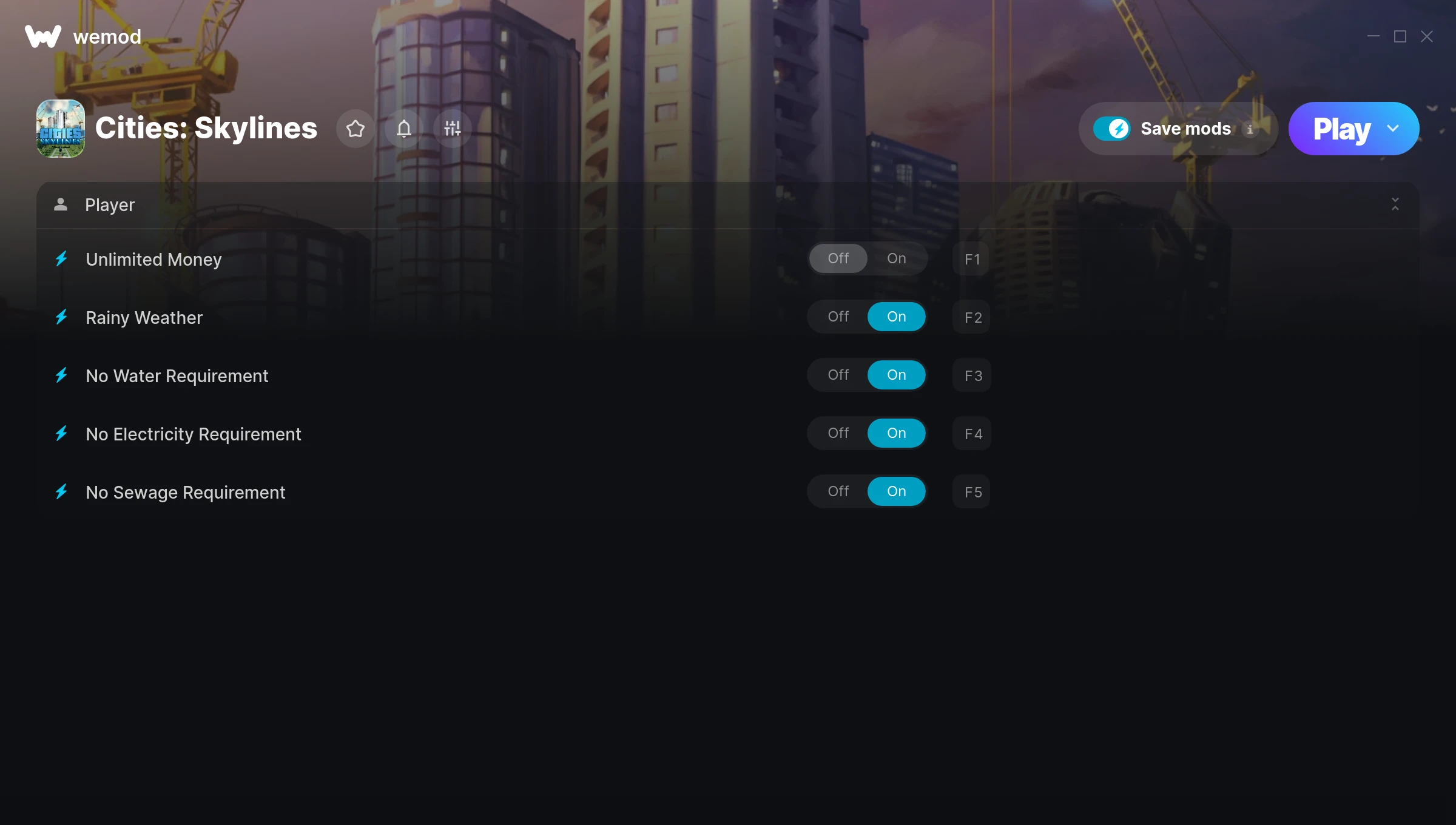
The Cities Skylines Trainer gives you access to 5 cheats that let you play the game however you want. Struggling with a tough section? Want to skip the grind? Just want to mess around? This trainer has you covered.
Unlimited money removes the grind entirely – just buy what you want and get back to the fun parts. These cheats let you get past the frustrating parts and actually enjoy the game at your own pace.
Load up the trainer, pick your cheats, and watch the game bend to your will. It never gets old.
This trainer ships in two flavours. The Auto-Updating Version patches itself every time the game gets an update, so you never have to hunt for a new download. The Standalone version is a single fixed release if you prefer to manage things yourself.
Some of the most popular cheats included in this trainer are Unlimited Money, Rainy Weather, No Water Requirement, No Electricity Requirement, and many more. These modifications let you customize difficulty, skip grinding, or simply experiment with the game in new ways.
Cities Skylines Trainer Cheats
This trainer includes 5 cheats covering resources.
| # | Cheat | Effect |
|---|---|---|
| 1 | Unlimited Money | Buy anything you want without thinking about cost |
| 2 | Rainy Weather | Tweak the rainy weather mechanic to your advantage |
| 3 | No Water Requirement | Completely disable water requirement |
| 4 | No Electricity Requirement | Completely disable electricity requirement |
| 5 | No Sewage Requirement | Turn off sewage requirement entirely for easier gameplay |
What Can You Do With This Trainer?
Here are some of the standout cheats in this trainer – the ones that really change how you play:
- Unlimited Money – Buy anything you want without thinking about cost
- Rainy Weather – Tweak the rainy weather mechanic to your advantage
- No Water Requirement – Completely disable water requirement
- No Electricity Requirement – Completely disable electricity requirement
- No Sewage Requirement – Remove sewage requirement from the equation
And that’s just scratching the surface. The full cheat list above has everything you need to play the game completely on your own terms.
Download Cities Skylines Trainer
Download the latest version of this trainer for PC below.
| Version | Creator | Platform | Date Added | Download |
|---|---|---|---|---|
| Auto-Updating Version (Latest) | MrAntiFun | Steam, Epic Games, Xbox | 2026-01-09 | Download |
| Standalone Version | FLiNG | Steam | 2025-10-27 | Download |
How to Use This Trainer
- Boot Up Cities Skylines – Start the game like you normally would. Once you’re at the main menu or loaded into your save, you’re ready for the next step.
- Open the Trainer – If using WeMod, open the app and search for “Cities Skylines”. Click Play to launch the overlay. For the standalone FLiNG trainer, run the downloaded .exe as Administrator.
- Enable the Cheats You Want – Use the WeMod overlay to enable any combination of cheats. Everything activates in real-time while the game is running.
- Enjoy the Game – You’re all set. Play the game with your cheats active and switch them around as you go. Try different combinations to see what’s the most fun.
Tips & Known Issues
- Trainers are designed for single-player use only. Using them online or in multiplayer will result in a ban.
- Always match your game version to the trainer version. An outdated game build can cause cheats to fail silently.
- Trainers modify game memory, which can trigger antivirus warnings. These are false positives – add an exception if needed.
- This trainer only works on PC. Console versions and cloud gaming platforms are not supported.
- WeMod auto-updates the trainer after game patches, so you never have to manually download a new version.
Frequently Asked Questions
What should I do if the trainer stops working after an update?
The Auto-Updating Version handles this on its own – give it a day or two after a big patch. Standalone users should check for an updated download.
Is this trainer compatible with mods?
In most cases they work fine together. Conflicts only happen when a mod alters the exact same memory values the trainer is trying to modify.
Can I get banned for using this trainer?
As long as you stick to single-player, you’re fine. Using cheats in multiplayer or online modes is a completely different story – don’t do it.
How do I know which version to download?
The Auto-Updating Version is the easiest choice – it handles compatibility on its own. Pick the Standalone if you want a specific build that won’t change.
Can I customise how much health or money I get?
Where available, yes. Look for cheats labelled ‘Set’ or ‘Edit’ – these let you punch in a custom value instead of going straight to infinite.
How do I use this trainer?
Just download the trainer and open it while the game is running. Each cheat has a toggle – flip them on or off as you play.
Does this trainer work with Steam?
It does. The trainer is compatible with Steam, Epic Games, Xbox.