Cozy Game Restoration Trainer
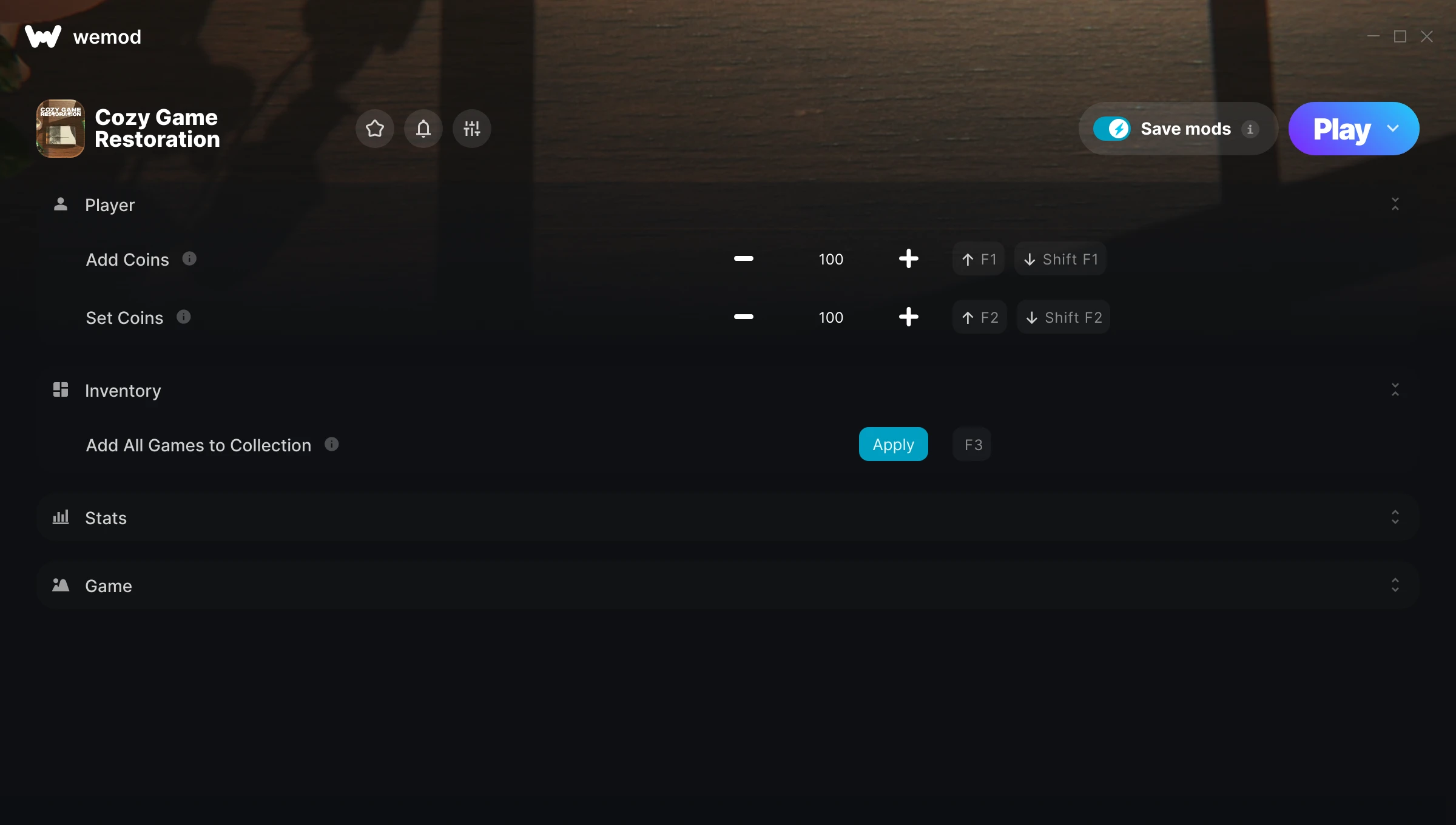
The Cozy Game Restoration Trainer gives you access to 15 cheats that let you play the game however you want. Struggling with a tough section? Want to skip the grind? Just want to mess around? This trainer has you covered.
Stuck at a difficulty wall? This trainer turns that wall into tissue paper.
Cozy Game Restoration first launched in 2026 as a simulator title and still has a strong community of players today.
No need to check for updates manually. This auto-updating trainer keeps itself compatible with the latest version of the game so your cheats always work.
Some of the most popular cheats included in this trainer are Add Coins, Set Coins, Add All Games to Collection, Complete Quests, and many more. These modifications let you customize difficulty, skip grinding, or simply experiment with the game in new ways.
Cozy Game Restoration Trainer Cheats
This trainer includes 15 cheats covering resources, movement, time.
| # | Cheat | Effect |
|---|---|---|
| 1 | Add Coins | Give yourself more coins on demand |
| 2 | Set Coins | Pick your own value for coins |
| 3 | Add All Games to Collection | Add extra all games to collection whenever you need it |
| 4 | Complete Quests | Tweak the complete quests mechanic to your advantage |
| 5 | Unlock Lore | Instantly gain access to lore |
| 6 | Mark Games As Cleaned | Tweak the mark games as cleaned mechanic to your advantage |
| 7 | Unlock Shelves | Instantly gain access to shelves |
| 8 | Force Legendary Games | Tweak the force legendary games mechanic to your advantage |
| 9 | Game Speed | Speed up or slow down the entire game to your liking |
| 10 | Hide UI | Tweak the hide ui mechanic to your advantage |
| 11 | High Res Screenshot | Tweak the high res screenshot mechanic to your advantage |
| 12 | Set Weather | Manually set your weather to any number |
| 13 | Unlimited Boxes Per Day | Your boxes per day never runs out or depletes |
| 14 | Hard Cleaning | Tweak the hard cleaning mechanic to your advantage |
| 15 | Pricey Boxes | Tweak the pricey boxes mechanic to your advantage |
What Can You Do With This Trainer?
Here are some of the standout cheats in this trainer – the ones that really change how you play:
- Add Coins – Give yourself more coins on demand
- Set Coins – Pick your own value for coins
- Add All Games to Collection – Add extra all games to collection whenever you need it
- Complete Quests – Tweak the complete quests mechanic to your advantage
- Unlock Lore – Skip the requirements and unlock lore right away
And that’s just scratching the surface. The full Cozy Game Restoration cheat list above has everything you need to play completely on your own terms.
Recommended Cheat Presets
Not sure which cheats to enable? Here are some recommended preset combinations for different playstyles:
Farming Preset
Skip the grind entirely. Max out your loot, XP, and cash without spending hours farming the same enemies over and over.
- Add Coins
- Set Coins
Download Cozy Game Restoration Trainer
Download the latest version of this trainer for PC below.
| Version | Creator | Platform | Date Added | Download |
|---|---|---|---|---|
| Auto-Updating Version (Latest) | milapesa | Steam | 2026-11-02 | Download |
How to Use This Trainer
- Get Cozy Game Restoration Running – Launch the game through your usual platform. Wait until you’re past any intro screens and into the menu or gameplay.
- Launch WeMod – Fire up the WeMod app and search for “Cozy Game Restoration”. Hit Play and the overlay will appear over your game with all cheats ready to toggle.
- Flip On the Cheats – In the WeMod overlay, toggle the cheats you’re interested in. They apply immediately to your game session.
- Play and Enjoy – That’s it – jump back into the game and enjoy. You can toggle cheats on and off whenever you want. Half the fun is experimenting to find your perfect setup.
Tips & Known Issues
- Trainers are designed for single-player use only. Using them online or in multiplayer will result in a ban.
- Your antivirus might quarantine the trainer file. This is a known false positive – whitelist the trainer in your security software.
- Running the trainer as Admin avoids most permission-related issues. Right-click and choose Run as Administrator.
- A quick save backup takes seconds and gives you peace of mind when experimenting with trainer cheats.
- Using WeMod? The trainer stays current on its own – it auto-patches after every game update.
Frequently Asked Questions
How often is this trainer updated?
This trainer auto-updates shortly after each game patch, so it stays compatible without you having to do anything.
How do I use this trainer?
Download the trainer, run it alongside the game, and use the hotkeys to toggle cheats on and off. It really is that simple.
Is this trainer compatible with mods?
In most cases they work fine together. Conflicts only happen when a mod alters the exact same memory values the trainer is trying to modify.
Will this trainer affect my save files?
The trainer only modifies values in memory while the game is running. Your save files stay intact, though any progress you make with cheats on will save as normal.
Can I use multiple cheats at the same time?
You can run every single cheat at once if you want. Mix and match until you find a combination you enjoy.
What should I do if the trainer stops working after an update?
If a game patch breaks things, the auto-updating trainer will fix itself automatically – usually within a day or two.
Does this trainer work with Steam?
It does. This trainer is built to work with the Steam version.