Crash Bandicoot 4: It’s About Time Trainer
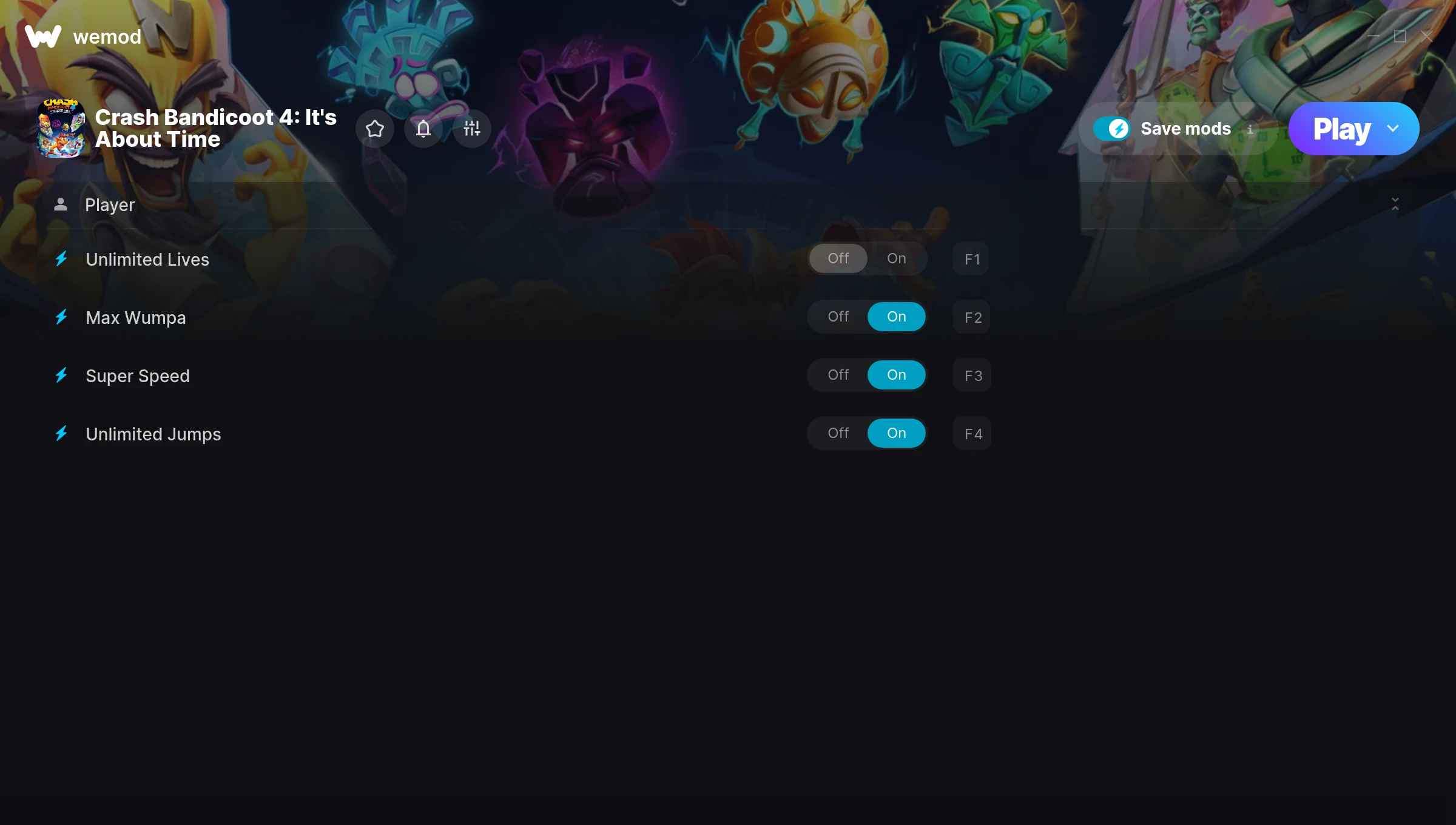
The Crash Bandicoot 4: It’s About Time Trainer gives you access to 4 cheats that let you play the game however you want. Struggling with a tough section? Want to skip the grind? Just want to mess around? This trainer has you covered.
Super speed makes exploration a breeze and lets you outrun anything the game throws at you. These cheats let you get past the frustrating parts and actually enjoy the game at your own pace.
The cheat list below covers basically everything you’d want to tweak. Health, resources, speed – all of it.
It’s been a while since Crash Bandicoot 4: It’s About Time first hit in 2020, but this platform title still has plenty to offer.
Once you’ve got this trainer installed, it takes care of itself. Every time the game gets a patch, the trainer updates automatically so your cheats keep working.
Crash Bandicoot 4: It’s About Time Trainer Cheats
This trainer includes 4 cheats covering movement.
| # | Cheat | Effect |
|---|---|---|
| 1 | Unlimited Lives | Keep coming back no matter how many times you go down |
| 2 | Max Wumpa | Instantly push your wumpa to the highest value |
| 3 | Super Speed | Move through the game world at blazing speed |
| 4 | Unlimited Jumps | Your jumps never runs out or depletes |
What Can You Do With This Trainer?
Here are some of the standout cheats in this trainer – the ones that really change how you play:
- Unlimited Lives – Keep coming back no matter how many times you go down
- Max Wumpa – Set your wumpa to the absolute maximum
- Super Speed – Move through the game world at blazing speed
- Unlimited Jumps – Remove all limits on your jumps
And that’s just scratching the surface. The full Crash Bandicoot 4: It’s About Time cheat list above has everything you need to play completely on your own terms.
Download Crash Bandicoot 4: It’s About Time Trainer
Download the latest version of this trainer for PC below.
| Version | Creator | Platform | Date Added | Download |
|---|---|---|---|---|
| Auto-Updating Version (Latest) | MrAntiFun | Steam | 2026-01-21 | Download |
How to Use This Trainer
- Start Crash Bandicoot 4: It’s About Time – Fire up the game and get to the main menu or load your save. The game needs to be running before you open the trainer.
- Launch WeMod – Fire up the WeMod app and search for “Crash Bandicoot 4: It’s About Time”. Hit Play and the overlay will appear over your game with all cheats ready to toggle.
- Turn On Cheats – Pick the cheats you want from the WeMod overlay and switch them on. They kick in instantly and you can toggle them off anytime.
- Enjoy Your Playthrough – All done. Now play Crash Bandicoot 4: It’s About Time however you want. You can tweak your active cheats at any point without restarting.
Tips & Known Issues
- Never activate this trainer during online play. It’s built for single-player only and multiplayer anti-cheat will catch it.
- Always match your game version to the trainer version. An outdated game build can cause cheats to fail silently.
- If cheats aren’t activating, check that the trainer is running with Administrator rights.
- Cloud gaming services like GeForce NOW or Xbox Cloud Gaming are not compatible with trainers. You need the game running locally on PC.
- Using WeMod? The trainer stays current on its own – it auto-patches after every game update.
Frequently Asked Questions
Will the trainer work with the latest game version?
The Auto-Updating Version keeps itself current automatically after each game patch.
Is this trainer compatible with mods?
Generally, yes. Most mods and trainers operate independently. You might see odd behaviour if a mod directly changes the same stats the trainer controls.
How do I know which version to download?
This trainer auto-updates whenever the game is patched, so you always have the latest compatible version. Just download it once and you’re set.
What cheats are included in this trainer?
There are 4 cheats in total – check the cheat table further up the page for the complete breakdown.
Will this trainer affect my save files?
The trainer only modifies values in memory while the game is running. Your save files stay intact, though any progress you make with cheats on will save as normal.
What should I do if the trainer stops working after an update?
If a game patch breaks things, the auto-updating trainer will fix itself automatically – usually within a day or two.
Does this trainer work with Steam?
Fully compatible with Steam. Just launch the game through Steam and run the trainer alongside it.