
Crusader Kings III Trainer
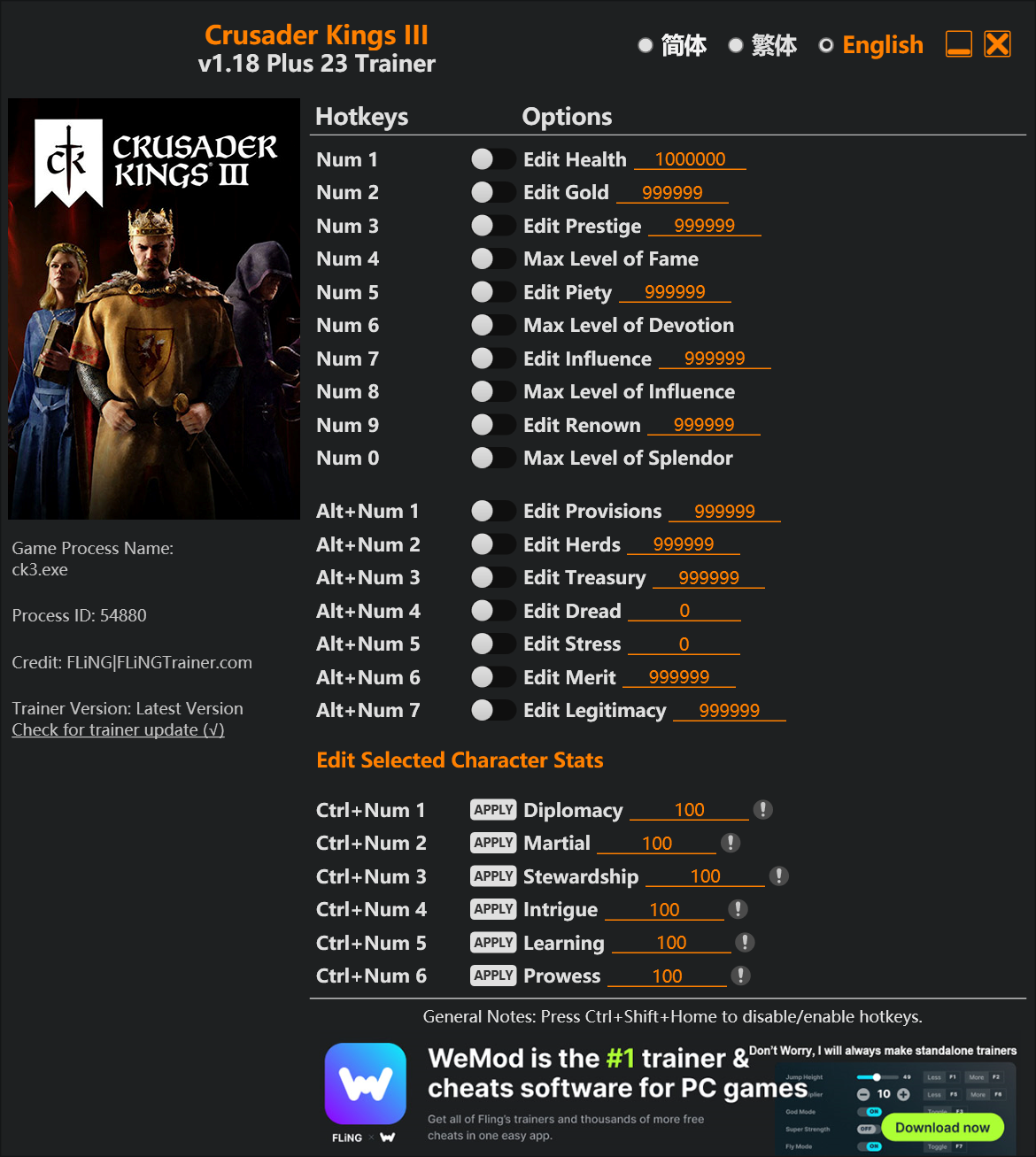
The Crusader Kings III Trainer gives you access to 21 cheats that let you play the game however you want. Struggling with a tough section? Want to skip the grind? Just want to mess around? This trainer has you covered.
Freezing time gives you all the breathing room you need to plan the perfect move. These cheats let you get past the frustrating parts and actually enjoy the game at your own pace.
The trainers below give you complete control over your experience. Use them however you want.
A role-playing (rpg) and simulator title that first dropped in 2025, Crusader Kings III still draws players who want to tweak the experience to their liking.
The Auto-Updating Version takes care of compatibility automatically whenever the game is updated. If you’d rather download once and not worry about auto-updates, the Standalone version has you covered.
Some of the most popular cheats included in this trainer are Max County Control, Freeze Time, Set Money, Set Prestige, and many more. These modifications let you customize difficulty, skip grinding, or simply experiment with the game in new ways.
Crusader Kings III Trainer Cheats
This trainer includes 21 cheats covering resources, movement, time.
| # | Cheat | Effect |
|---|---|---|
| 1 | Set Money | Manually set your money to any number |
| 2 | Set Prestige | Adjust prestige to whatever feels right |
| 3 | Set Piety | Adjust piety to whatever feels right |
| 4 | Set Renown | Pick your own value for renown |
| 5 | Set Dread | Choose exactly how much dread you want |
| 6 | Set Diplomacy | Pick your own value for diplomacy |
| 7 | Set Martial | Manually set your martial to any number |
| 8 | Set Stewardship | Manually set your stewardship to any number |
| 9 | Set Intrigue | Adjust intrigue to whatever feels right |
| 10 | Set Learning | Manually set your learning to any number |
| 11 | Set Prowess | Choose exactly how much prowess you want |
| 12 | Set King Age | Pick your own value for king age |
| 13 | Set Stress | Manually set your stress to any number |
| 14 | Instant Construction | Get construction immediately with no waiting |
| 15 | Construction Speed Multiplier | Boost your construction speed earnings dramatically |
| 16 | Fast Culture Progress | Tweak the fast culture progress mechanic to your advantage |
| 17 | Instant Movement | Skip the wait and trigger movement right away |
| 18 | Movement Speed Multiplier | Multiply your movement speed gains by a huge amount |
| 19 | Max County Control | Max out your county control in one go |
| 20 | Freeze Time | Prevent your time from going up or down |
| 21 | Enable Console | Activate console for a gameplay advantage |
What Can You Do With This Trainer?
Here are some of the standout cheats in this trainer – the ones that really change how you play:
- Set Money – Manually set your money to any number
- Set Prestige – Adjust prestige to whatever feels right
- Set Piety – Manually set your piety to any number
- Set Renown – Pick your own value for renown
- Set Dread – Adjust dread to whatever feels right
And that’s just scratching the surface. The full cheat list above has everything you need to play the game completely on your own terms.
Download Crusader Kings III Trainer
Download the latest version of this trainer for PC below.
| Version | Creator | Platform | Date Added | Download |
|---|---|---|---|---|
| Auto-Updating Version (Latest) | MrAntiFun | Steam, Xbox | 2025-12-10 | Download |
| Standalone Version | FLiNG | Steam | 2025-10-22 | Download |
How to Use This Trainer
- Launch the Game – Open Crusader Kings III and get to the point where you’re actually playing. The trainer hooks into the game while it’s running.
- Start the Trainer – Got WeMod? Search for “Crusader Kings III” in the app and click Play. Using the FLiNG standalone? Run the .exe with Administrator privileges.
- Flip On the Cheats – In the WeMod overlay, toggle the cheats you’re interested in. They apply immediately to your game session.
- Enjoy Your Playthrough – All done. Now play Crusader Kings III however you want. You can tweak your active cheats at any point without restarting.
Tips & Known Issues
- This is a single-player trainer only. Do not use it in online or multiplayer modes – you will get banned.
- If cheats aren’t working, check for conflicting overlays. Discord, GeForce Experience, and similar tools can interfere.
- Consider backing up your save files before using cheats, especially if you’re on your main playthrough.
- Having issues on Steam? Try disabling the Steam Overlay under Settings > In-Game. It can sometimes clash with trainers.
- The WeMod version updates itself automatically after each game patch. No action needed on your end.
Frequently Asked Questions
Is this trainer free to download?
It is. No hidden fees, no sign-up walls – just download it from the links above and start playing.
How often is this trainer updated?
The auto-updating trainer stays current automatically after each patch. Standalone updates happen on a less regular schedule.
Can I get banned for using this trainer?
As long as you stick to single-player, you’re fine. Using cheats in multiplayer or online modes is a completely different story – don’t do it.
How do I use this trainer?
Grab the download, launch the game, then fire up the trainer. Toggle cheats with the hotkeys or the overlay – done.
Does this trainer work with Steam?
Yes. The trainer hooks into the game process regardless of whether you launch through Steam, Xbox.



