
Dead or Alive 6 Trainer
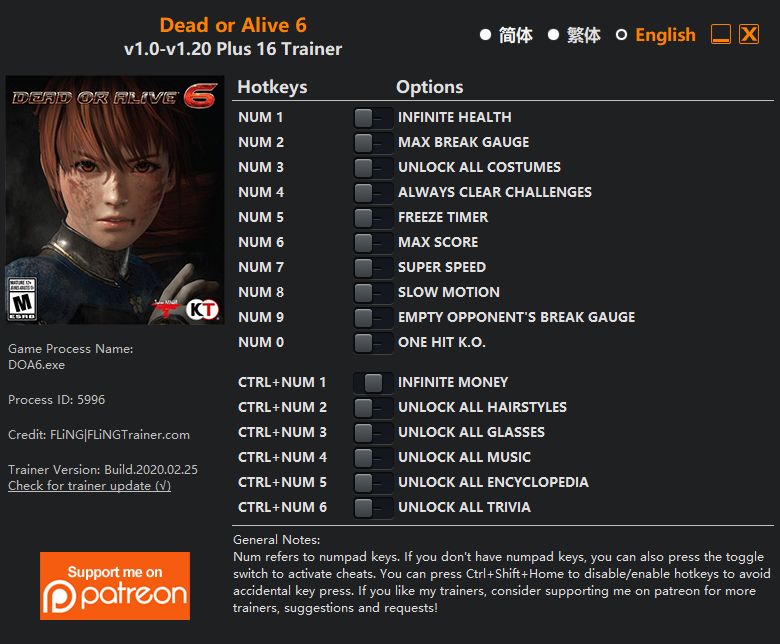
The Dead or Alive 6 Trainer gives you access to 6 cheats that let you play the game however you want. Struggling with a tough section? Want to skip the grind? Just want to mess around? This trainer has you covered.
Infinite health means you can charge headfirst into anything without consequences. It’s as liberating as it sounds. These cheats let you get past the frustrating parts and actually enjoy the game at your own pace.
If you’re the type who reads every tooltip and explores every corner, infinite health makes that a lot more relaxing.
First hitting the scene in 2019, this fighting title keeps attracting players who want more control over their run.
Some of the most popular cheats included in this trainer are Num 1 – Infinite Health, Num 2 – Max Break Gauge, Num 5 – Freeze Timer, Num 7 – Super Speed, and many more. These modifications let you customize difficulty, skip grinding, or simply experiment with the game in new ways.
Dead or Alive 6 Trainer Cheats
This trainer includes 6 cheats covering health, resources, movement, time.
| # | Cheat | Effect |
|---|---|---|
| 1 | Num 1 – Infinite Health | Health that never drops – charge into anything without worry |
| 2 | Num 2 – Max Break Gauge | Set your break gauge to the absolute maximum |
| 3 | Num 5 – Freeze Timer | Stop any in-game countdown dead in its tracks |
| 4 | Num 6 – Max Score | Jump straight to the highest possible score |
| 5 | Num 7 – Super Speed | Move through the game world at blazing speed |
| 6 | Ctrl+Num 1 – Infinite Money | Your wallet never runs out – go on a spending spree |
What Can You Do With This Trainer?
Here are some of the standout cheats in this trainer – the ones that really change how you play:
- Num 1 – Infinite Health – Health that never drops – charge into anything without worry
- Num 2 – Max Break Gauge – Set your break gauge to the absolute maximum
- Num 5 – Freeze Timer – Stop any in-game countdown dead in its tracks
- Num 6 – Max Score – Jump straight to the highest possible score
- Num 7 – Super Speed – Move through the game world at blazing speed
And that’s just scratching the surface. The full cheat list above has everything you need to play the game completely on your own terms.
Download Dead or Alive 6 Trainer
Download the latest version of this trainer for PC below.
| Version | Creator | Platform | Date Added | Download |
|---|---|---|---|---|
| Standalone Version | FLiNG | PC (Windows) | 2020-02-26 | Download |
How to Use This Trainer
- Get Dead or Alive 6 Running – Launch the game through your usual platform. Wait until you’re past any intro screens and into the menu or gameplay.
- Launch the Trainer – Right-click the FLiNG trainer .exe and select Run as Administrator. A window will open showing all the cheats and their hotkeys.
- Trigger Cheats with Hotkeys – Each cheat is mapped to a keyboard shortcut shown in the trainer. Press the key to toggle the cheat on, press again to turn it off.
- Start Playing – That’s all there is to it. Dive back in and enjoy Dead or Alive 6 with your cheats running. Feel free to adjust them anytime mid-game.
Tips & Known Issues
- Keep this trainer offline. Single-player only – any online or multiplayer use risks a permanent ban from the game.
- Trainers are PC-only. If you’re playing on console or through a cloud streaming service, the trainer won’t work.
- Steam’s in-game overlay sometimes interferes with trainers. If cheats aren’t activating, disable it in Steam > Settings > In-Game.
- Running into problems? Other overlay software (Discord, NVIDIA ShadowPlay) can conflict with trainers. Try turning them off.
Frequently Asked Questions
Can I use multiple cheats at the same time?
Yes – enable as many as you like simultaneously. Combining cheats is where things get really fun.
What cheats are included in this trainer?
This trainer packs 6 cheats covering everything from infinite health to unlimited resources and more. The full list is in the table above.
How do I use this trainer?
Grab the download, launch the game, then fire up the trainer. Toggle cheats with the hotkeys or the overlay – done.
How do I know which version to download?
The Auto-Updating Version is the easiest choice – it handles compatibility on its own. Pick the Standalone if you want a specific build that won’t change.
Is this trainer free to download?
Free as it gets. The download links are right above this section, pick whichever version suits you.
What should I do if the trainer stops working after an update?
The Auto-Updating Version handles this on its own – give it a day or two after a big patch. Standalone users should check for an updated download.



