
Death end re;Quest 2 Trainer
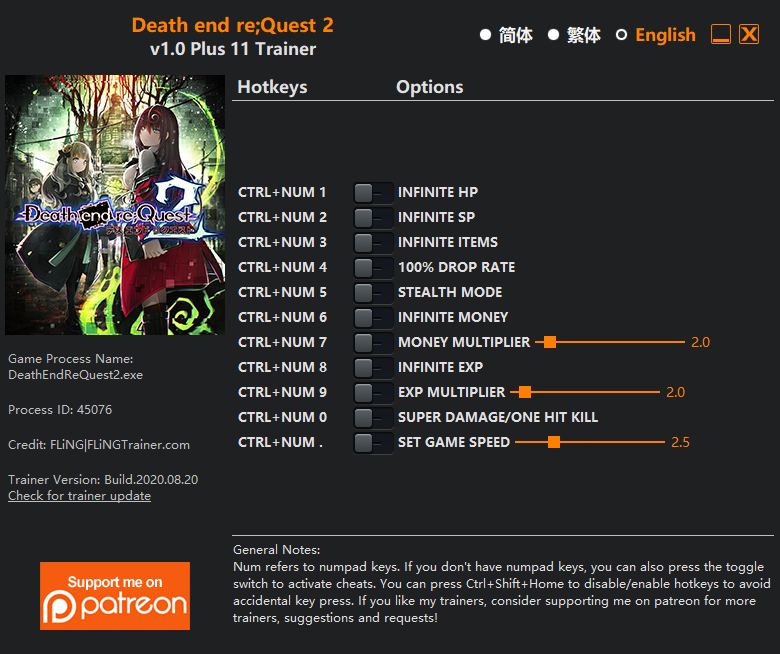
The Death end re;Quest 2 Trainer gives you access to 11 cheats that let you play the game however you want. Struggling with a tough section? Want to skip the grind? Just want to mess around? This trainer has you covered.
Some of these cheats are genuinely overpowered. You’ve been warned.
First hitting the scene in 2020, this role-playing (rpg) and adventure title keeps attracting players who want more control over their run.
Some of the most popular cheats included in this trainer are Ctrl+Num 0 – Super Damage/One Hit Kill, Ctrl+Num 1 – Infinite HP, Ctrl+Num 2 – Infinite SP, Ctrl+Num 3 – Infinite Items, and many more. These modifications let you customize difficulty, skip grinding, or simply experiment with the game in new ways.
Death end re;Quest 2 Trainer Cheats
This trainer includes 11 cheats covering health, resources, combat, movement, experience.
| # | Cheat | Effect |
|---|---|---|
| 1 | Ctrl+Num 1 – Infinite HP | Your hp supply becomes endless |
| 2 | Ctrl+Num 2 – Infinite SP | Bottomless sp – it never runs dry |
| 3 | Ctrl+Num 3 – Infinite Items | Items never deplete no matter how many times you use them |
| 4 | Ctrl+Num 6 – Infinite Money | Your wallet never runs out – go on a spending spree |
| 5 | Ctrl+Num 7 – Money Multiplier | Multiply your money gains by a huge amount |
| 6 | Ctrl+Num 8 – Infinite Exp | Gain XP endlessly and level up as fast as you want |
| 7 | Ctrl+Num 9 – Exp Multiplier | Earn experience way faster from everything you do |
| 8 | Ctrl+Num 0 – Super Damage/One Hit Kill | Drop any enemy with a single hit, no matter their health bar |
| 9 | Ctrl+Num . – Set Game Speed | Speed up or slow down the entire game to your liking |
| 10 | “Infinite Money” and “Infinite Exp” take effects when winning a battle. | Adjust your “money” and “exp” take effects when winning a battle. however you see fit |
| 11 | “Infinite Items” takes effect when item quantity changes. | Take charge of your “items” takes effect when item quantity changes. with this cheat |
What Can You Do With This Trainer?
Here are some of the standout cheats in this trainer – the ones that really change how you play:
- Ctrl+Num 1 – Infinite HP – Bottomless hp – it never runs dry
- Ctrl+Num 2 – Infinite SP – Bottomless sp – it never runs dry
- Ctrl+Num 3 – Infinite Items – Items never deplete no matter how many times you use them
- Ctrl+Num 6 – Infinite Money – Your wallet never runs out – go on a spending spree
- Ctrl+Num 7 – Money Multiplier – Multiply your money gains by a huge amount
And that’s just scratching the surface. The full cheat list above has everything you need to play the game completely on your own terms.
Recommended Cheat Presets
Not sure which cheats to enable? Here are some recommended preset combinations for different playstyles:
Farming Preset
Skip the grind entirely. Max out your loot, XP, and cash without spending hours farming the same enemies over and over.
- Ctrl+Num 6 – Infinite Money
- Ctrl+Num 7 – Money Multiplier
- Ctrl+Num 8 – Infinite Exp
- Ctrl+Num 9 – Exp Multiplier
- “Infinite Money” and “Infinite Exp” take effects when winning a battle.
Download Death end re;Quest 2 Trainer
Download the latest version of this trainer for PC below.
| Version | Creator | Platform | Date Added | Download |
|---|---|---|---|---|
| Standalone Version | FLiNG | PC (Windows) | 2020-08-21 | Download |
How to Use This Trainer
- Fire Up Death end re;Quest 2 – Open the game and let it load fully. Whether you’re continuing a save or starting new, just make sure it’s running.
- Run the Trainer – Run the downloaded FLiNG trainer .exe file as Administrator. The trainer window will appear with a list of available hotkeys.
- Activate Cheats via Hotkeys – Press the hotkeys shown in the trainer window to toggle cheats on and off. Each cheat has its own keyboard shortcut.
- Game On – You’re set. Head back into Death end re;Quest 2 and have fun. Remember, you can toggle cheats at any time – find the combination that works best for you.
Tips & Known Issues
- This is a single-player trainer only. Do not use it in online or multiplayer modes – you will get banned.
- For the trainer to work properly, make sure you launch it with Administrator privileges.
- If using Steam, consider disabling the Steam Overlay (Steam > Settings > In-Game) to avoid conflicts with the trainer.
- Always match your game version to the trainer version. An outdated game build can cause cheats to fail silently.
Frequently Asked Questions
Will this trainer affect my save files?
It won’t corrupt your saves. The trainer works in memory only – but keep in mind that any progress made with cheats enabled will be saved normally.
Can I customise how much health or money I get?
Yes – many cheats have edit or set options that let you type in the exact value you want. Perfect for dialling things in without going completely overboard.
Will the trainer work with the latest game version?
If you’re using the Auto-Updating Version, yes – it patches itself after every game update. The Standalone build may lag behind slightly after major patches.
What should I do if the trainer stops working after an update?
Sit tight. The auto-updating trainer usually fixes itself within a day or so after a patch. If you’re on the Standalone version, look for a newer build.
How often is this trainer updated?
The Auto-Updating Version syncs with game patches within a day or two. Standalone releases come out as needed.



