Death’s Gambit: Afterlife Trainer
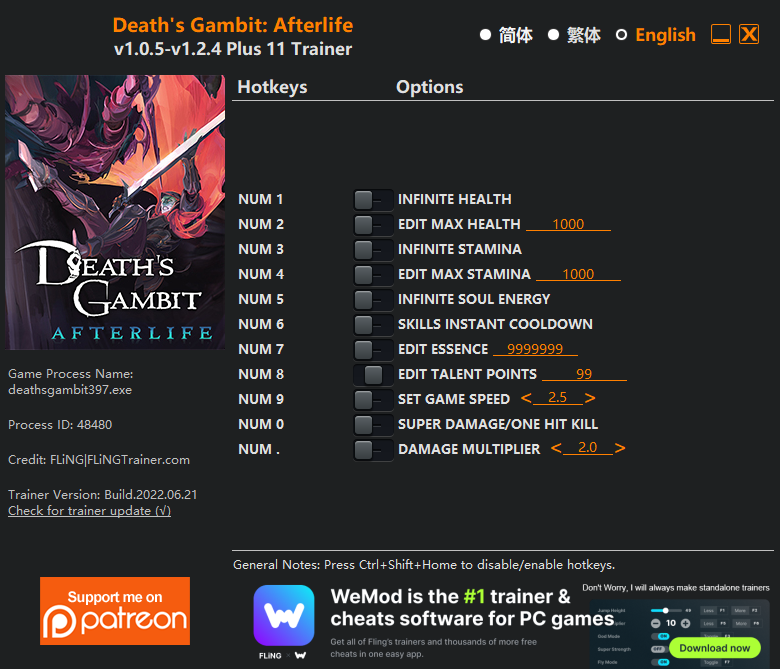
The Death’s Gambit: Afterlife Trainer gives you access to 11 cheats that let you play the game however you want. Struggling with a tough section? Want to skip the grind? Just want to mess around? This trainer has you covered.
Infinite health means you can charge headfirst into anything without consequences. It’s as liberating as it sounds. These cheats let you get past the frustrating parts and actually enjoy the game at your own pace.
Think of it as unlocking developer mode. Except better.
Death’s Gambit: Afterlife first launched in 2018 as a platform and role-playing (rpg) title and still has a strong community of players today.
Some of the most popular cheats included in this trainer are Num 1 – Infinite Health, Num 2 – Edit Max Health, Num 3 – Infinite Stamina, Num 0 – Super Damage/One Hit Kill, and many more. These modifications let you customize difficulty, skip grinding, or simply experiment with the game in new ways.
Death’s Gambit: Afterlife Trainer Cheats
This trainer includes 11 cheats covering health, combat, movement, cooldowns, time.
| # | Cheat | Effect |
|---|---|---|
| 1 | Num 1 – Infinite Health | Health that never drops – charge into anything without worry |
| 2 | Num 2 – Edit Max Health | Instantly fill your health bar to full |
| 3 | Num 3 – Infinite Stamina | Your stamina bar never depletes no matter what you do |
| 4 | Num 4 – Edit Max Stamina | Instantly refill your stamina to full capacity |
| 5 | Num 5 – Infinite Soul Energy | Never worry about running out of soul energy again |
| 6 | Num 6 – Skills Instant Cooldown | Skip the wait and trigger skills cooldown right away |
| 7 | Num 7 – Edit Essence | Set your essence to any value you choose |
| 8 | Num 8 – Edit Talent Points | Manually adjust your talent points to whatever you need |
| 9 | Num 9 – Set Game Speed | Speed up or slow down the entire game to your liking |
| 10 | Num 0 – Super Damage/One Hit Kill | Drop any enemy with a single hit, no matter their health bar |
| 11 | Num . – Damage Multiplier | Hit harder – multiply the damage on every attack you land |
What Can You Do With This Trainer?
Here are some of the standout cheats in this trainer – the ones that really change how you play:
- Num 1 – Infinite Health – Health that never drops – charge into anything without worry
- Num 2 – Edit Max Health – Instantly fill your health bar to full
- Num 3 – Infinite Stamina – Your stamina bar never depletes no matter what you do
- Num 4 – Edit Max Stamina – Instantly refill your stamina to full capacity
- Num 5 – Infinite Soul Energy – Your soul energy supply becomes endless
And that’s just scratching the surface. The full cheat list above has everything you need to play the game completely on your own terms.
Recommended Cheat Presets
Not sure which cheats to enable? Here are some recommended preset combinations for different playstyles:
Easy Mode
Turn the difficulty down to nothing. Perfect for enjoying the story, or for a second playthrough where you just want to feel unstoppable.
- Num 1 – Infinite Health
- Num 2 – Edit Max Health
- Num 0 – Super Damage/One Hit Kill
Download Death’s Gambit: Afterlife Trainer
Download the latest version of this trainer for PC below.
| Version | Creator | Platform | Date Added | Download |
|---|---|---|---|---|
| Standalone Version | FLiNG | PC (Windows) | 2022-06-21 | Download |
How to Use This Trainer
- Launch Death’s Gambit: Afterlife – Start the game and load into your save file or start a new game. Make sure it’s running before activating the trainer.
- Run the Trainer – Run the downloaded FLiNG trainer .exe file as Administrator. The trainer window will appear with a list of available hotkeys.
- Press the Hotkeys – Hit the hotkeys displayed in the FLiNG trainer window to switch cheats on and off. Each cheat maps to a specific key.
- Enjoy the Game – You’re all set. Play the game with your cheats active and switch them around as you go. Try different combinations to see what’s the most fun.
Tips & Known Issues
- This trainer is strictly for single-player gameplay. Anti-cheat software in online modes will flag and ban your account.
- Steam’s in-game overlay sometimes interferes with trainers. If cheats aren’t activating, disable it in Steam > Settings > In-Game.
- Some antivirus software may flag the trainer as a false positive. You may need to add an exception for it.
- If you’re running other overlays (Discord, NVIDIA, MSI Afterburner), try disabling them if the trainer isn’t responding.
Frequently Asked Questions
Will the trainer work with the latest game version?
If you’re using the Auto-Updating Version, yes – it patches itself after every game update. The Standalone build may lag behind slightly after major patches.
Do I need to restart the game after activating cheats?
Nope. Cheats kick in immediately while the game is running. Just toggle them on and off whenever you want.
What should I do if the trainer stops working after an update?
Sit tight. The auto-updating trainer usually fixes itself within a day or so after a patch. If you’re on the Standalone version, look for a newer build.
Is this trainer free to download?
It is. No hidden fees, no sign-up walls – just download it from the links above and start playing.
How do I know which version to download?
The Auto-Updating Version is the easiest choice – it handles compatibility on its own. Pick the Standalone if you want a specific build that won’t change.
Is this trainer compatible with mods?
In most cases they work fine together. Conflicts only happen when a mod alters the exact same memory values the trainer is trying to modify.