Dragon Quest Heroes: Torneko’s Mystery Dungeon -Classic HD- Trainer
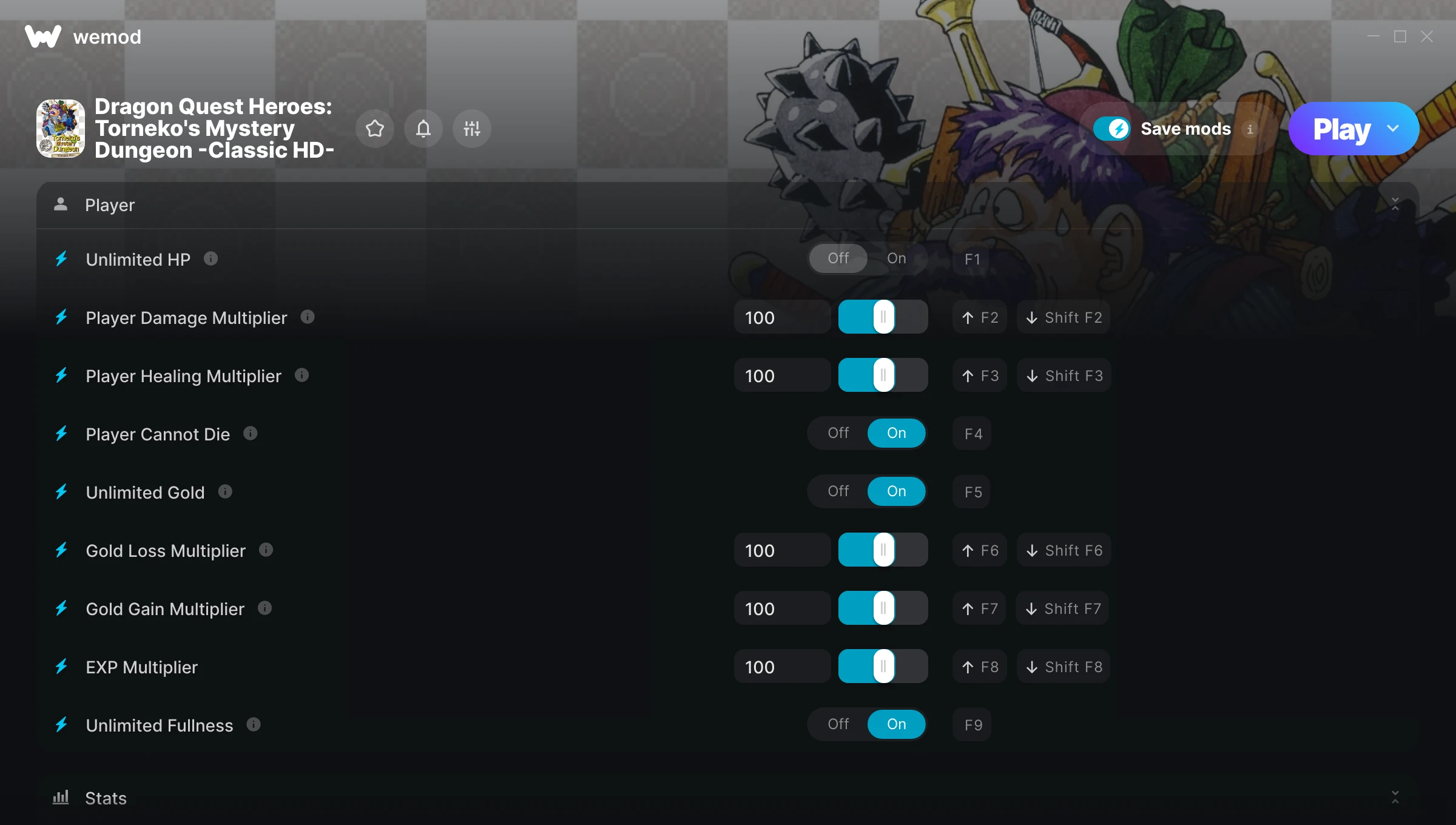
The Dragon Quest Heroes: Torneko’s Mystery Dungeon -Classic HD- Trainer gives you access to 14 cheats that let you play the game however you want. Struggling with a tough section? Want to skip the grind? Just want to mess around? This trainer has you covered.
There’s a reason trainers have been around since the DOS era. They just make games more fun.
It’s been a while since Dragon Quest Heroes: Torneko’s Mystery Dungeon -Classic HD- first hit in 2026, but this role-playing (rpg) and simulator title still has plenty to offer.
This trainer is auto-updating – it patches itself every time the game gets an update, so you never have to hunt for a new download. Just install it once and you’re set.
Some of the most popular cheats included in this trainer are EDIT Max HP, Unlimited HP, Player Damage Multiplier, Player Healing Multiplier, and many more. These modifications let you customize difficulty, skip grinding, or simply experiment with the game in new ways.
Dragon Quest Heroes: Torneko’s Mystery Dungeon -Classic HD- Trainer Cheats
This trainer includes 14 cheats covering health, resources, combat, experience.
| # | Cheat | Effect |
|---|---|---|
| 1 | Unlimited HP | Remove all limits on your hp |
| 2 | Player Damage Multiplier | Hit harder – multiply the damage on every attack you land |
| 3 | Player Healing Multiplier | Multiply your player healing gains by a huge amount |
| 4 | Player Cannot Die | Tweak the player cannot die mechanic to your advantage |
| 5 | Unlimited Gold | Gold for days – never worry about currency again |
| 6 | Gold Loss Multiplier | Multiply your gold loss gains by a huge amount |
| 7 | Gold Gain Multiplier | Multiply your gold gain gains by a huge amount |
| 8 | EXP Multiplier | Earn experience way faster from everything you do |
| 9 | Unlimited Fullness | Remove all limits on your fullness |
| 10 | EDIT Current HP | Set your current hp to any value you choose |
| 11 | EDIT Max HP | Fine-tune your hp to the perfect amount |
| 12 | EDIT Fullness | Fine-tune your fullness to the perfect amount |
| 13 | EDIT Gold | Manually adjust your gold to whatever you need |
| 14 | EDIT Experience | Dial in the exact experience you want |
What Can You Do With This Trainer?
Here are some of the standout cheats in this trainer – the ones that really change how you play:
- Unlimited HP – Your hp never runs out or depletes
- Player Damage Multiplier – Hit harder – multiply the damage on every attack you land
- Player Healing Multiplier – Multiply your player healing gains by a huge amount
- Player Cannot Die – Tweak the player cannot die mechanic to your advantage
- Unlimited Gold – Gold for days – never worry about currency again
And that’s just scratching the surface. The full Dragon Quest Heroes: Torneko’s Mystery Dungeon -Classic HD- cheat list above has everything you need to play completely on your own terms.
Recommended Cheat Presets
Not sure which cheats to enable? Here are some recommended preset combinations for different playstyles:
Farming Preset
Skip the grind entirely. Max out your loot, XP, and cash without spending hours farming the same enemies over and over.
- Unlimited Gold
- Gold Loss Multiplier
- Gold Gain Multiplier
- EXP Multiplier
- EDIT Gold
Download Dragon Quest Heroes: Torneko’s Mystery Dungeon -Classic HD- Trainer
Download the latest version of this trainer for PC below.
| Version | Creator | Platform | Date Added | Download |
|---|---|---|---|---|
| Auto-Updating Version (Latest) | DrummerIX | Steam | 2026-10-16 | Download |
How to Use This Trainer
- Load Dragon Quest Heroes: Torneko’s Mystery Dungeon -Classic HD- – Start the game and either load your existing save or begin a new one. The trainer connects to the running game process.
- Open the Trainer – Open the WeMod app and search for “Dragon Quest Heroes: Torneko’s Mystery Dungeon -Classic HD-“. Click Play to launch the overlay. WeMod will detect the game and enable all available cheats.
- Switch On Your Cheats – Browse the cheat list in the WeMod overlay and toggle on whatever you want. Effects are instant and reversible.
- Enjoy Your Playthrough – All done. Now play Dragon Quest Heroes: Torneko’s Mystery Dungeon -Classic HD- however you want. You can tweak your active cheats at any point without restarting.
Tips & Known Issues
- This trainer is strictly for single-player gameplay. Anti-cheat software in online modes will flag and ban your account.
- Your antivirus might quarantine the trainer file. This is a known false positive – whitelist the trainer in your security software.
- Running the trainer as Admin avoids most permission-related issues. Right-click and choose Run as Administrator.
- If this is your primary save, consider making a backup first. Cheats won’t corrupt data, but it’s good to have a safety net.
- No need to check for updates manually with WeMod. The trainer patches itself whenever the game is updated.
Frequently Asked Questions
Can I get banned for using this trainer?
Single-player? No risk at all. Online or multiplayer? Do not even think about it. Anti-cheat systems will catch you and you will be banned.
What should I do if the trainer stops working after an update?
If a game patch breaks things, the auto-updating trainer will fix itself automatically – usually within a day or two.
Will the trainer work with the latest game version?
The auto-updating trainer stays compatible with new patches on its own. If you grabbed the Standalone version, you might need to check for a newer release after big updates.
Do I need to restart the game after activating cheats?
Not at all. Everything applies in real-time. Turn cheats on, turn them off, no restarts required at any point.
Is this trainer compatible with mods?
They’re typically fine together. The rare exception is when a mod overwrites the same values the trainer hooks into, but that’s uncommon.
How often is this trainer updated?
This trainer auto-updates shortly after each game patch, so it stays compatible without you having to do anything.
Does this trainer work with Steam?
It does. This trainer is built to work with the Steam version.