
eFootball PES 2020 Trainer
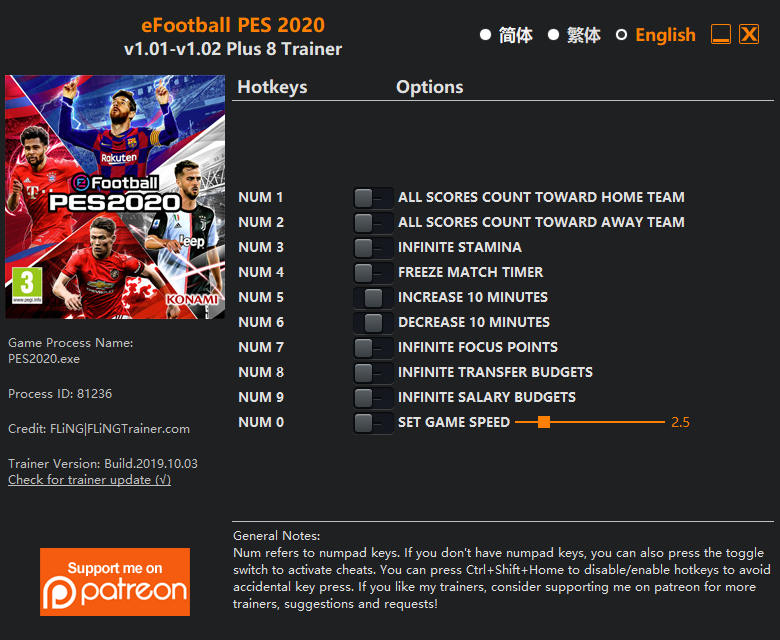
The eFootball PES 2020 Trainer gives you access to 6 cheats that let you play the game however you want. Struggling with a tough section? Want to skip the grind? Just want to mess around? This trainer has you covered.
We’ve seen people sink hundreds of hours into this game with cheats on. It hits different.
This simulator and sport title has been around since 2019 and remains a popular pick for players looking to push their experience further.
Some of the most popular cheats included in this trainer are Num 3 – Infinite Stamina, Num 4 – Freeze Match Timer, Num 7 – Infinite Focus Points, Num 8 – Infinite Transfer Budgets, and many more. These modifications let you customize difficulty, skip grinding, or simply experiment with the game in new ways.
eFootball PES 2020 Trainer Cheats
This trainer includes 6 cheats covering movement, time.
| # | Cheat | Effect |
|---|---|---|
| 1 | Num 3 – Infinite Stamina | Your stamina bar never depletes no matter what you do |
| 2 | Num 4 – Freeze Match Timer | Lock your match timer so it never changes |
| 3 | Num 7 – Infinite Focus Points | Your focus points supply becomes endless |
| 4 | Num 8 – Infinite Transfer Budgets | Bottomless transfer budgets – it never runs dry |
| 5 | Num 9 – Infinite Salary Budgets | Never worry about running out of salary budgets again |
| 6 | Num 0 – Set Game Speed | Speed up or slow down the entire game to your liking |
What Can You Do With This Trainer?
Here are some of the standout cheats in this trainer – the ones that really change how you play:
- Num 3 – Infinite Stamina – Your stamina bar never depletes no matter what you do
- Num 4 – Freeze Match Timer – Prevent your match timer from going up or down
- Num 7 – Infinite Focus Points – Bottomless focus points – it never runs dry
- Num 8 – Infinite Transfer Budgets – Bottomless transfer budgets – it never runs dry
- Num 9 – Infinite Salary Budgets – Never worry about running out of salary budgets again
And that’s just scratching the surface. The full cheat list above has everything you need to play the game completely on your own terms.
Download eFootball PES 2020 Trainer
Download the latest version of this trainer for PC below.
| Version | Creator | Platform | Date Added | Download |
|---|---|---|---|---|
| Standalone Version | FLiNG | PC (Windows) | 2019-10-03 | Download |
How to Use This Trainer
- Fire Up eFootball PES 2020 – Open the game and let it load fully. Whether you’re continuing a save or starting new, just make sure it’s running.
- Start the FLiNG .exe – Double-click the FLiNG trainer file (run as Admin if prompted). The trainer window displays all hotkeys for activating cheats.
- Enable Cheats by Hotkey – Look at the trainer window for each cheat’s hotkey assignment. Tap a key to toggle that cheat on or off during gameplay.
- Dive In – Everything is ready. Return to eFootball PES 2020 and enjoy the game your way. Swap cheats around whenever you feel like mixing things up.
Tips & Known Issues
- Keep this trainer offline. Single-player only – any online or multiplayer use risks a permanent ban from the game.
- Trainers are PC-only. If you’re playing on console or through a cloud streaming service, the trainer won’t work.
- If the trainer isn’t working, make sure your game is fully updated to the latest version.
- Running the trainer as Admin avoids most permission-related issues. Right-click and choose Run as Administrator.
Frequently Asked Questions
What cheats are included in this trainer?
The trainer comes loaded with 6 cheats. Everything from combat tweaks to resource mods – the full list is in the table above.
Can I customise how much health or money I get?
Certain cheats let you choose exact amounts instead of just toggling unlimited. Check for any ‘set’ or ‘edit’ options in the cheat list.
Is this trainer compatible with mods?
In most cases they work fine together. Conflicts only happen when a mod alters the exact same memory values the trainer is trying to modify.
Do I need to restart the game after activating cheats?
Not at all. Everything applies in real-time. Turn cheats on, turn them off, no restarts required at any point.
Will the trainer work with the latest game version?
The auto-updating trainer stays compatible with new patches on its own. If you grabbed the Standalone version, you might need to check for a newer release after big updates.
What should I do if the trainer stops working after an update?
Sit tight. The auto-updating trainer usually fixes itself within a day or so after a patch. If you’re on the Standalone version, look for a newer build.



