Entity: The Black Day Trainer
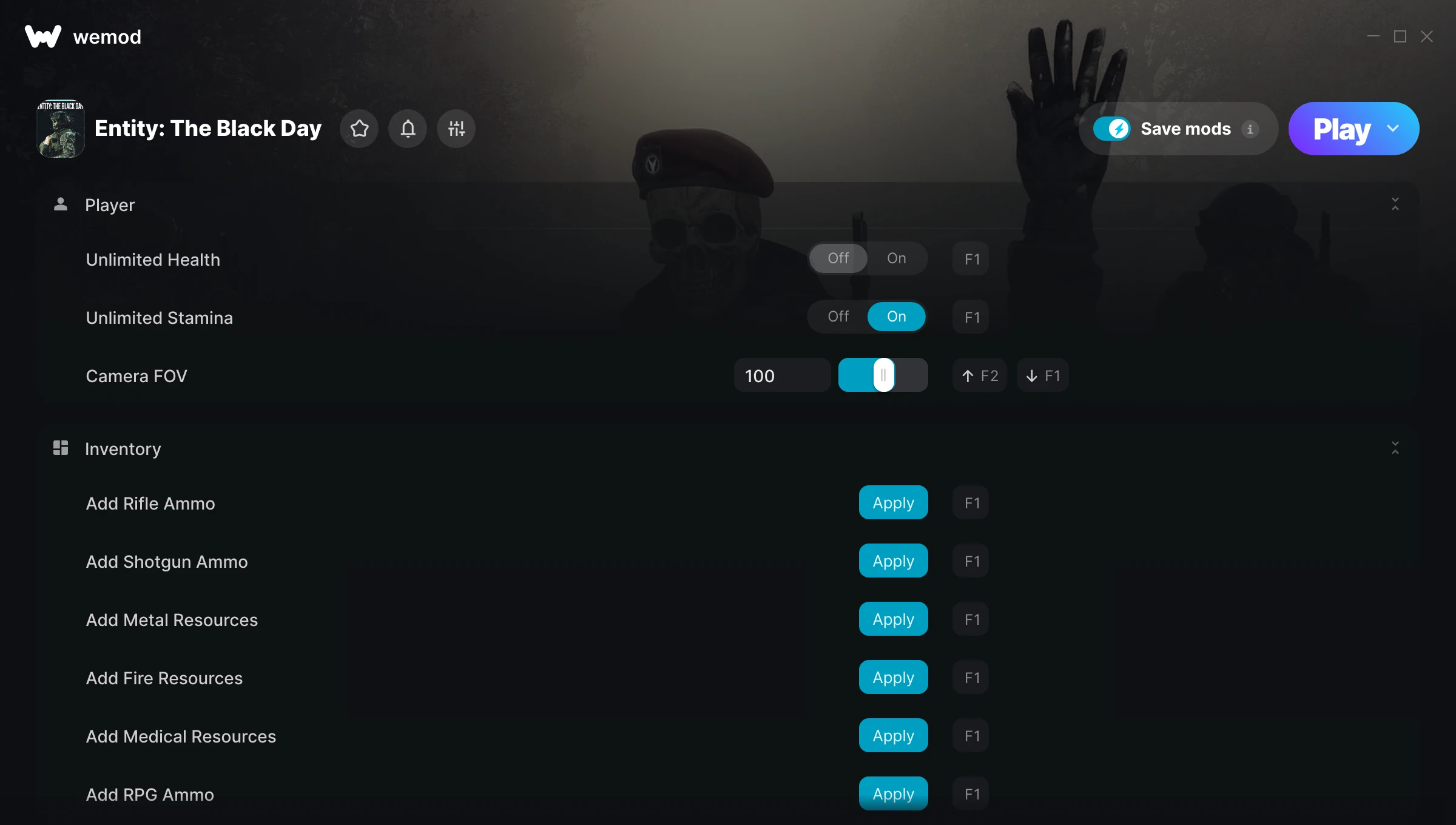
The Entity: The Black Day Trainer gives you access to 14 cheats that let you play the game however you want. Struggling with a tough section? Want to skip the grind? Just want to mess around? This trainer has you covered.
Unlimited stamina means you can sprint, dodge, and fight nonstop without that annoying stamina bar slowing you down. These cheats let you get past the frustrating parts and actually enjoy the game at your own pace.
If you’ve already finished the story and want to replay it like an overpowered lunatic, this is for you.
It’s been a while since Entity: The Black Day first hit in 2026, but this shooter and adventure title still has plenty to offer.
This trainer is auto-updating – it patches itself every time the game gets an update, so you never have to hunt for a new download. Just install it once and you’re set.
Some of the most popular cheats included in this trainer are Unlimited Health, Unlimited Stamina, No Reload, Super Speed, and many more. These modifications let you customize difficulty, skip grinding, or simply experiment with the game in new ways.
Entity: The Black Day Trainer Cheats
This trainer includes 14 cheats covering health, ammo, resources, movement, time.
| # | Cheat | Effect |
|---|---|---|
| 1 | Unlimited Health | Your health stays maxed out no matter what hits you |
| 2 | Unlimited Stamina | Sprint, dodge, and fight without ever getting winded |
| 3 | Camera FOV | Tweak the camera fov mechanic to your advantage |
| 4 | Add Rifle Ammo | Give yourself more rifle ammo on demand |
| 5 | Add Shotgun Ammo | Add extra shotgun ammo whenever you need it |
| 6 | Add Metal Resources | Add extra metal resources whenever you need it |
| 7 | Add Fire Resources | Give yourself more fire resources on demand |
| 8 | Add Medical Resources | Give yourself more medical resources on demand |
| 9 | Add RPG Ammo | Give yourself more rpg ammo on demand |
| 10 | No Reload | Skip reload animations entirely and keep firing nonstop |
| 11 | Game Speed Multiplier | Speed up or slow down the entire game to your liking |
| 12 | Free Camera | Tweak the free camera mechanic to your advantage |
| 13 | High Res Screenshot | Tweak the high res screenshot mechanic to your advantage |
| 14 | Super Speed | Move through the game world at blazing speed |
What Can You Do With This Trainer?
Here are some of the standout cheats in this trainer – the ones that really change how you play:
- Unlimited Health – Your health stays maxed out no matter what hits you
- Unlimited Stamina – Sprint, dodge, and fight without ever getting winded
- Camera FOV – Tweak the camera fov mechanic to your advantage
- Add Rifle Ammo – Give yourself more rifle ammo on demand
- Add Shotgun Ammo – Give yourself more shotgun ammo on demand
And that’s just scratching the surface. The full Entity: The Black Day cheat list above has everything you need to play completely on your own terms.
Recommended Cheat Presets
Not sure which cheats to enable? Here are some recommended preset combinations for different playstyles:
Easy Mode
Turn the difficulty down to nothing. Perfect for enjoying the story, or for a second playthrough where you just want to feel unstoppable.
- Unlimited Health
- No Reload
Farming Preset
Skip the grind entirely. Max out your loot, XP, and cash without spending hours farming the same enemies over and over.
- Add Metal Resources
- Add Fire Resources
- Add Medical Resources
Exploration Mode
Explore every corner of the map with zero restrictions. No stamina bar holding you back, no invisible walls – just pure freedom.
- Unlimited Stamina
- Super Speed
Download Entity: The Black Day Trainer
Download the latest version of this trainer for PC below.
| Version | Creator | Platform | Date Added | Download |
|---|---|---|---|---|
| Auto-Updating Version (Latest) | Sandvix | Steam | 2026-01-22 | Download |
How to Use This Trainer
- Fire Up Entity: The Black Day – Open the game and let it load fully. Whether you’re continuing a save or starting new, just make sure it’s running.
- Open WeMod Overlay – Search for “Entity: The Black Day” in WeMod and click Play. The in-game overlay will appear with toggles for every available cheat.
- Switch On Your Cheats – Browse the cheat list in the WeMod overlay and toggle on whatever you want. Effects are instant and reversible.
- Get Back to the Game – Everything is set up. Continue playing Entity: The Black Day with your chosen cheats active. Experiment freely – you can change things at any time.
Tips & Known Issues
- Never activate this trainer during online play. It’s built for single-player only and multiplayer anti-cheat will catch it.
- For the smoothest experience on Steam, switch off the Steam Overlay in your Steam settings before running the trainer.
- Running into problems? Other overlay software (Discord, NVIDIA ShadowPlay) can conflict with trainers. Try turning them off.
- Always run the trainer as Administrator for best compatibility.
- The WeMod version updates itself automatically after each game patch. No action needed on your end.
Frequently Asked Questions
Is this trainer compatible with mods?
They’re typically fine together. The rare exception is when a mod overwrites the same values the trainer hooks into, but that’s uncommon.
Will this trainer affect my save files?
It won’t corrupt your saves. The trainer works in memory only – but keep in mind that any progress made with cheats enabled will be saved normally.
Can I use multiple cheats at the same time?
Of course. There’s no limit to how many you can have active. Layer them however you want.
Can I customise how much health or money I get?
Where available, yes. Look for cheats labelled ‘Set’ or ‘Edit’ – these let you punch in a custom value instead of going straight to infinite.
What should I do if the trainer stops working after an update?
If a game patch breaks things, the auto-updating trainer will fix itself automatically – usually within a day or two.
Will the trainer work with the latest game version?
The Auto-Updating Version keeps itself current automatically after each game patch.
Does this trainer work with Steam?
Yes, it works with the Steam version of the game.