F1 2019 Anniversary Edition Trainer
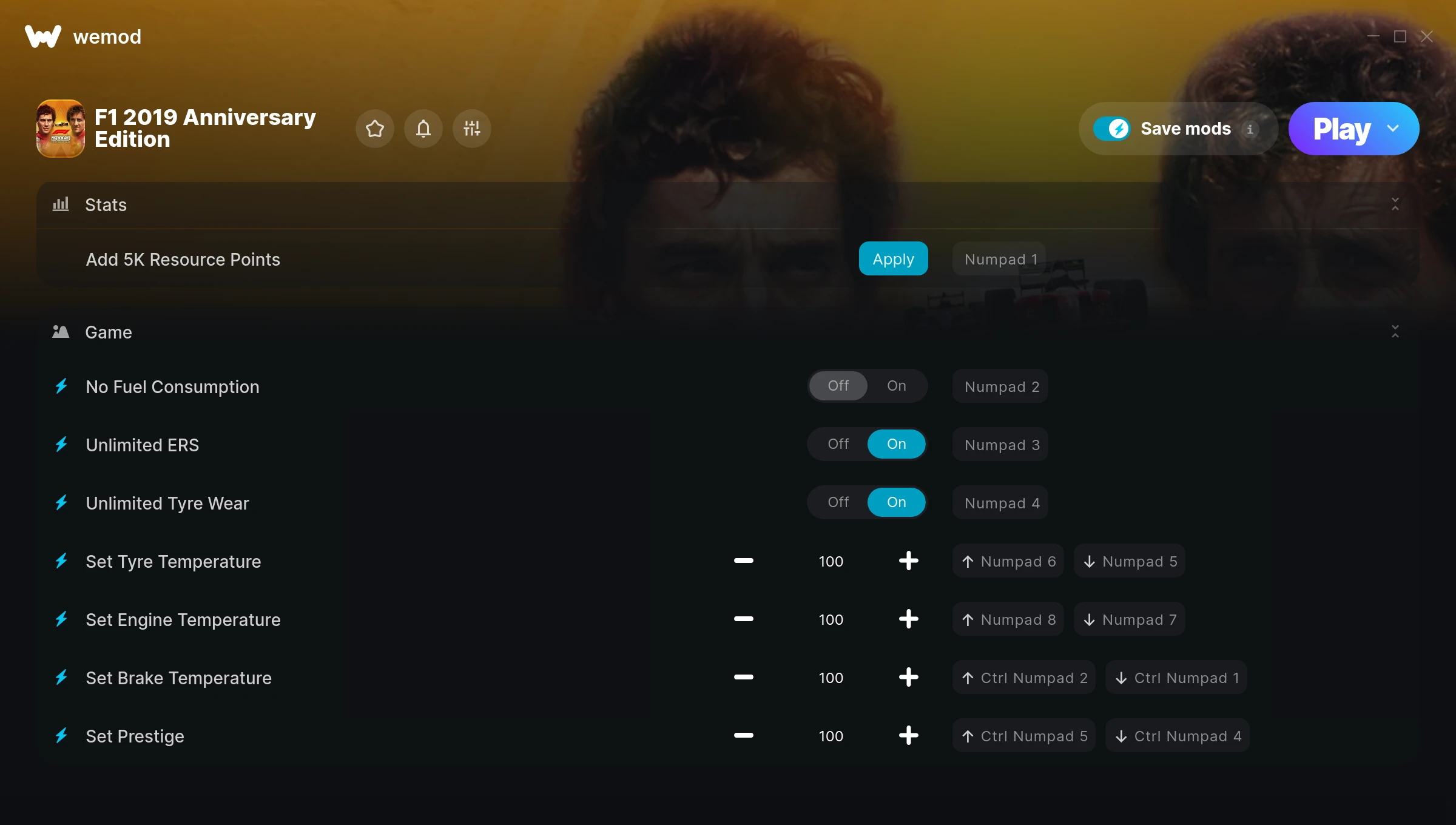
The F1 2019 Anniversary Edition Trainer gives you access to 8 cheats that let you play the game however you want. Struggling with a tough section? Want to skip the grind? Just want to mess around? This trainer has you covered.
The trainers below give you complete control over your experience. Use them however you want.
This trainer stays in sync with game patches automatically. You’ll never have to worry about downloading a new version after an update – it handles everything behind the scenes.
Some of the most popular cheats included in this trainer are Add 5K Resource Points, No Fuel Consumption, Unlimited ERS, Unlimited Tyre Wear, and many more. These modifications let you customize difficulty, skip grinding, or simply experiment with the game in new ways.
F1 2019 Anniversary Edition Trainer Cheats
This trainer includes 8 cheats for tweaking your gameplay.
| # | Cheat | Effect |
|---|---|---|
| 1 | Add 5K Resource Points | Add extra 5k resource points whenever you need it |
| 2 | No Fuel Consumption | Turn off fuel consumption entirely for easier gameplay |
| 3 | Unlimited ERS | Your ers never runs out or depletes |
| 4 | Unlimited Tyre Wear | Remove all limits on your tyre wear |
| 5 | Set Tyre Temperature | Adjust tyre temperature to whatever feels right |
| 6 | Set Engine Temperature | Pick your own value for engine temperature |
| 7 | Set Brake Temperature | Adjust brake temperature to whatever feels right |
| 8 | Set Prestige | Adjust prestige to whatever feels right |
What Can You Do With This Trainer?
Here are some of the standout cheats in this trainer – the ones that really change how you play:
- Add 5K Resource Points – Give yourself more 5k resource points on demand
- No Fuel Consumption – Completely disable fuel consumption
- Unlimited ERS – Your ers never runs out or depletes
- Unlimited Tyre Wear – Use your tyre wear as much as you want without limits
- Set Tyre Temperature – Pick your own value for tyre temperature
And that’s just scratching the surface. The full F1 2019 Anniversary Edition cheat list above has everything you need to play completely on your own terms.
Download F1 2019 Anniversary Edition Trainer
Download the latest version of this trainer for PC below.
| Version | Creator | Platform | Date Added | Download |
|---|---|---|---|---|
| Auto-Updating Version (Latest) | STiNGERR | Steam | 2026-01-09 | Download |
How to Use This Trainer
- Launch F1 2019 Anniversary Edition – Start the game and load into your save file or start a new game. Make sure it’s running before activating the trainer.
- Open WeMod Overlay – Search for “F1 2019 Anniversary Edition” in WeMod and click Play. The in-game overlay will appear with toggles for every available cheat.
- Enable the Cheats You Want – Use the WeMod overlay to enable any combination of cheats. Everything activates in real-time while the game is running.
- Enjoy the Game – You’re all set. Play the game with your cheats active and switch them around as you go. Try different combinations to see what’s the most fun.
Tips & Known Issues
- Only use this trainer in single-player. Online and multiplayer modes have anti-cheat systems that will detect and ban you.
- Trainers modify game memory, which can trigger antivirus warnings. These are false positives – add an exception if needed.
- Cloud gaming services like GeForce NOW or Xbox Cloud Gaming are not compatible with trainers. You need the game running locally on PC.
- Overlay apps from Discord, NVIDIA, or Razer can occasionally clash with trainer hooks. Disable them as a troubleshooting step.
- The WeMod version updates itself automatically after each game patch. No action needed on your end.
Frequently Asked Questions
Will this trainer affect my save files?
The trainer only modifies values in memory while the game is running. Your save files stay intact, though any progress you make with cheats on will save as normal.
Will the trainer work with the latest game version?
If you’re using the Auto-Updating Version, yes – it patches itself after every game update.
Do I need to restart the game after activating cheats?
No restart needed. Cheats take effect the moment you activate them – toggle freely while you play.
How do I know which version to download?
This trainer auto-updates whenever the game is patched, so you always have the latest compatible version. Just download it once and you’re set.
What should I do if the trainer stops working after an update?
If a game patch breaks things, the auto-updating trainer will fix itself automatically – usually within a day or two.
Does this trainer work with Steam?
It does. This trainer is built to work with the Steam version.