
How To Survive: Third Person Standalone Trainer
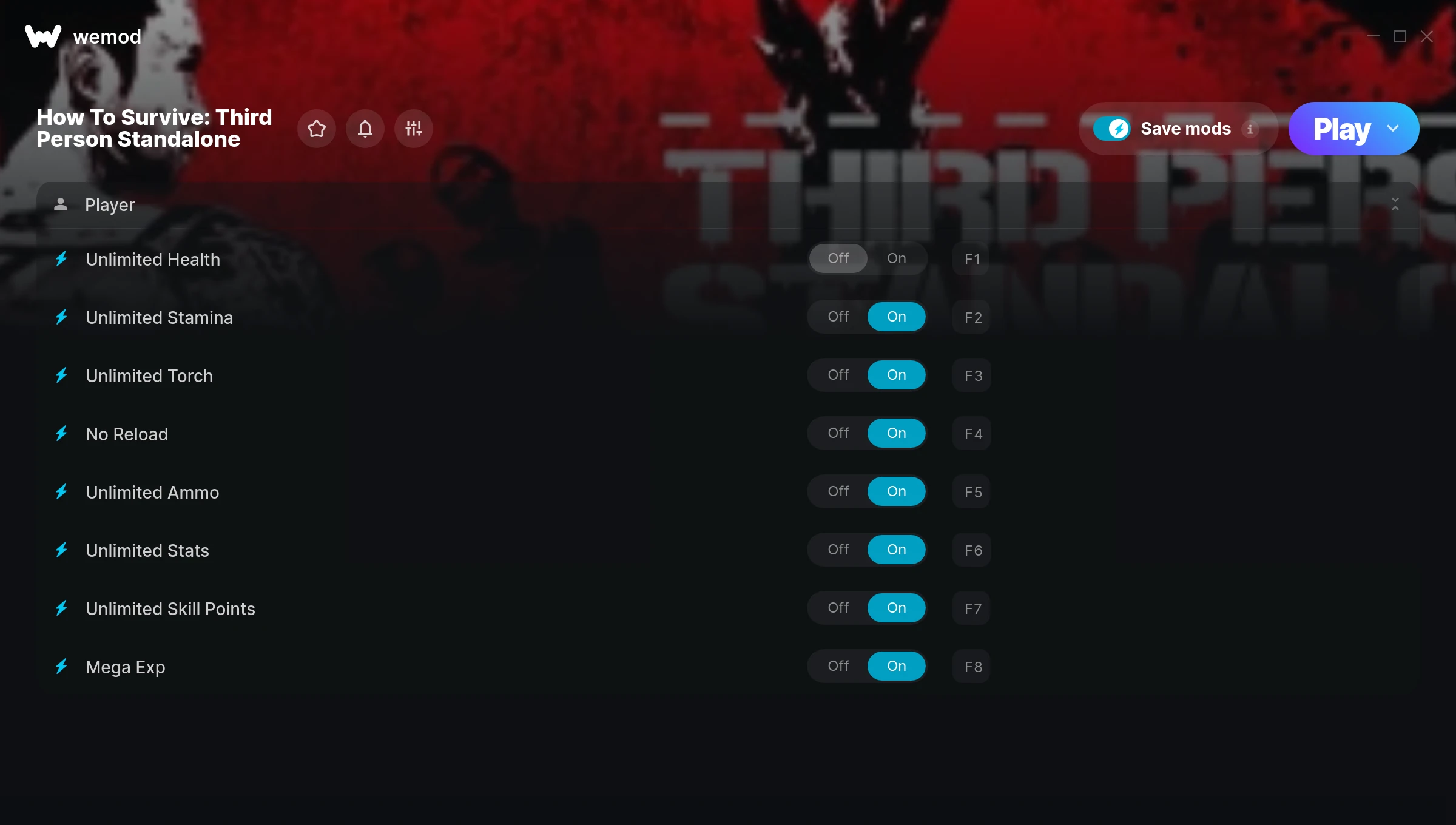
The How To Survive: Third Person Standalone Trainer gives you access to 8 cheats that let you play the game however you want. Struggling with a tough section? Want to skip the grind? Just want to mess around? This trainer has you covered.
Unlimited stamina means you can sprint, dodge, and fight nonstop without that annoying stamina bar slowing you down. These cheats let you get past the frustrating parts and actually enjoy the game at your own pace.
Consider this your shortcut past every annoying difficulty spike in the game.
Players have been diving into How To Survive: Third Person Standalone since 2015, making it one of the more enduring role-playing (rpg) and adventure titles out there.
The best part? This PC trainer auto-updates whenever the game is patched. Zero effort on your part – it stays compatible in the background so you can just play.
Some of the most popular cheats included in this trainer are Unlimited Health, Unlimited Stamina, No Reload, Unlimited Ammo, and many more. These modifications let you customize difficulty, skip grinding, or simply experiment with the game in new ways.
How To Survive: Third Person Standalone Trainer Cheats
This trainer includes 8 cheats covering health, ammo, movement, experience.
| # | Cheat | Effect |
|---|---|---|
| 1 | Unlimited Health | Your health stays maxed out no matter what hits you |
| 2 | Unlimited Stamina | Sprint, dodge, and fight without ever getting winded |
| 3 | Unlimited Torch | Your torch never runs out or depletes |
| 4 | No Reload | Skip reload animations entirely and keep firing nonstop |
| 5 | Unlimited Ammo | Fire away without ever worrying about running dry |
| 6 | Unlimited Stats | Remove all limits on your stats |
| 7 | Unlimited Skill Points | Max out every skill tree without having to choose |
| 8 | Mega Exp | Crank your exp up to extreme amounts |
What Can You Do With This Trainer?
Here are some of the standout cheats in this trainer – the ones that really change how you play:
- Unlimited Health – Your health stays maxed out no matter what hits you
- Unlimited Stamina – Sprint, dodge, and fight without ever getting winded
- Unlimited Torch – Use your torch as much as you want without limits
- No Reload – Skip reload animations entirely and keep firing nonstop
- Unlimited Ammo – Fire away without ever worrying about running dry
And that’s just scratching the surface. The full How To Survive: Third Person Standalone cheat list above has everything you need to play completely on your own terms.
Recommended Cheat Presets
Not sure which cheats to enable? Here are some recommended preset combinations for different playstyles:
Easy Mode
Turn the difficulty down to nothing. Perfect for enjoying the story, or for a second playthrough where you just want to feel unstoppable.
- Unlimited Health
- No Reload
- Unlimited Ammo
Farming Preset
Skip the grind entirely. Max out your loot, XP, and cash without spending hours farming the same enemies over and over.
- Unlimited Skill Points
- Mega Exp
Download How To Survive: Third Person Standalone Trainer
Download the latest version of this trainer for PC below.
| Version | Creator | Platform | Date Added | Download |
|---|---|---|---|---|
| Auto-Updating Version (Latest) | MrAntiFun | Steam | 2025-11-12 | Download |
How to Use This Trainer
- Start the Game First – Always start How To Survive: Third Person Standalone before the trainer. Load your save or start a new game – the trainer needs an active game process.
- Connect WeMod – Launch the WeMod application and find “How To Survive: Third Person Standalone” in the library. Press Play and WeMod will hook into the running game automatically.
- Select and Activate – Choose your cheats from the WeMod overlay and flip them on. Every toggle takes effect right away with no need to reload.
- Start Playing – That’s all there is to it. Dive back in and enjoy How To Survive: Third Person Standalone with your cheats running. Feel free to adjust them anytime mid-game.
Tips & Known Issues
- Trainers are designed for single-player use only. Using them online or in multiplayer will result in a ban.
- Some antivirus software may flag the trainer as a false positive. You may need to add an exception for it.
- Launch the trainer with elevated permissions (Run as Administrator) to avoid access issues.
- Steam’s in-game overlay sometimes interferes with trainers. If cheats aren’t activating, disable it in Steam > Settings > In-Game.
- The WeMod version updates itself automatically after each game patch. No action needed on your end.
Frequently Asked Questions
How often is this trainer updated?
This trainer auto-updates shortly after each game patch, so it stays compatible without you having to do anything.
How do I use this trainer?
Download the trainer, run it alongside the game, and use the hotkeys to toggle cheats on and off. It really is that simple.
What should I do if the trainer stops working after an update?
If a game patch breaks things, the auto-updating trainer will fix itself automatically – usually within a day or two.
Is this trainer free to download?
100% free. Hit one of the download buttons above and you can be up and running in seconds.
Can I customise how much health or money I get?
Some cheats include an edit mode where you can set a specific value rather than just maxing things out. Great for keeping things balanced if you want.
Does this trainer work with Steam?
Fully compatible with Steam. Just launch the game through Steam and run the trainer alongside it.



