JETT: The Far Shore Trainer
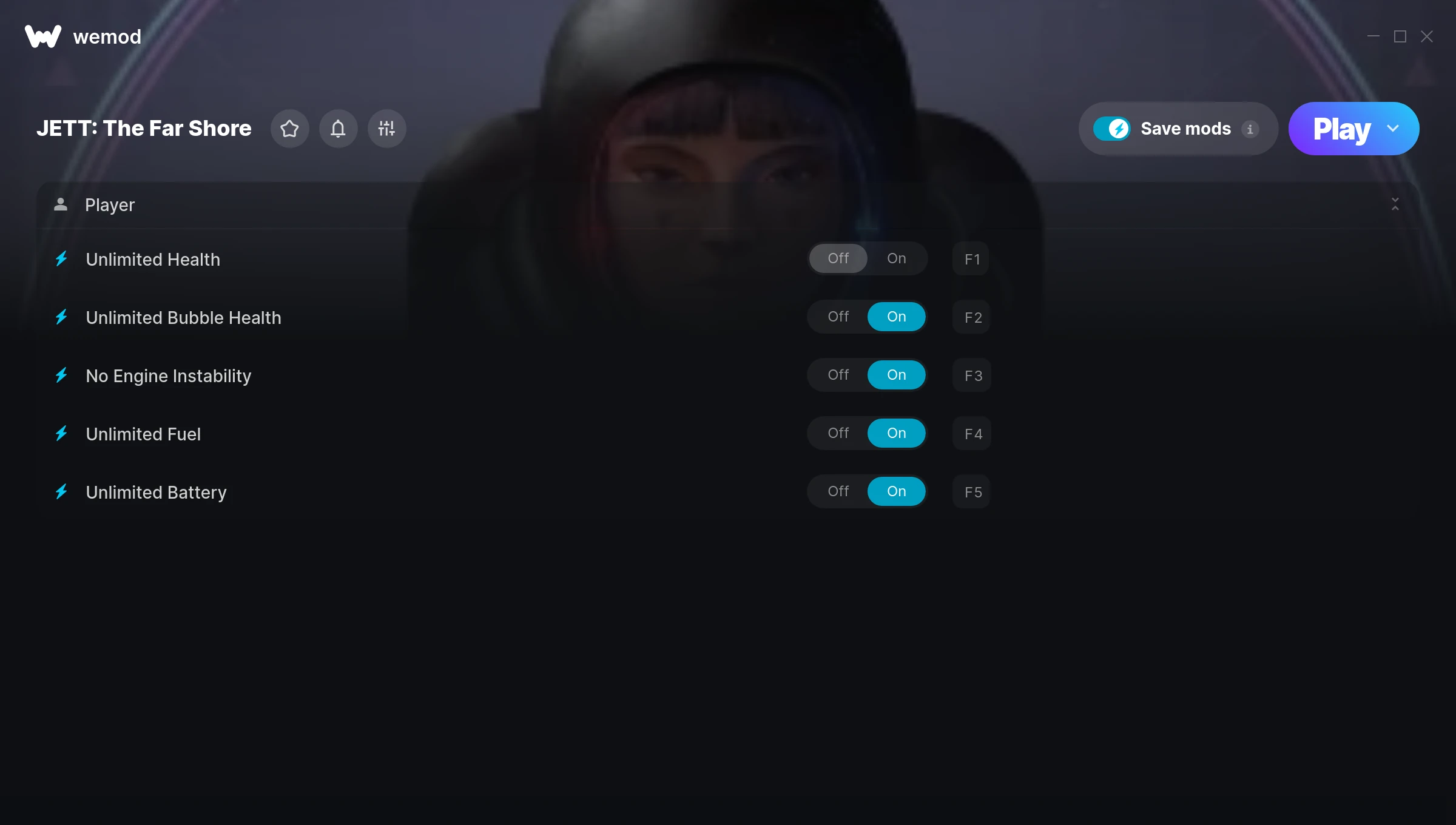
The JETT: The Far Shore Trainer gives you access to 5 cheats that let you play the game however you want. Struggling with a tough section? Want to skip the grind? Just want to mess around? This trainer has you covered.
We’ve seen people sink hundreds of hours into this game with cheats on. It hits different.
Players have been diving into JETT: The Far Shore since 2021, making it one of the more enduring adventure titles out there.
This trainer stays in sync with game patches automatically. You’ll never have to worry about downloading a new version after an update – it handles everything behind the scenes.
Some of the most popular cheats included in this trainer are Unlimited Health, Unlimited Bubble Health, No Engine Instability, Unlimited Fuel, and many more. These modifications let you customize difficulty, skip grinding, or simply experiment with the game in new ways.
JETT: The Far Shore Trainer Cheats
This trainer includes 5 cheats covering health, cooldowns.
| # | Cheat | Effect |
|---|---|---|
| 1 | Unlimited Health | Your health stays maxed out no matter what hits you |
| 2 | Unlimited Bubble Health | Remove all limits on your bubble health |
| 3 | No Engine Instability | Turn off engine instability entirely for easier gameplay |
| 4 | Unlimited Fuel | Use your fuel as much as you want without limits |
| 5 | Unlimited Battery | Remove all limits on your battery |
What Can You Do With This Trainer?
Here are some of the standout cheats in this trainer – the ones that really change how you play:
- Unlimited Health – Your health stays maxed out no matter what hits you
- Unlimited Bubble Health – Your bubble health never runs out or depletes
- No Engine Instability – Remove engine instability from the equation
- Unlimited Fuel – Use your fuel as much as you want without limits
- Unlimited Battery – Remove all limits on your battery
And that’s just scratching the surface. The full JETT: The Far Shore cheat list above has everything you need to play completely on your own terms.
Download JETT: The Far Shore Trainer
Download the latest version of this trainer for PC below.
| Version | Creator | Platform | Date Added | Download |
|---|---|---|---|---|
| Auto-Updating Version (Latest) | MrAntiFun | Epic Games | 2025-12-12 | Download |
How to Use This Trainer
- Start the Game First – Always start JETT: The Far Shore before the trainer. Load your save or start a new game – the trainer needs an active game process.
- Start the Trainer – Open WeMod, type “JETT: The Far Shore” in the search bar, and click Play. The overlay pops up in-game and you’re ready to go.
- Select and Activate – Choose your cheats from the WeMod overlay and flip them on. Every toggle takes effect right away with no need to reload.
- Play and Enjoy – That’s it – jump back into the game and enjoy. You can toggle cheats on and off whenever you want. Half the fun is experimenting to find your perfect setup.
Tips & Known Issues
- Only use this trainer in single-player. Online and multiplayer modes have anti-cheat systems that will detect and ban you.
- Third-party overlays like Discord or GeForce Experience can sometimes interfere with trainers. Disable them if you have issues.
- Trainers modify game memory, which can trigger antivirus warnings. These are false positives – add an exception if needed.
- Steam’s in-game overlay sometimes interferes with trainers. If cheats aren’t activating, disable it in Steam > Settings > In-Game.
- WeMod handles version compatibility automatically. When the game updates, the trainer follows shortly after.
Frequently Asked Questions
How do I use this trainer?
Just download the trainer and open it while the game is running. Each cheat has a toggle – flip them on or off as you play.
Will this trainer affect my save files?
No damage to saves. The trainer tweaks memory values on the fly, not your save data. That said, if you earn a million gold with cheats on, that gold saves too.
Can I customise how much health or money I get?
Where available, yes. Look for cheats labelled ‘Set’ or ‘Edit’ – these let you punch in a custom value instead of going straight to infinite.
How do I know which version to download?
This trainer auto-updates whenever the game is patched, so you always have the latest compatible version. Just download it once and you’re set.
Does this trainer work with Epic Games?
Fully compatible with Epic Games. Just launch the game through Epic Games and run the trainer alongside it.