Lies of P Trainer
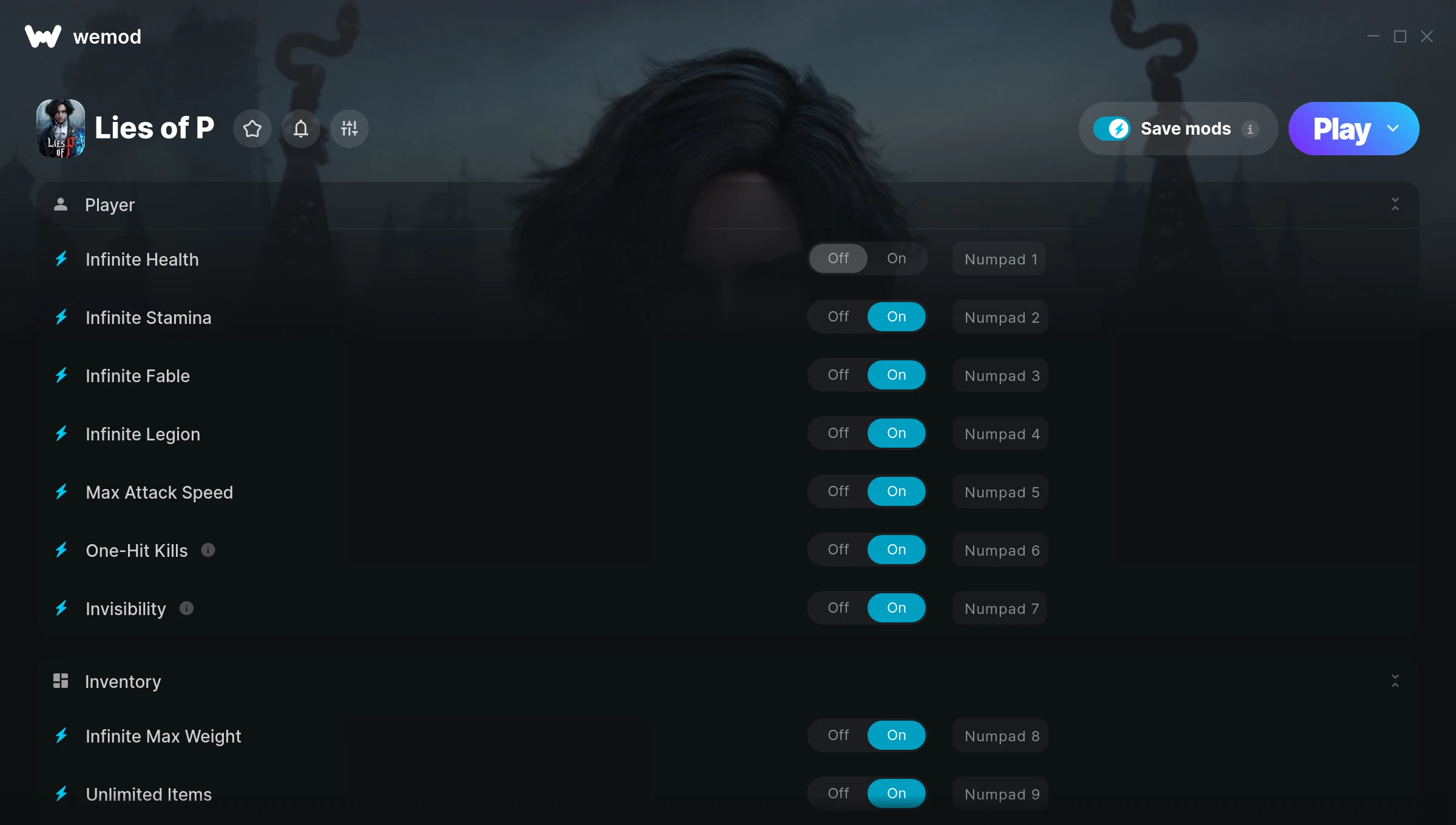
The Lies of P Trainer gives you access to 25 cheats that let you play the game however you want. Struggling with a tough section? Want to skip the grind? Just want to mess around? This trainer has you covered.
Infinite health means you can charge headfirst into anything without consequences. It’s as liberating as it sounds. These cheats let you get past the frustrating parts and actually enjoy the game at your own pace.
Perfect for a second playthrough where you just want to mess around and have fun.
If you missed Lies of P when it launched in 2023, now is a great time to jump into this role-playing (rpg) and adventure title.
Grab the Auto-Updating Version if you want this PC trainer to stay compatible after every patch – it handles updates in the background. The Standalone version is there if you’d rather have a single, fixed download.
Some of the most popular cheats included in this trainer are Infinite Health, Infinite Stamina, Max Attack Speed, Infinite Fable, and many more. These modifications let you customize difficulty, skip grinding, or simply experiment with the game in new ways.
Lies of P Trainer Cheats
This trainer includes 25 cheats covering health, combat, movement, experience, inventory.
| # | Cheat | Effect |
|---|---|---|
| 1 | Infinite Health | Health that never drops – charge into anything without worry |
| 2 | Infinite Stamina | Your stamina bar never depletes no matter what you do |
| 3 | Infinite Fable | Never worry about running out of fable again |
| 4 | Infinite Legion | Never worry about running out of legion again |
| 5 | Max Attack Speed | Max out your attack speed in one go |
| 6 | One-Hit Kills | Tweak the one hit kills mechanic to your advantage |
| 7 | Invisibility | Tweak the invisibility mechanic to your advantage |
| 8 | Infinite Max Weight | Instantly push your weight to the highest value |
| 9 | Unlimited Items | Use items freely without your inventory running out |
| 10 | Set Hovered Item Amount | Adjust hovered item amount to whatever feels right |
| 11 | Set Level | Choose exactly how much level you want |
| 12 | Set Ergo | Manually set your ergo to any number |
| 13 | Set Points Given to Vitality | Pick your own value for points given to vitality |
| 14 | Set Points Given to Vigor | Pick your own value for points given to vigor |
| 15 | Set Points Given to Capacity | Manually set your points given to capacity to any number |
| 16 | Set Points Given to Motivity | Manually set your points given to motivity to any number |
| 17 | Set Points Given to Technique | Adjust points given to technique to whatever feels right |
| 18 | Set Points Given to Advance | Pick your own value for points given to advance |
| 19 | Set Ergo Multiplier | Choose exactly how much ergo you want |
| 20 | Infinite Weapon Sharpness | Bottomless weapon sharpness – it never runs dry |
| 21 | Game Speed | Speed up or slow down the entire game to your liking |
| 22 | Fly | Tweak the fly mechanic to your advantage |
| 23 | Instant Acceleration | Skip the wait and trigger acceleration right away |
| 24 | Set Movement Speed Multiplier | Adjust movement speed to whatever feels right |
| 25 | Set Flying Speed Multiplier | Pick your own value for flying speed |
What Can You Do With This Trainer?
Here are some of the standout cheats in this trainer – the ones that really change how you play:
- Infinite Health – Health that never drops – charge into anything without worry
- Infinite Stamina – Your stamina bar never depletes no matter what you do
- Infinite Fable – Your fable supply becomes endless
- Infinite Legion – Bottomless legion – it never runs dry
- Max Attack Speed – Set your attack speed to the absolute maximum
And that’s just scratching the surface. The full cheat list above has everything you need to play the game completely on your own terms.
Download Lies of P Trainer
Download the latest version of this trainer for PC below.
| Version | Creator | Platform | Date Added | Download |
|---|---|---|---|---|
| Auto-Updating Version (Latest) | GreenHouse | Steam, Xbox | 2026-01-09 | Download |
| Standalone Version | FLiNG | Steam | 2025-10-24 | Download |
How to Use This Trainer
- Load Lies of P – Start the game and either load your existing save or begin a new one. The trainer connects to the running game process.
- Connect the Trainer – Using WeMod? Open the app, search “Lies of P”, and hit Play. Prefer FLiNG standalone? Right-click the .exe and run as Administrator. Either way, the trainer links to the running game.
- Activate Cheats – Toggle the cheats you want using the WeMod overlay or press the assigned hotkeys. Cheats activate in real-time while you play.
- Play and Enjoy – That’s it – jump back into the game and enjoy. You can toggle cheats on and off whenever you want. Half the fun is experimenting to find your perfect setup.
Tips & Known Issues
- Never activate this trainer during online play. It’s built for single-player only and multiplayer anti-cheat will catch it.
- Trainers modify game memory, which can trigger antivirus warnings. These are false positives – add an exception if needed.
- If using Steam, consider disabling the Steam Overlay (Steam > Settings > In-Game) to avoid conflicts with the trainer.
- Running into problems? Other overlay software (Discord, NVIDIA ShadowPlay) can conflict with trainers. Try turning them off.
- No need to check for updates manually with WeMod. The trainer patches itself whenever the game is updated.
Frequently Asked Questions
Is this trainer free to download?
100% free. Hit one of the download buttons above and you can be up and running in seconds.
Can I use multiple cheats at the same time?
Of course. There’s no limit to how many you can have active. Layer them however you want.
Will the trainer work with the latest game version?
If you’re using the Auto-Updating Version, yes – it patches itself after every game update. The Standalone build may lag behind slightly after major patches.
What cheats are included in this trainer?
There are 25 cheats in total – check the cheat table further up the page for the complete breakdown.
How do I use this trainer?
It’s straightforward: download, run the trainer while the game is open, and press the hotkeys to activate whichever cheats you want.
Does this trainer work with Steam?
Fully compatible. This trainer works with Steam, Xbox – just launch the game through whichever launcher you use.