Little Nightmares II Trainer
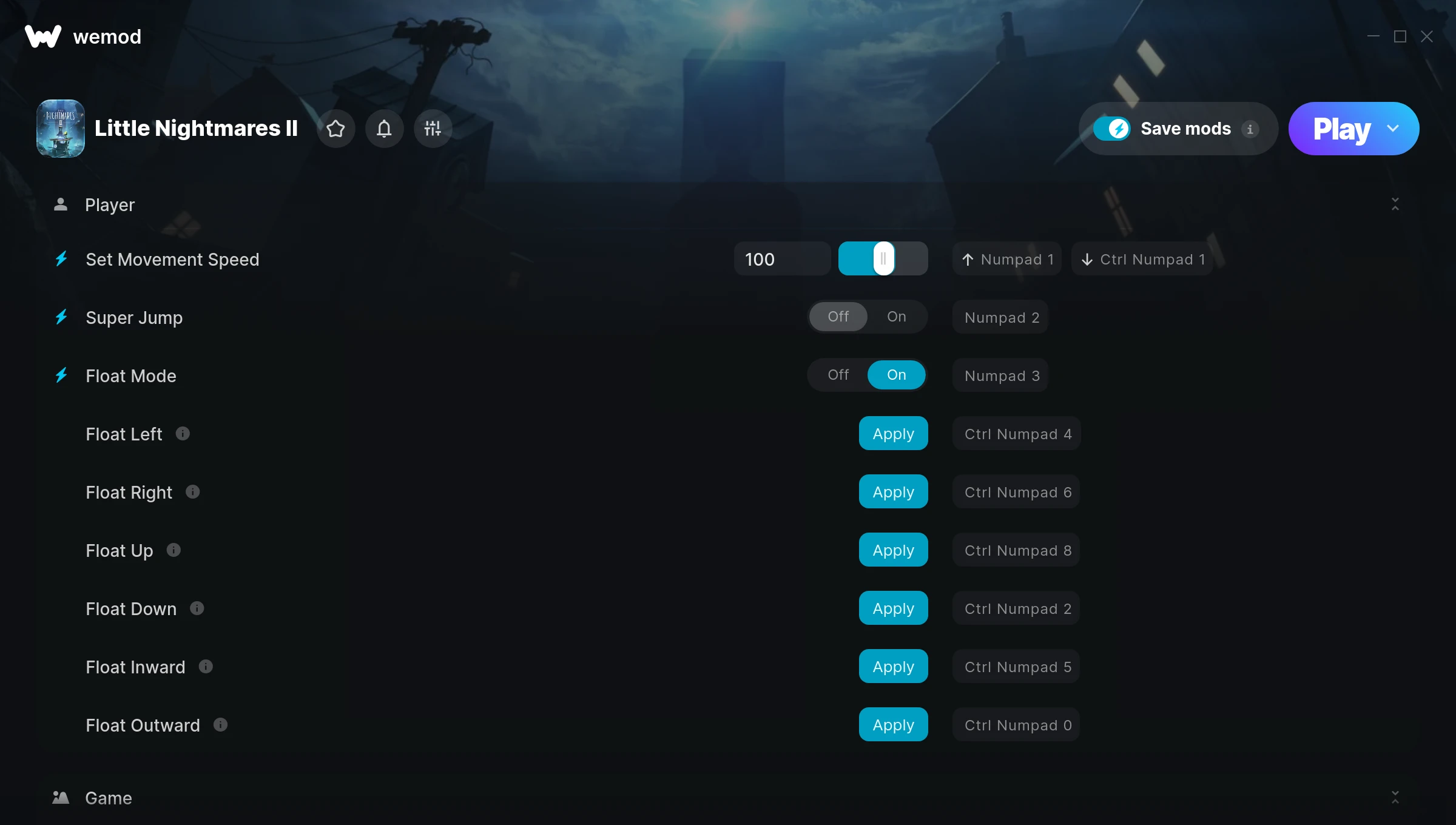
The Little Nightmares II Trainer gives you access to 10 cheats that let you play the game however you want. Struggling with a tough section? Want to skip the grind? Just want to mess around? This trainer has you covered.
Some of these cheats are subtle quality-of-life tweaks. Others are straight-up game-breaking. Both are great.
First hitting the scene in 2021, this platform and puzzle title keeps attracting players who want more control over their run.
No need to check for updates manually. This auto-updating trainer keeps itself compatible with the latest version of the game so your cheats always work.
Some of the most popular cheats included in this trainer are Set Movement Speed, Super Jump, Float Mode, Float Left, and many more. These modifications let you customize difficulty, skip grinding, or simply experiment with the game in new ways.
Little Nightmares II Trainer Cheats
This trainer includes 10 cheats covering movement, time.
| # | Cheat | Effect |
|---|---|---|
| 1 | Set Movement Speed | Choose exactly how much movement speed you want |
| 2 | Super Jump | Launch yourself way higher than the game normally allows |
| 3 | Float Mode | Tweak the float mode mechanic to your advantage |
| 4 | Float Left | Tweak the float left mechanic to your advantage |
| 5 | Float Right | Tweak the float right mechanic to your advantage |
| 6 | Float Up | Tweak the float up mechanic to your advantage |
| 7 | Float Down | Tweak the float down mechanic to your advantage |
| 8 | Float Inward | Tweak the float inward mechanic to your advantage |
| 9 | Float Outward | Tweak the float outward mechanic to your advantage |
| 10 | Set Game Speed | Speed up or slow down the entire game to your liking |
What Can You Do With This Trainer?
Here are some of the standout cheats in this trainer – the ones that really change how you play:
- Set Movement Speed – Adjust movement speed to whatever feels right
- Super Jump – Launch yourself way higher than the game normally allows
- Float Mode – Tweak the float mode mechanic to your advantage
- Float Left – Tweak the float left mechanic to your advantage
- Float Right – Tweak the float right mechanic to your advantage
And that’s just scratching the surface. The full Little Nightmares II cheat list above has everything you need to play completely on your own terms.
Download Little Nightmares II Trainer
Download the latest version of this trainer for PC below.
| Version | Creator | Platform | Date Added | Download |
|---|---|---|---|---|
| Auto-Updating Version (Latest) | FLiNG | Steam, GOG | 2025-10-12 | Download |
How to Use This Trainer
- Load Little Nightmares II – Start the game and either load your existing save or begin a new one. The trainer connects to the running game process.
- Open WeMod Overlay – Search for “Little Nightmares II” in WeMod and click Play. The in-game overlay will appear with toggles for every available cheat.
- Enable the Cheats You Want – Use the WeMod overlay to enable any combination of cheats. Everything activates in real-time while the game is running.
- Play Your Way – That’s the full setup. Get back into Little Nightmares II and play on your own terms. Adjust cheats whenever the mood strikes.
Tips & Known Issues
- Only use this trainer in single-player. Online and multiplayer modes have anti-cheat systems that will detect and ban you.
- Always run the trainer as Administrator for best compatibility.
- While trainers are safe to use, backing up your save file beforehand is always a smart precaution.
- Multiple overlays running at once can cause issues. If the trainer isn’t responding, close any unnecessary overlay software.
- WeMod auto-updates the trainer after game patches, so you never have to manually download a new version.
Frequently Asked Questions
Will the trainer work with the latest game version?
The Auto-Updating Version keeps itself current automatically after each game patch.
Do I need to restart the game after activating cheats?
No. Cheats are live the instant you toggle them. You can switch them on and off mid-gameplay without interruption.
Can I get banned for using this trainer?
Not in single-player – that’s what trainers are designed for. Never use them in online or multiplayer though, that will get you banned.
Is this trainer compatible with mods?
In most cases they work fine together. Conflicts only happen when a mod alters the exact same memory values the trainer is trying to modify.
What should I do if the trainer stops working after an update?
If a game patch breaks things, the auto-updating trainer will fix itself automatically – usually within a day or two.
Will this trainer affect my save files?
No damage to saves. The trainer tweaks memory values on the fly, not your save data. That said, if you earn a million gold with cheats on, that gold saves too.
Does this trainer work with Steam?
Fully compatible. This trainer works with Steam, GOG – just launch the game through whichever launcher you use.