Lost Castle 2 Trainer
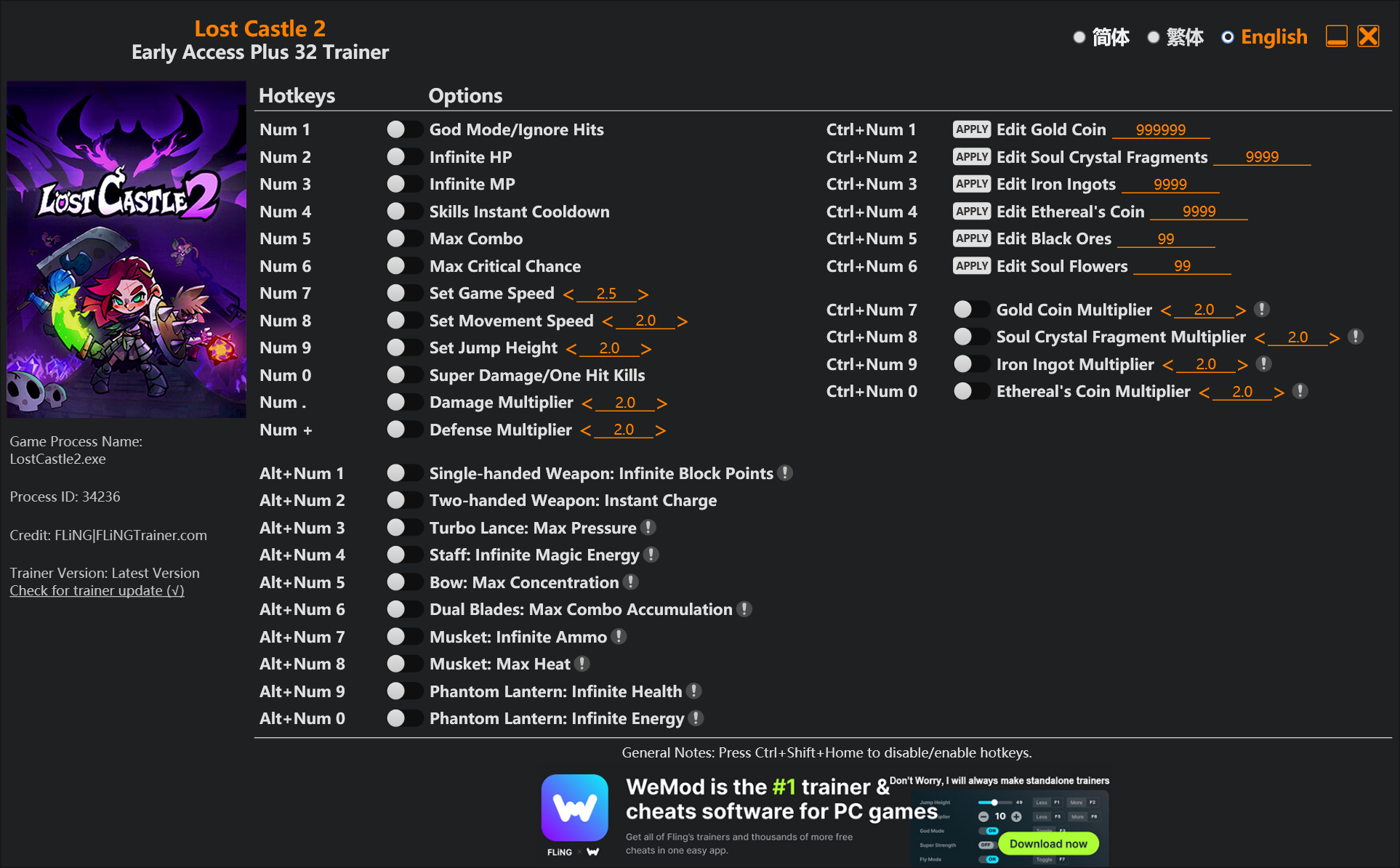
The Lost Castle 2 Trainer gives you access to 19 cheats that let you play the game however you want. Struggling with a tough section? Want to skip the grind? Just want to mess around? This trainer has you covered.
Infinite health means you can charge headfirst into anything without consequences. It’s as liberating as it sounds. These cheats let you get past the frustrating parts and actually enjoy the game at your own pace.
We’ve seen people sink hundreds of hours into this game with cheats on. It hits different.
Out since 2024, this role-playing (rpg) and adventure title is still going strong with players who want to shape the experience on their own terms.
Choose between two versions: the Auto-Updating one handles game patches for you behind the scenes, while the Standalone build is a straightforward one-and-done download.
Some of the most popular cheats included in this trainer are Infinite Health, Unhittable, Infinite Mana, Massive Damage, and many more. These modifications let you customize difficulty, skip grinding, or simply experiment with the game in new ways.
Lost Castle 2 Trainer Cheats
This trainer includes 19 cheats covering health, resources, combat, movement.
| # | Cheat | Effect |
|---|---|---|
| 1 | Unhittable | Tweak the unhittable mechanic to your advantage |
| 2 | Infinite Health | Health that never drops – charge into anything without worry |
| 3 | Infinite Mana | Your mana pool never empties – keep casting forever |
| 4 | Massive Damage | Tweak the massive damage mechanic to your advantage |
| 5 | Infinite Combo Duration | Bottomless combo duration – it never runs dry |
| 6 | Infinite Elixir | Your elixir supply becomes endless |
| 7 | Unlimited Soul Crystals | Remove all limits on your soul crystals |
| 8 | Unlimited Coins | Use your coins as much as you want without limits |
| 9 | Unlimited Magic Ingots | Remove all limits on your magic ingots |
| 10 | Set Soul Crystals Multiplier | Choose exactly how much soul crystals you want |
| 11 | Set Coins Multiplier | Choose exactly how much coins you want |
| 12 | Set Magic Ingots Multiplier | Choose exactly how much magic ingots you want |
| 13 | Choose Item | Tweak the choose item mechanic to your advantage |
| 14 | [Chosen Item] Add 100 | Add extra [chosen item] 100 whenever you need it |
| 15 | [Chosen Item] Add 1K | Give yourself more [chosen item] 1k on demand |
| 16 | 100% Critical Chance | Tweak the 100% critical chance mechanic to your advantage |
| 17 | Fast Attack Speed | Tweak the fast attack speed mechanic to your advantage |
| 18 | Faster Attack Speed | Tweak the faster attack speed mechanic to your advantage |
| 19 | Set Movement Speed Multiplier | Pick your own value for movement speed |
What Can You Do With This Trainer?
Here are some of the standout cheats in this trainer – the ones that really change how you play:
- Unhittable – Tweak the unhittable mechanic to your advantage
- Infinite Health – Health that never drops – charge into anything without worry
- Infinite Mana – Your mana pool never empties – keep casting forever
- Massive Damage – Tweak the massive damage mechanic to your advantage
- Infinite Combo Duration – Your combo duration supply becomes endless
And that’s just scratching the surface. The full cheat list above has everything you need to play the game completely on your own terms.
Recommended Cheat Presets
Not sure which cheats to enable? Here are some recommended preset combinations for different playstyles:
Farming Preset
Skip the grind entirely. Max out your loot, XP, and cash without spending hours farming the same enemies over and over.
- Unlimited Coins
- Set Coins Multiplier
Download Lost Castle 2 Trainer
Download the latest version of this trainer for PC below.
| Version | Creator | Platform | Date Added | Download |
|---|---|---|---|---|
| Auto-Updating Version (Latest) | GreenHouse | Steam | 2025-10-11 | Download |
| Standalone Version | FLiNG | Steam | 2025-08-07 | Download |
How to Use This Trainer
- Begin With Lost Castle 2 – Open the game first and let it fully load. You’ll activate the trainer in the next step once the game is up.
- Run Your Chosen Trainer – For the auto-updating version, open WeMod and find “Lost Castle 2”. For the standalone version, run the FLiNG .exe file as Administrator. Both connect to the game automatically.
- Flip On the Cheats – In the WeMod overlay, toggle the cheats you’re interested in. They apply immediately to your game session.
- Game On – You’re set. Head back into Lost Castle 2 and have fun. Remember, you can toggle cheats at any time – find the combination that works best for you.
Tips & Known Issues
- This is a single-player trainer only. Do not use it in online or multiplayer modes – you will get banned.
- It’s good practice to back up your saves before activating cheats. That way you can revert if anything feels off.
- This trainer is for the PC version of the game only. PlayStation, Xbox, and Switch are not supported.
- If you’re running other overlays (Discord, NVIDIA, MSI Afterburner), try disabling them if the trainer isn’t responding.
- WeMod auto-updates the trainer after game patches, so you never have to manually download a new version.
Frequently Asked Questions
Will the trainer work with the latest game version?
The Auto-Updating Version keeps itself current automatically after each game patch. The Standalone version might need a manual update after big patches.
Is this trainer compatible with mods?
In most cases they work fine together. Conflicts only happen when a mod alters the exact same memory values the trainer is trying to modify.
Can I use multiple cheats at the same time?
Yes – enable as many as you like simultaneously. Combining cheats is where things get really fun.
Can I customise how much health or money I get?
Some cheats include an edit mode where you can set a specific value rather than just maxing things out. Great for keeping things balanced if you want.
How do I know which version to download?
The Auto-Updating Version is the easiest choice – it handles compatibility on its own. Pick the Standalone if you want a specific build that won’t change.
Do I need to restart the game after activating cheats?
Nope. Cheats kick in immediately while the game is running. Just toggle them on and off whenever you want.
Does this trainer work with Steam?
Yes, it works with the Steam version of the game.