Lost in Random: The Eternal Die Trainer
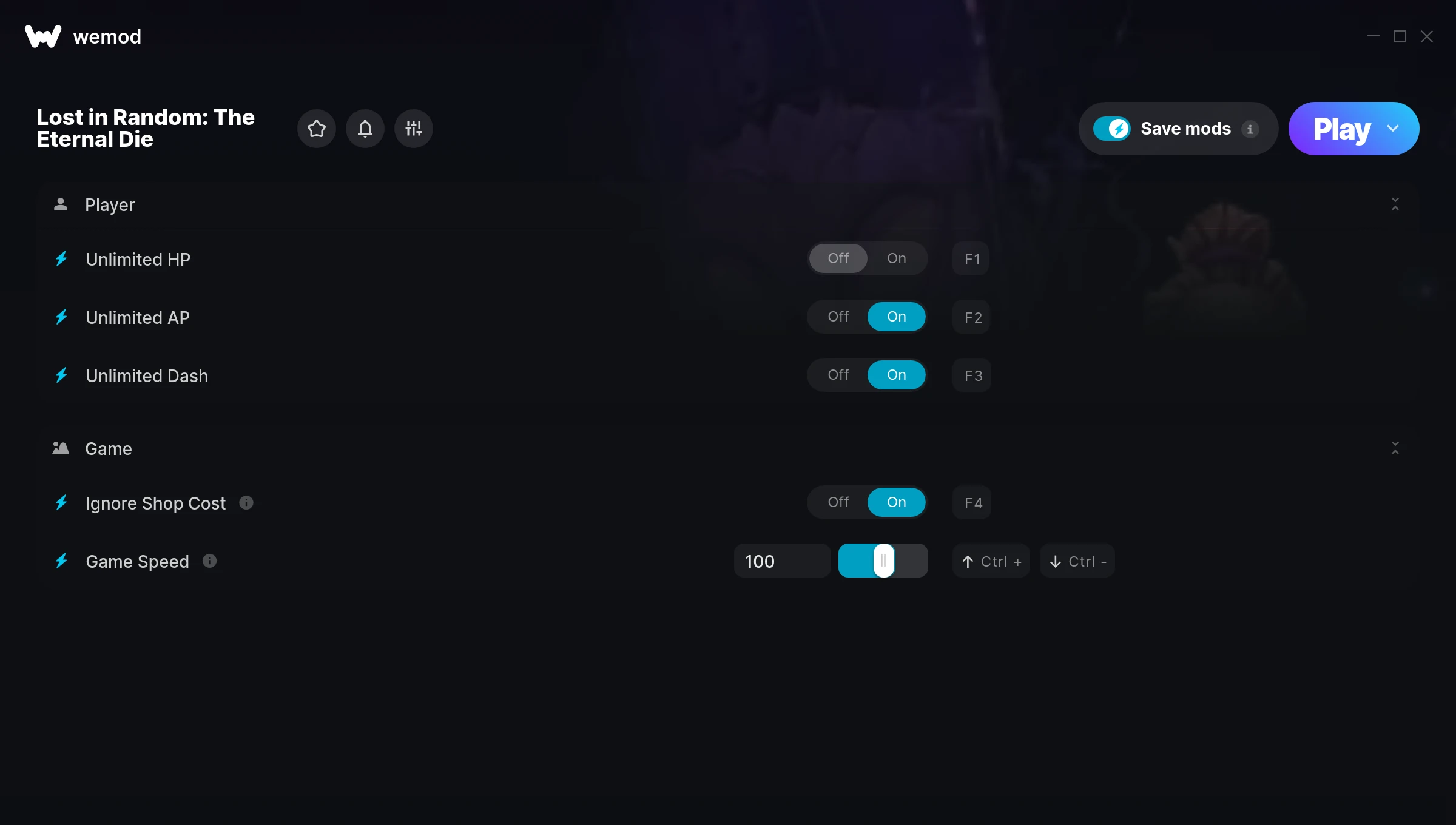
The Lost in Random: The Eternal Die Trainer gives you access to 5 cheats that let you play the game however you want. Struggling with a tough section? Want to skip the grind? Just want to mess around? This trainer has you covered.
Fair warning – some of these cheats will completely break the game. In the best way possible.
This role-playing (rpg) and adventure title has been around since 2025 and remains a popular pick for players looking to push their experience further.
This is an auto-updating trainer that keeps pace with every game patch automatically. No need to manually grab new versions after updates.
Some of the most popular cheats included in this trainer are Unlimited HP, Unlimited AP, Unlimited Dash, Ignore Shop Cost, and many more. These modifications let you customize difficulty, skip grinding, or simply experiment with the game in new ways.
Lost in Random: The Eternal Die Trainer Cheats
This trainer includes 5 cheats covering health, movement, time.
| # | Cheat | Effect |
|---|---|---|
| 1 | Unlimited HP | Remove all limits on your hp |
| 2 | Unlimited AP | Remove all limits on your ap |
| 3 | Unlimited Dash | Your dash never runs out or depletes |
| 4 | Ignore Shop Cost | Tweak the ignore shop cost mechanic to your advantage |
| 5 | Game Speed | Speed up or slow down the entire game to your liking |
What Can You Do With This Trainer?
Here are some of the standout cheats in this trainer – the ones that really change how you play:
- Unlimited HP – Remove all limits on your hp
- Unlimited AP – Remove all limits on your ap
- Unlimited Dash – Your dash never runs out or depletes
- Ignore Shop Cost – Tweak the ignore shop cost mechanic to your advantage
- Game Speed – Speed up or slow down the entire game to your liking
And that’s just scratching the surface. The full Lost in Random: The Eternal Die cheat list above has everything you need to play completely on your own terms.
Download Lost in Random: The Eternal Die Trainer
Download the latest version of this trainer for PC below.
| Version | Creator | Platform | Date Added | Download |
|---|---|---|---|---|
| Auto-Updating Version (Latest) | ColonelRVH | Xbox, Steam, PC Game Pass | 2026-01-10 | Download |
How to Use This Trainer
- Boot Up Lost in Random: The Eternal Die – Start the game like you normally would. Once you’re at the main menu or loaded into your save, you’re ready for the next step.
- Open the Trainer – Open the WeMod app and search for “Lost in Random: The Eternal Die”. Click Play to launch the overlay. WeMod will detect the game and enable all available cheats.
- Turn On Cheats – Pick the cheats you want from the WeMod overlay and switch them on. They kick in instantly and you can toggle them off anytime.
- Play and Enjoy – That’s it – jump back into the game and enjoy. You can toggle cheats on and off whenever you want. Half the fun is experimenting to find your perfect setup.
Tips & Known Issues
- Keep this trainer offline. Single-player only – any online or multiplayer use risks a permanent ban from the game.
- While trainers are safe to use, backing up your save file beforehand is always a smart precaution.
- If using Steam, consider disabling the Steam Overlay (Steam > Settings > In-Game) to avoid conflicts with the trainer.
- If cheats aren’t working, check for conflicting overlays. Discord, GeForce Experience, and similar tools can interfere.
- One of the perks of WeMod is automatic updates. The trainer syncs with game patches behind the scenes.
Frequently Asked Questions
Will the trainer work with the latest game version?
If you’re using the Auto-Updating Version, yes – it patches itself after every game update.
Do I need to restart the game after activating cheats?
Nope. Cheats kick in immediately while the game is running. Just toggle them on and off whenever you want.
How do I know which version to download?
This trainer auto-updates whenever the game is patched, so you always have the latest compatible version. Just download it once and you’re set.
How often is this trainer updated?
This trainer auto-updates shortly after each game patch, so it stays compatible without you having to do anything.
Does this trainer work with Xbox?
It does. The trainer is compatible with Xbox, Steam.
Is this trainer compatible with PC Game Pass?
Yes, this trainer works with the PC Game Pass version. Since the game is available through the Xbox app, the trainer hooks into it just like any other PC version.