
Marvel’s Avengers Trainer
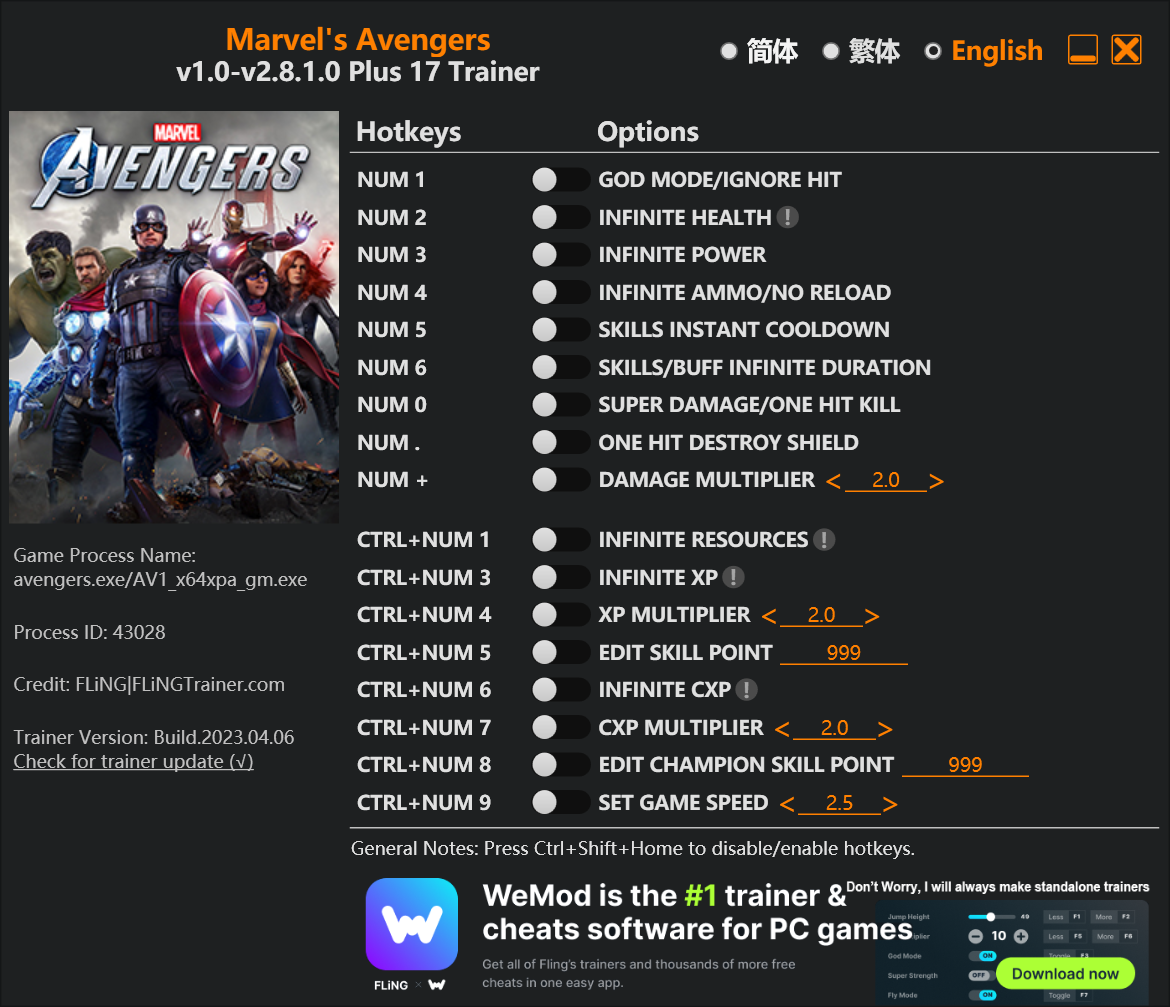
The Marvel’s Avengers Trainer gives you access to 16 cheats that let you play the game however you want. Struggling with a tough section? Want to skip the grind? Just want to mess around? This trainer has you covered.
God mode lets you take on anything the game throws at you without breaking a sweat. Boss fights become victory laps. These cheats let you get past the frustrating parts and actually enjoy the game at your own pace.
Pro tip: start with one or two cheats and see how it feels. Or turn them all on. Your call.
Out since 2020, this role-playing (rpg) and hack and slash/beat ’em up title is still going strong with players who want to shape the experience on their own terms.
Some of the most popular cheats included in this trainer are Num 1 – God Mode/Ignore Hit, Num 2 – Infinite Health, Num 4 – Infinite Ammo/No Reload, Num 0 – Super Damage/One Hit Kill, and many more. These modifications let you customize difficulty, skip grinding, or simply experiment with the game in new ways.
Marvel’s Avengers Trainer Cheats
This trainer includes 16 cheats covering health, ammo, resources, combat, movement.
| # | Cheat | Effect |
|---|---|---|
| 1 | Num 1 – God Mode/Ignore Hit | Become completely invincible – nothing in the game can hurt you |
| 2 | Num 2 – Infinite Health | Health that never drops – charge into anything without worry |
| 3 | Num 3 – Infinite Power | Never worry about running out of power again |
| 4 | Num 4 – Infinite Ammo/No Reload | Your ammo count never drops no matter how much you shoot |
| 5 | Num 5 – Skills Instant Cooldown | Get skills cooldown immediately with no waiting |
| 6 | Num 6 – Skills/BUFF Infinite Duration | Your skills/buff duration supply becomes endless |
| 7 | Num 0 – Super Damage/One Hit Kill | Drop any enemy with a single hit, no matter their health bar |
| 8 | Num + – Damage Multiplier | Hit harder – multiply the damage on every attack you land |
| 9 | Ctrl+Num 1 – Infinite Resources | Your resource stockpile never runs out |
| 10 | Ctrl+Num 3 – Infinite XP | Never worry about running out of xp again |
| 11 | Ctrl+Num 4 – XP Multiplier | Boost your xp earnings dramatically |
| 12 | Ctrl+Num 5 – Edit Skill Point | Set your skill point to any value you choose |
| 13 | Ctrl+Num 6 – Infinite CXP | Your cxp supply becomes endless |
| 14 | Ctrl+Num 7 – CXP Multiplier | Multiply your cxp gains by a huge amount |
| 15 | Ctrl+Num 8 – Edit Champion Skill Point | Manually adjust your champion skill point to whatever you need |
| 16 | Ctrl+Num 9 – Set Game Speed | Speed up or slow down the entire game to your liking |
What Can You Do With This Trainer?
Here are some of the standout cheats in this trainer – the ones that really change how you play:
- Num 1 – God Mode/Ignore Hit – Become completely invincible – nothing in the game can hurt you
- Num 2 – Infinite Health – Health that never drops – charge into anything without worry
- Num 3 – Infinite Power – Your power supply becomes endless
- Num 4 – Infinite Ammo/No Reload – Your ammo count never drops no matter how much you shoot
- Num 5 – Skills Instant Cooldown – Get skills cooldown immediately with no waiting
And that’s just scratching the surface. The full cheat list above has everything you need to play the game completely on your own terms.
Recommended Cheat Presets
Not sure which cheats to enable? Here are some recommended preset combinations for different playstyles:
Easy Mode
Turn the difficulty down to nothing. Perfect for enjoying the story, or for a second playthrough where you just want to feel unstoppable.
- Num 1 – God Mode/Ignore Hit
- Num 2 – Infinite Health
- Num 4 – Infinite Ammo/No Reload
- Num 0 – Super Damage/One Hit Kill
Farming Preset
Skip the grind entirely. Max out your loot, XP, and cash without spending hours farming the same enemies over and over.
- Ctrl+Num 1 – Infinite Resources
- Ctrl+Num 3 – Infinite XP
- Ctrl+Num 4 – XP Multiplier
- Ctrl+Num 5 – Edit Skill Point
- Ctrl+Num 7 – CXP Multiplier
Download Marvel’s Avengers Trainer
Download the latest version of this trainer for PC below.
| Version | Creator | Platform | Date Added | Download |
|---|---|---|---|---|
| Standalone Version | FLiNG | PC (Windows) | 2023-04-06 | Download |
How to Use This Trainer
- Run Marvel’s Avengers – Get the game running first – load a save or start fresh. The trainer won’t work unless the game is already open.
- Fire Up the Trainer – Launch the FLiNG .exe with Administrator privileges. The trainer window shows up with hotkey mappings for each cheat.
- Activate via Keyboard – The trainer window shows a hotkey next to each cheat. Press the listed key to turn a cheat on, and press it again to disable it.
- Play Your Way – That’s the full setup. Get back into Marvel’s Avengers and play on your own terms. Adjust cheats whenever the mood strikes.
Tips & Known Issues
- Trainers are designed for single-player use only. Using them online or in multiplayer will result in a ban.
- A quick save backup takes seconds and gives you peace of mind when experimenting with trainer cheats.
- If cheats aren’t activating, check that the trainer is running with Administrator rights.
- For the smoothest experience on Steam, switch off the Steam Overlay in your Steam settings before running the trainer.
Frequently Asked Questions
Can I get banned for using this trainer?
As long as you stick to single-player, you’re fine. Using cheats in multiplayer or online modes is a completely different story – don’t do it.
How do I use this trainer?
Download the trainer, run it alongside the game, and use the hotkeys to toggle cheats on and off. It really is that simple.
Will this trainer affect my save files?
Your save files are safe. Cheats only change values in RAM while you play. Just be aware that anything you accomplish with cheats active gets saved like normal progress.
Do I need to restart the game after activating cheats?
Nope. Cheats kick in immediately while the game is running. Just toggle them on and off whenever you want.
How do I know which version to download?
Most people should grab the Auto-Updating Version since it takes care of patches automatically. The Standalone is there if you need a fixed, offline-friendly build.



