MechWarrior 5: Clans Trainer
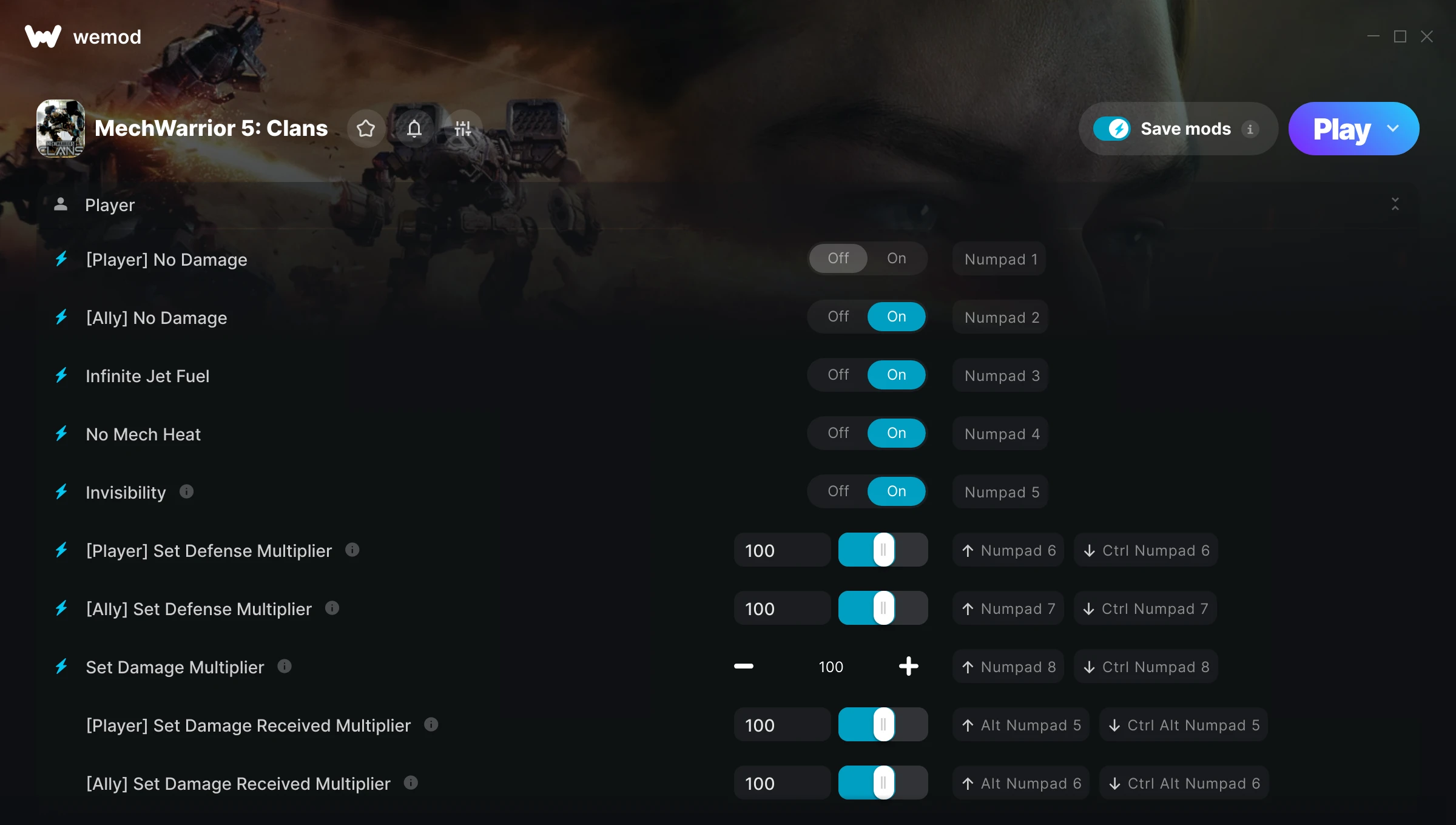
The MechWarrior 5: Clans Trainer gives you access to 16 cheats that let you play the game however you want. Struggling with a tough section? Want to skip the grind? Just want to mess around? This trainer has you covered.
With infinite ammo, every weapon becomes viable and you never have to hold back. These cheats let you get past the frustrating parts and actually enjoy the game at your own pace.
You can play it straight or go full chaos mode. No judgement either way.
Players have been diving into MechWarrior 5: Clans since 2024, making it one of the more enduring shooter and simulator titles out there.
The best part? This PC trainer auto-updates whenever the game is patched. Zero effort on your part – it stays compatible in the background so you can just play.
Some of the most popular cheats included in this trainer are Infinite Ammo, [Player] No Damage, [Ally] No Damage, Infinite Jet Fuel, and many more. These modifications let you customize difficulty, skip grinding, or simply experiment with the game in new ways.
MechWarrior 5: Clans Trainer Cheats
This trainer includes 16 cheats covering ammo, combat, movement, defense, cooldowns.
| # | Cheat | Effect |
|---|---|---|
| 1 | [Player] No Damage | Turn off [player] damage entirely for easier gameplay |
| 2 | [Ally] No Damage | Turn off [ally] damage entirely for easier gameplay |
| 3 | Infinite Jet Fuel | Never worry about running out of jet fuel again |
| 4 | No Mech Heat | Completely disable mech heat |
| 5 | Invisibility | Tweak the invisibility mechanic to your advantage |
| 6 | [Player] Set Defense Multiplier | Shrug off more damage with massively boosted defense |
| 7 | [Ally] Set Defense Multiplier | Your [ally] defense, your rules |
| 8 | Set Damage Multiplier | Hit harder – multiply the damage on every attack you land |
| 9 | [Player] Set Damage Received Multiplier | Adjust [player] damage received to whatever feels right |
| 10 | [Ally] Set Damage Received Multiplier | Choose exactly how much [ally] damage received you want |
| 11 | Infinite Ammo | Your ammo count never drops no matter how much you shoot |
| 12 | No Weapon Cooldown | Turn off weapon cooldown entirely for easier gameplay |
| 13 | Massive Damage | Tweak the massive damage mechanic to your advantage |
| 14 | Instant Acceleration | Get acceleration immediately with no waiting |
| 15 | Set Movement Speed Multiplier | Manually set your movement speed to any number |
| 16 | Set Turn Speed Multiplier | Choose exactly how much turn speed you want |
What Can You Do With This Trainer?
Here are some of the standout cheats in this trainer – the ones that really change how you play:
- [Player] No Damage – Completely disable [player] damage
- [Ally] No Damage – Completely disable [ally] damage
- Infinite Jet Fuel – Never worry about running out of jet fuel again
- No Mech Heat – Completely disable mech heat
- Invisibility – Tweak the invisibility mechanic to your advantage
And that’s just scratching the surface. The full MechWarrior 5: Clans cheat list above has everything you need to play completely on your own terms.
Recommended Cheat Presets
Not sure which cheats to enable? Here are some recommended preset combinations for different playstyles:
Combat Specialist
Stack every combat cheat and dominate every fight. Fair? Not even close. Fun? Absolutely.
- Set Damage Multiplier
- Infinite Ammo
Download MechWarrior 5: Clans Trainer
Download the latest version of this trainer for PC below.
| Version | Creator | Platform | Date Added | Download |
|---|---|---|---|---|
| Auto-Updating Version (Latest) | GreenHouse | Steam, Xbox | 2026-01-29 | Download |
How to Use This Trainer
- Begin With MechWarrior 5: Clans – Open the game first and let it fully load. You’ll activate the trainer in the next step once the game is up.
- Start the Trainer – Open WeMod, type “MechWarrior 5: Clans” in the search bar, and click Play. The overlay pops up in-game and you’re ready to go.
- Enable the Cheats You Want – Use the WeMod overlay to enable any combination of cheats. Everything activates in real-time while the game is running.
- Play Your Way – That’s the full setup. Get back into MechWarrior 5: Clans and play on your own terms. Adjust cheats whenever the mood strikes.
Tips & Known Issues
- Keep this trainer offline. Single-player only – any online or multiplayer use risks a permanent ban from the game.
- Your antivirus might quarantine the trainer file. This is a known false positive – whitelist the trainer in your security software.
- Multiple overlays running at once can cause issues. If the trainer isn’t responding, close any unnecessary overlay software.
- Steam’s in-game overlay sometimes interferes with trainers. If cheats aren’t activating, disable it in Steam > Settings > In-Game.
- WeMod auto-updates the trainer after game patches, so you never have to manually download a new version.
Frequently Asked Questions
What should I do if the trainer stops working after an update?
If a game patch breaks things, the auto-updating trainer will fix itself automatically – usually within a day or two.
Can I customise how much health or money I get?
Some cheats include an edit mode where you can set a specific value rather than just maxing things out. Great for keeping things balanced if you want.
Will the trainer work with the latest game version?
The auto-updating trainer stays compatible with new patches on its own. If you grabbed the Standalone version, you might need to check for a newer release after big updates.
How do I use this trainer?
Grab the download, launch the game, then fire up the trainer. Toggle cheats with the hotkeys or the overlay – done.
Is this trainer compatible with mods?
Usually, yes. Trainers and mods can run side by side without issues. The only time you might hit a snag is if a mod changes the same values the trainer is targeting.
Do I need to restart the game after activating cheats?
No. Cheats are live the instant you toggle them. You can switch them on and off mid-gameplay without interruption.
Does this trainer work with Steam?
Yes, it works with Steam, Xbox. Check the download table above for specific platform details.