Metal Thunder Trainer
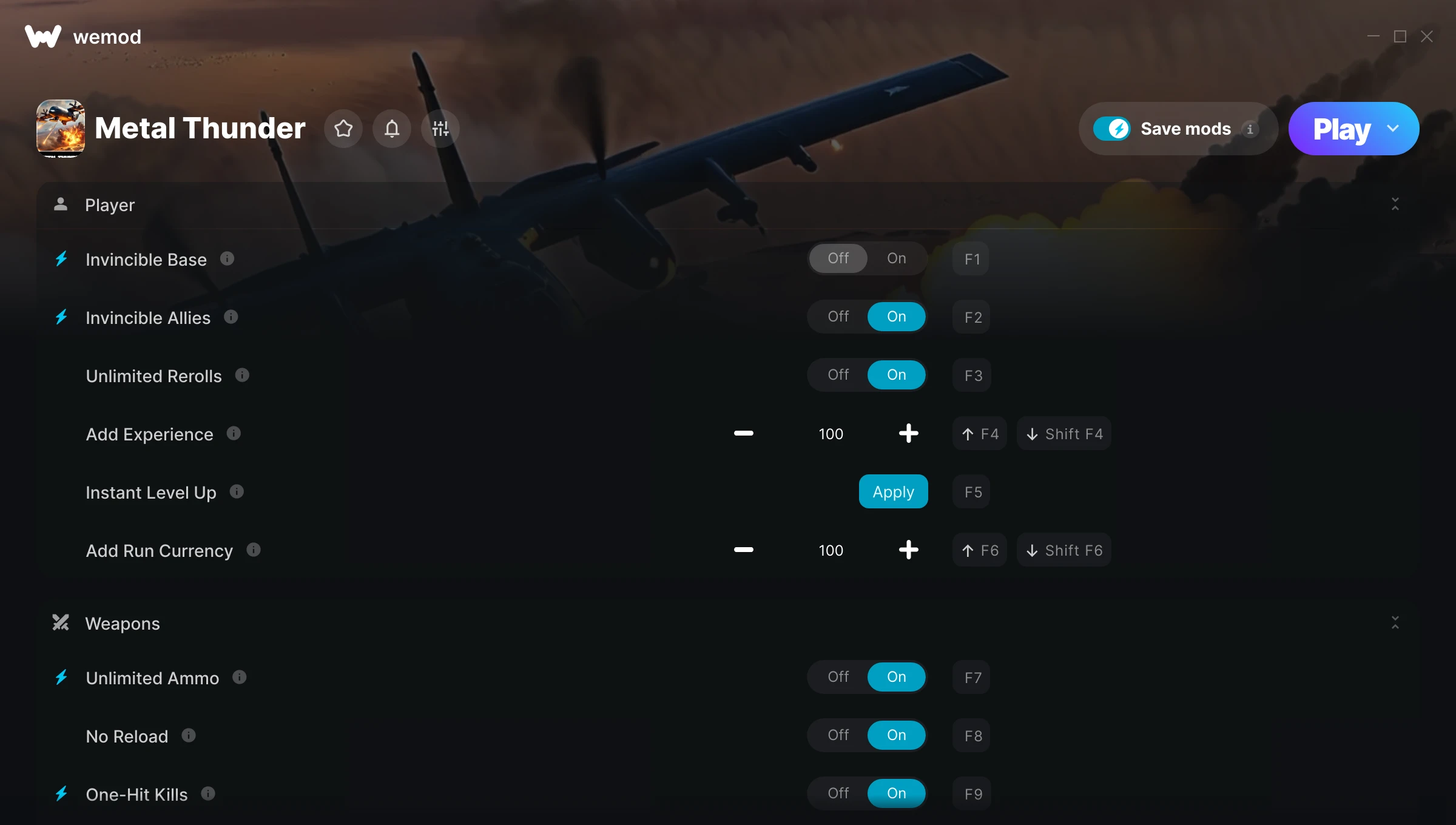
The Metal Thunder Trainer gives you access to 15 cheats that let you play the game however you want. Struggling with a tough section? Want to skip the grind? Just want to mess around? This trainer has you covered.
No reload means nonstop firepower. Seriously, it changes how you approach every fight. These cheats let you get past the frustrating parts and actually enjoy the game at your own pace.
Load up the trainer, pick your cheats, and watch the game bend to your will. It never gets old.
Players have been diving into Metal Thunder since 2024, making it one of the more enduring shooter and simulator titles out there.
Once you’ve got this trainer installed, it takes care of itself. Every time the game gets a patch, the trainer updates automatically so your cheats keep working.
Some of the most popular cheats included in this trainer are Unlimited Ammo, No Reload, Freeze Enemies, Invincible Base, and many more. These modifications let you customize difficulty, skip grinding, or simply experiment with the game in new ways.
Metal Thunder Trainer Cheats
This trainer includes 15 cheats covering health, ammo, resources, combat, movement.
| # | Cheat | Effect |
|---|---|---|
| 1 | Invincible Base | Take zero damage from anything, period |
| 2 | Invincible Allies | Gives you full control over your invincible allies |
| 3 | Unlimited Rerolls | Remove all limits on your rerolls |
| 4 | Add Experience | Give yourself more experience on demand |
| 5 | Instant Level Up | Get level up immediately with no waiting |
| 6 | Add Run Currency | Add extra run currency whenever you need it |
| 7 | Unlimited Ammo | Fire away without ever worrying about running dry |
| 8 | No Reload | Skip reload animations entirely and keep firing nonstop |
| 9 | One-Hit Kills | Tweak the one hit kills mechanic to your advantage |
| 10 | Damage Multiplier | Hit harder – multiply the damage on every attack you land |
| 11 | Blast Radius Multiplier | Boost your blast radius earnings dramatically |
| 12 | Freeze Enemies | Lock every enemy in place – they can’t move or fight back |
| 13 | Kill All Enemies | Tweak the kill all enemies mechanic to your advantage |
| 14 | Freeze Mission Timer | Keep your mission timer frozen at its current value |
| 15 | Game Speed | Speed up or slow down the entire game to your liking |
What Can You Do With This Trainer?
Here are some of the standout cheats in this trainer – the ones that really change how you play:
- Invincible Base – Take zero damage from anything, period
- Invincible Allies – Tweak the invincible allies mechanic to your advantage
- Unlimited Rerolls – Your rerolls never runs out or depletes
- Add Experience – Add extra experience whenever you need it
- Instant Level Up – Get level up immediately with no waiting
And that’s just scratching the surface. The full Metal Thunder cheat list above has everything you need to play completely on your own terms.
Recommended Cheat Presets
Not sure which cheats to enable? Here are some recommended preset combinations for different playstyles:
Easy Mode
Turn the difficulty down to nothing. Perfect for enjoying the story, or for a second playthrough where you just want to feel unstoppable.
- Invincible Base
- Invincible Allies
- Unlimited Ammo
- No Reload
Farming Preset
Skip the grind entirely. Max out your loot, XP, and cash without spending hours farming the same enemies over and over.
- Add Experience
- Add Run Currency
Combat Specialist
Stack every combat cheat and dominate every fight. Fair? Not even close. Fun? Absolutely.
- Damage Multiplier
- Freeze Enemies
Download Metal Thunder Trainer
Download the latest version of this trainer for PC below.
| Version | Creator | Platform | Date Added | Download |
|---|---|---|---|---|
| Auto-Updating Version (Latest) | Technox | Steam | 2026-09-05 | Download |
How to Use This Trainer
- Get Metal Thunder Running – Launch the game through your usual platform. Wait until you’re past any intro screens and into the menu or gameplay.
- Activate WeMod – Run the WeMod app, locate “Metal Thunder”, and hit Play. WeMod attaches to the game and shows you the full cheat list in the overlay.
- Flip On the Cheats – In the WeMod overlay, toggle the cheats you’re interested in. They apply immediately to your game session.
- Game On – You’re set. Head back into Metal Thunder and have fun. Remember, you can toggle cheats at any time – find the combination that works best for you.
Tips & Known Issues
- Keep this trainer offline. Single-player only – any online or multiplayer use risks a permanent ban from the game.
- Running the trainer as Admin avoids most permission-related issues. Right-click and choose Run as Administrator.
- Some antivirus software may flag the trainer as a false positive. You may need to add an exception for it.
- If using Steam, consider disabling the Steam Overlay (Steam > Settings > In-Game) to avoid conflicts with the trainer.
- The WeMod version updates itself automatically after each game patch. No action needed on your end.
Frequently Asked Questions
Will this trainer affect my save files?
It won’t corrupt your saves. The trainer works in memory only – but keep in mind that any progress made with cheats enabled will be saved normally.
How do I use this trainer?
Download the trainer, run it alongside the game, and use the hotkeys to toggle cheats on and off. It really is that simple.
Will the trainer work with the latest game version?
The auto-updating trainer stays compatible with new patches on its own. If you grabbed the Standalone version, you might need to check for a newer release after big updates.
Can I get banned for using this trainer?
Trainers are for single-player only. Seriously, do not try these in online or multiplayer modes – that is a fast track to a ban.
Is this trainer compatible with mods?
In most cases they work fine together. Conflicts only happen when a mod alters the exact same memory values the trainer is trying to modify.
Can I use multiple cheats at the same time?
Absolutely. Stack as many as you want. God mode plus unlimited ammo plus one-hit kills? Go for it. That’s half the fun.
Does this trainer work with Steam?
It does. This trainer is built to work with the Steam version.