
Middle-earth: Shadow of War (Windows Store) Trainer
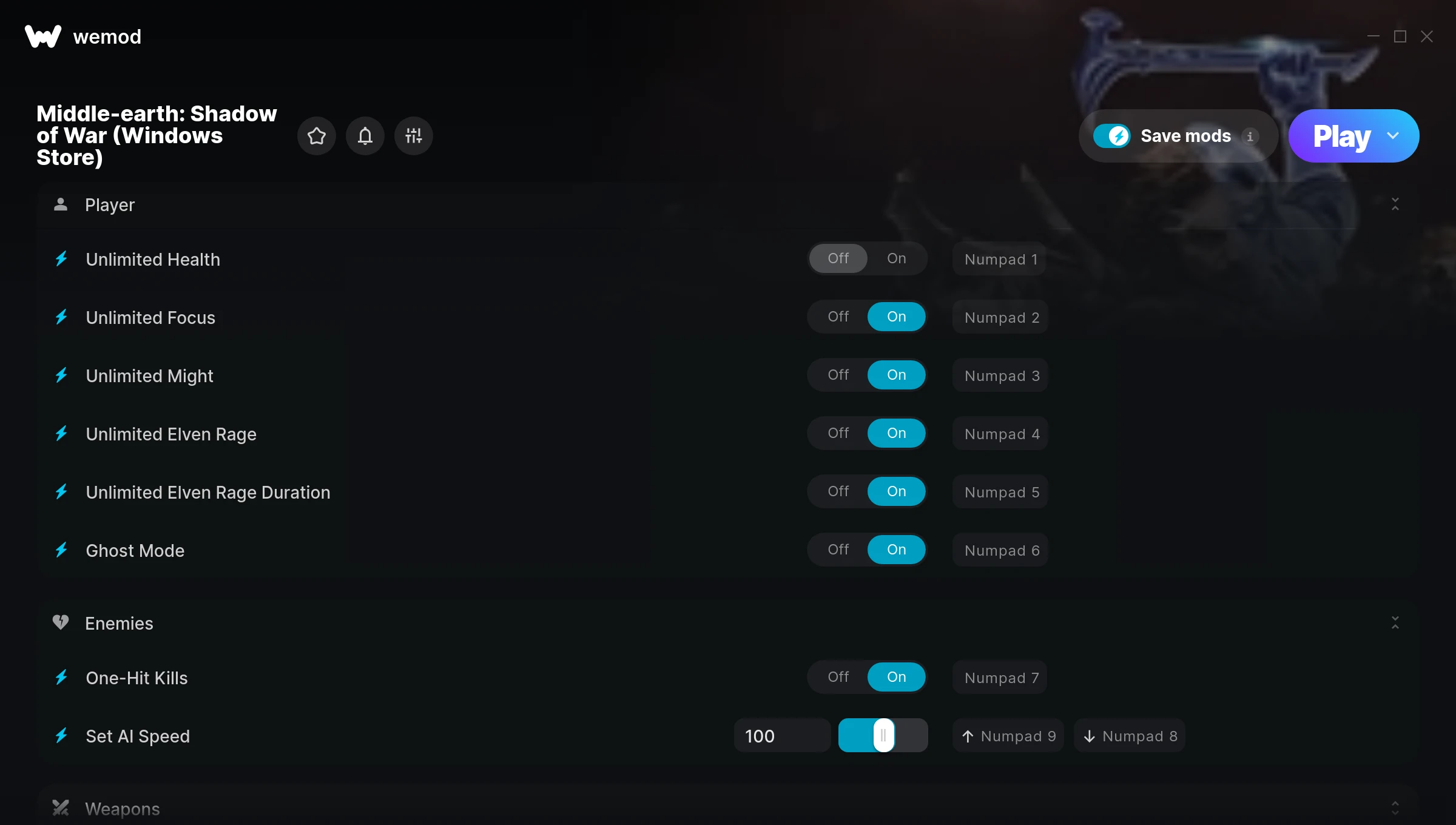
The Middle-earth: Shadow of War (Windows Store) Trainer gives you access to 14 cheats that let you play the game however you want. Struggling with a tough section? Want to skip the grind? Just want to mess around? This trainer has you covered.
There’s a reason trainers have been around since the DOS era. They just make games more fun.
Originally a 2014 release, Middle-earth: Shadow of War (Windows Store) carved out a solid spot in the role-playing (rpg) and hack and slash/beat ’em up space and players keep coming back.
This is an auto-updating trainer that keeps pace with every game patch automatically. No need to manually grab new versions after updates.
Some of the most popular cheats included in this trainer are Unlimited Health, Unlimited Focus, Unlimited Might, Unlimited Elven Rage, and many more. These modifications let you customize difficulty, skip grinding, or simply experiment with the game in new ways.
Middle-earth: Shadow of War (Windows Store) Trainer Cheats
This trainer includes 14 cheats covering health, resources, movement, experience, time.
| # | Cheat | Effect |
|---|---|---|
| 1 | Unlimited Health | Your health stays maxed out no matter what hits you |
| 2 | Unlimited Focus | Use your focus as much as you want without limits |
| 3 | Unlimited Might | Your might never runs out or depletes |
| 4 | Unlimited Elven Rage | Remove all limits on your elven rage |
| 5 | Unlimited Elven Rage Duration | Remove all limits on your elven rage duration |
| 6 | Ghost Mode | Tweak the ghost mode mechanic to your advantage |
| 7 | One-Hit Kills | Tweak the one hit kills mechanic to your advantage |
| 8 | Set AI Speed | Pick your own value for ai speed |
| 9 | Unlimited Arrows | Your arrows never runs out or depletes |
| 10 | Unlimited Timer | Use your timer as much as you want without limits |
| 11 | Add 5K Silver Coins | Give yourself more 5k silver coins on demand |
| 12 | Unlock Skills | Instantly gain access to skills |
| 13 | Add 10 Skill Points | Give yourself more 10 skill points on demand |
| 14 | Mega XP | Supercharge your xp way beyond normal limits |
What Can You Do With This Trainer?
Here are some of the standout cheats in this trainer – the ones that really change how you play:
- Unlimited Health – Your health stays maxed out no matter what hits you
- Unlimited Focus – Use your focus as much as you want without limits
- Unlimited Might – Use your might as much as you want without limits
- Unlimited Elven Rage – Remove all limits on your elven rage
- Unlimited Elven Rage Duration – Your elven rage duration never runs out or depletes
And that’s just scratching the surface. The full Middle-earth: Shadow of War (Windows Store) cheat list above has everything you need to play completely on your own terms.
Recommended Cheat Presets
Not sure which cheats to enable? Here are some recommended preset combinations for different playstyles:
Farming Preset
Skip the grind entirely. Max out your loot, XP, and cash without spending hours farming the same enemies over and over.
- Add 5K Silver Coins
- Add 10 Skill Points
- Mega XP
Download Middle-earth: Shadow of War (Windows Store) Trainer
Download the latest version of this trainer for PC below.
| Version | Creator | Platform | Date Added | Download |
|---|---|---|---|---|
| Auto-Updating Version (Latest) | STiNGERR | Xbox | 2026-01-10 | Download |
How to Use This Trainer
- Get Into Middle-earth: Shadow of War (Windows Store) – Launch the game, get past the splash screens, and load into gameplay. Once you can see your character or the main menu, move to step 2.
- Launch WeMod – Fire up the WeMod app and search for “Middle-earth: Shadow of War (Windows Store)”. Hit Play and the overlay will appear over your game with all cheats ready to toggle.
- Switch On Your Cheats – Browse the cheat list in the WeMod overlay and toggle on whatever you want. Effects are instant and reversible.
- Play and Enjoy – That’s it – jump back into the game and enjoy. You can toggle cheats on and off whenever you want. Half the fun is experimenting to find your perfect setup.
Tips & Known Issues
- Never activate this trainer during online play. It’s built for single-player only and multiplayer anti-cheat will catch it.
- This trainer only works on PC. Console versions and cloud gaming platforms are not supported.
- Steam’s in-game overlay sometimes interferes with trainers. If cheats aren’t activating, disable it in Steam > Settings > In-Game.
- Overlay apps from Discord, NVIDIA, or Razer can occasionally clash with trainer hooks. Disable them as a troubleshooting step.
- WeMod auto-updates the trainer after game patches, so you never have to manually download a new version.
Frequently Asked Questions
Do I need to restart the game after activating cheats?
Not at all. Everything applies in real-time. Turn cheats on, turn them off, no restarts required at any point.
Is this trainer free to download?
Free as it gets. The download links are right above this section, pick whichever version suits you.
What should I do if the trainer stops working after an update?
If a game patch breaks things, the auto-updating trainer will fix itself automatically – usually within a day or two.
Will this trainer affect my save files?
Your save files are safe. Cheats only change values in RAM while you play. Just be aware that anything you accomplish with cheats active gets saved like normal progress.
Is this trainer compatible with mods?
Usually, yes. Trainers and mods can run side by side without issues. The only time you might hit a snag is if a mod changes the same values the trainer is targeting.
How do I use this trainer?
Grab the download, launch the game, then fire up the trainer. Toggle cheats with the hotkeys or the overlay – done.
Does this trainer work with Xbox?
Fully compatible with Xbox. Just launch the game through Xbox and run the trainer alongside it.



