Not Tonight Trainer
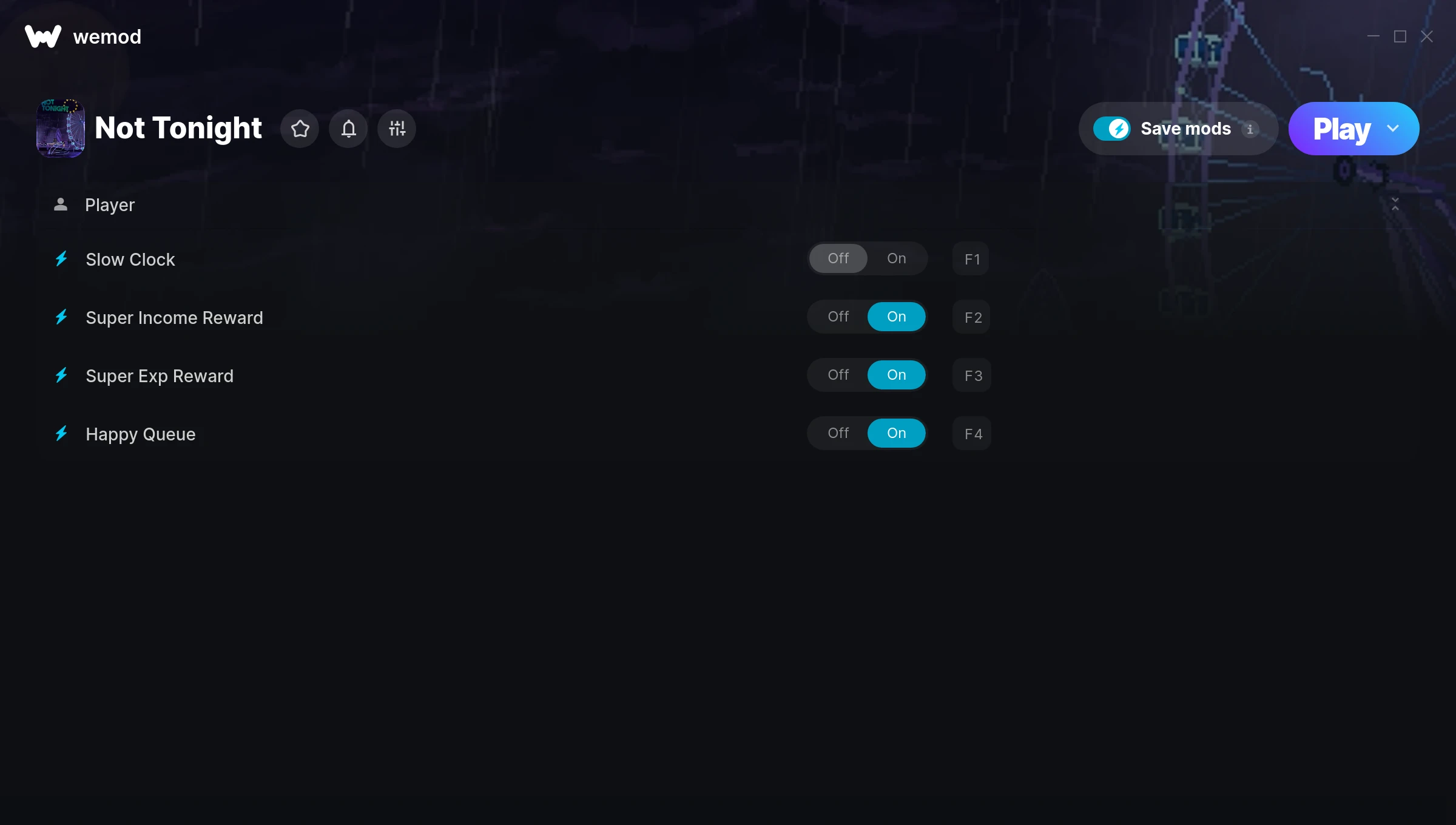
The Not Tonight Trainer gives you access to 4 cheats that let you play the game however you want. Struggling with a tough section? Want to skip the grind? Just want to mess around? This trainer has you covered.
Fair warning – some of these cheats will completely break the game. In the best way possible.
A puzzle and role-playing (rpg) title that first dropped in 2018, Not Tonight still draws players who want to tweak the experience to their liking.
Once you’ve got this trainer installed, it takes care of itself. Every time the game gets a patch, the trainer updates automatically so your cheats keep working.
Not Tonight Trainer Cheats
This trainer includes 4 cheats covering experience.
| # | Cheat | Effect |
|---|---|---|
| 1 | Slow Clock | Tweak the slow clock mechanic to your advantage |
| 2 | Super Income Reward | Crank your income reward up to ridiculous levels |
| 3 | Super Exp Reward | Massively boost your exp reward beyond normal limits |
| 4 | Happy Queue | Tweak the happy queue mechanic to your advantage |
What Can You Do With This Trainer?
Here are some of the standout cheats in this trainer – the ones that really change how you play:
- Slow Clock – Tweak the slow clock mechanic to your advantage
- Super Income Reward – Massively boost your income reward beyond normal limits
- Super Exp Reward – Crank your exp reward up to ridiculous levels
- Happy Queue – Tweak the happy queue mechanic to your advantage
And that’s just scratching the surface. The full Not Tonight cheat list above has everything you need to play completely on your own terms.
Download Not Tonight Trainer
Download the latest version of this trainer for PC below.
| Version | Creator | Platform | Date Added | Download |
|---|---|---|---|---|
| Auto-Updating Version (Latest) | MrAntiFun | Steam | 2025-10-11 | Download |
How to Use This Trainer
- Boot Up Not Tonight – Start the game like you normally would. Once you’re at the main menu or loaded into your save, you’re ready for the next step.
- Connect WeMod – Launch the WeMod application and find “Not Tonight” in the library. Press Play and WeMod will hook into the running game automatically.
- Activate Cheats – Toggle the cheats you want using the WeMod overlay or press the assigned hotkeys. Cheats activate in real-time while you play.
- Get Back to the Game – Everything is set up. Continue playing Not Tonight with your chosen cheats active. Experiment freely – you can change things at any time.
Tips & Known Issues
- This trainer is strictly for single-player gameplay. Anti-cheat software in online modes will flag and ban your account.
- If cheats aren’t activating, check that the trainer is running with Administrator rights.
- A quick save backup takes seconds and gives you peace of mind when experimenting with trainer cheats.
- Steam’s in-game overlay sometimes interferes with trainers. If cheats aren’t activating, disable it in Steam > Settings > In-Game.
- The WeMod version updates itself automatically after each game patch. No action needed on your end.
Frequently Asked Questions
Will this trainer affect my save files?
It won’t corrupt your saves. The trainer works in memory only – but keep in mind that any progress made with cheats enabled will be saved normally.
How do I know which version to download?
This trainer auto-updates whenever the game is patched, so you always have the latest compatible version. Just download it once and you’re set.
Can I use multiple cheats at the same time?
Yes – enable as many as you like simultaneously. Combining cheats is where things get really fun.
Is this trainer free to download?
It is. No hidden fees, no sign-up walls – just download it from the links above and start playing.
Can I customise how much health or money I get?
Certain cheats let you choose exact amounts instead of just toggling unlimited. Check for any ‘set’ or ‘edit’ options in the cheat list.
Do I need to restart the game after activating cheats?
Not at all. Everything applies in real-time. Turn cheats on, turn them off, no restarts required at any point.
Does this trainer work with Steam?
It does. This trainer is built to work with the Steam version.