Oddsparks: An Automation Adventure Trainer
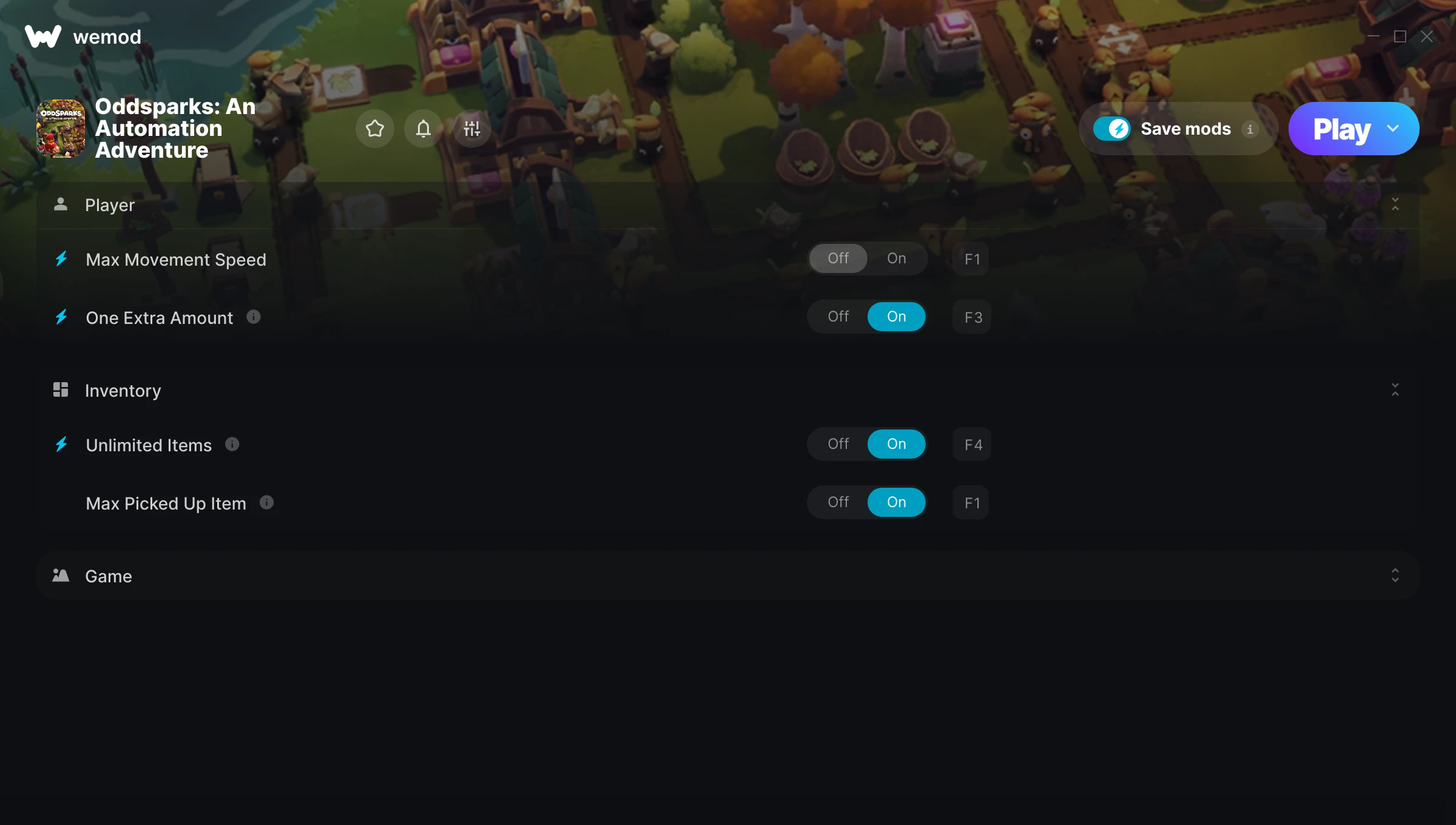
The Oddsparks: An Automation Adventure Trainer gives you access to 13 cheats that let you play the game however you want. Struggling with a tough section? Want to skip the grind? Just want to mess around? This trainer has you covered.
Fair warning – some of these cheats will completely break the game. In the best way possible.
Oddsparks: An Automation Adventure first launched in 2025 as a simulator and strategy title and still has a strong community of players today.
The best part? This PC trainer auto-updates whenever the game is patched. Zero effort on your part – it stays compatible in the background so you can just play.
Some of the most popular cheats included in this trainer are Max Movement Speed, Walk Movement Speed, One Extra Amount, Unlimited Items, and many more. These modifications let you customize difficulty, skip grinding, or simply experiment with the game in new ways.
Oddsparks: An Automation Adventure Trainer Cheats
This trainer includes 13 cheats covering movement, crafting, inventory, time.
| # | Cheat | Effect |
|---|---|---|
| 1 | Max Movement Speed | Set your movement speed to the absolute maximum |
| 2 | Walk Movement Speed | Tweak the walk movement speed mechanic to your advantage |
| 3 | One Extra Amount | Tweak the one extra amount mechanic to your advantage |
| 4 | Unlimited Items | Use items freely without your inventory running out |
| 5 | Max Picked Up Item | Instantly push your picked up item to the highest value |
| 6 | Game Speed | Speed up or slow down the entire game to your liking |
| 7 | Auto-Complete Craft | Tweak the auto complete craft mechanic to your advantage |
| 8 | Faster Craft Progress | Tweak the faster craft progress mechanic to your advantage |
| 9 | High Res Screenshot | Tweak the high res screenshot mechanic to your advantage |
| 10 | Skip Dialogue | Tweak the skip dialogue mechanic to your advantage |
| 11 | All Workbench Are Old | Tweak the all workbench are old mechanic to your advantage |
| 12 | Crafting Speed | Tweak the crafting speed mechanic to your advantage |
| 13 | Lightning Flash | Tweak the lightning flash mechanic to your advantage |
What Can You Do With This Trainer?
Here are some of the standout cheats in this trainer – the ones that really change how you play:
- Max Movement Speed – Max out your movement speed in one go
- Walk Movement Speed – Tweak the walk movement speed mechanic to your advantage
- One Extra Amount – Tweak the one extra amount mechanic to your advantage
- Unlimited Items – Use items freely without your inventory running out
- Max Picked Up Item – Set your picked up item to the absolute maximum
And that’s just scratching the surface. The full Oddsparks: An Automation Adventure cheat list above has everything you need to play completely on your own terms.
Download Oddsparks: An Automation Adventure Trainer
Download the latest version of this trainer for PC below.
| Version | Creator | Platform | Date Added | Download |
|---|---|---|---|---|
| Auto-Updating Version (Latest) | Switchyyyy | Steam | 2025-12-12 | Download |
How to Use This Trainer
- Boot Up Oddsparks: An Automation Adventure – Start the game like you normally would. Once you’re at the main menu or loaded into your save, you’re ready for the next step.
- Start the Trainer – Open WeMod, type “Oddsparks: An Automation Adventure” in the search bar, and click Play. The overlay pops up in-game and you’re ready to go.
- Switch On Your Cheats – Browse the cheat list in the WeMod overlay and toggle on whatever you want. Effects are instant and reversible.
- Have Fun – Done! Get back to playing and enjoy the ride. Mix and match cheats whenever you want – there’s no wrong way to use them.
Tips & Known Issues
- This trainer is strictly for single-player gameplay. Anti-cheat software in online modes will flag and ban your account.
- Steam users may want to turn off the Steam Overlay to prevent it from interfering with the trainer.
- Overlay apps from Discord, NVIDIA, or Razer can occasionally clash with trainer hooks. Disable them as a troubleshooting step.
- This trainer only works on PC. Console versions and cloud gaming platforms are not supported.
- WeMod handles version compatibility automatically. When the game updates, the trainer follows shortly after.
Frequently Asked Questions
Will the trainer work with the latest game version?
If you’re using the Auto-Updating Version, yes – it patches itself after every game update.
How often is this trainer updated?
This trainer auto-updates shortly after each game patch, so it stays compatible without you having to do anything.
How do I know which version to download?
This trainer auto-updates whenever the game is patched, so you always have the latest compatible version. Just download it once and you’re set.
Can I get banned for using this trainer?
Not in single-player – that’s what trainers are designed for. Never use them in online or multiplayer though, that will get you banned.
Does this trainer work with Steam?
Fully compatible with Steam. Just launch the game through Steam and run the trainer alongside it.