Outcast – A New Beginning Trainer
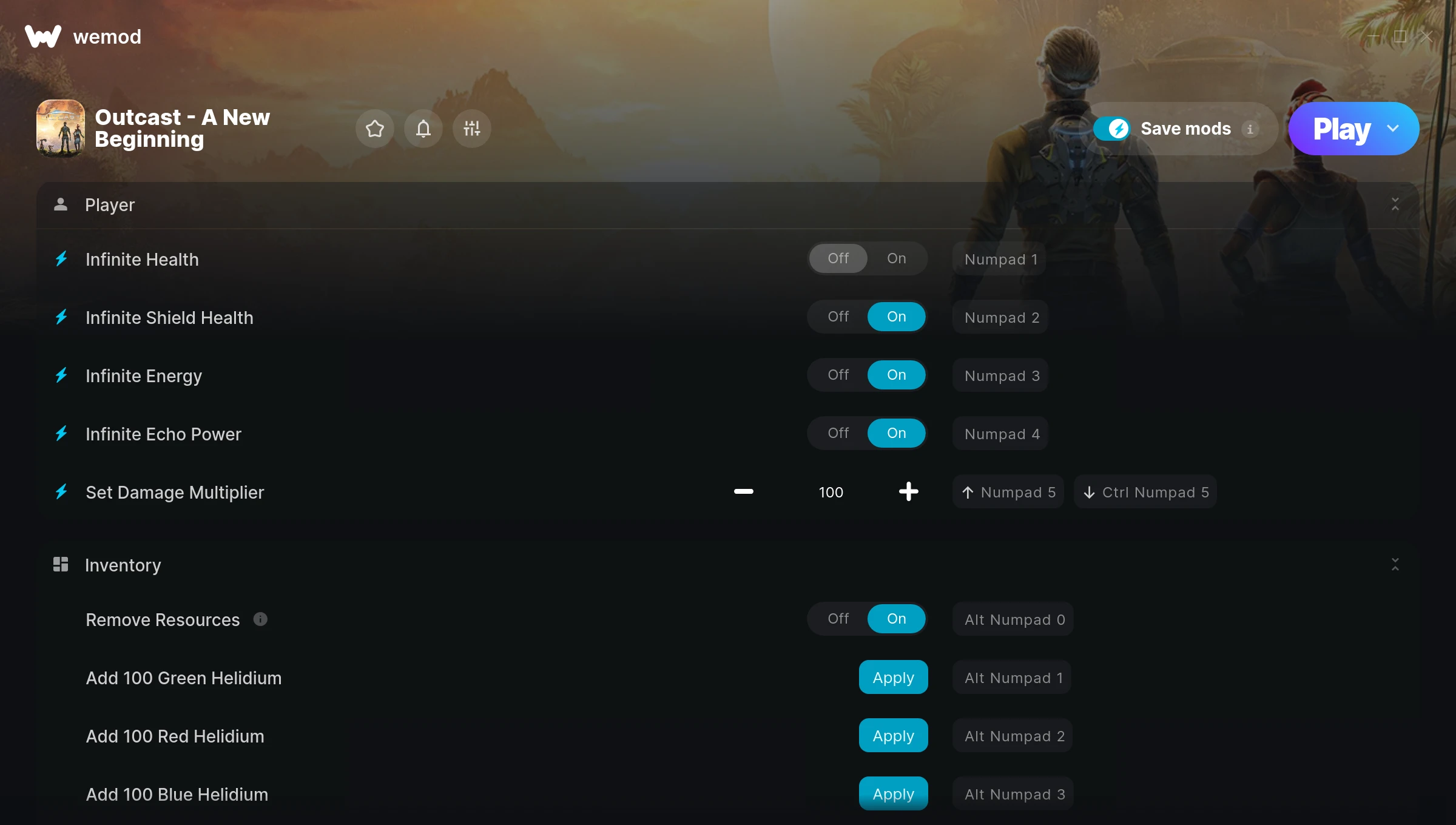
The Outcast – A New Beginning Trainer gives you access to 21 cheats that let you play the game however you want. Struggling with a tough section? Want to skip the grind? Just want to mess around? This trainer has you covered.
Infinite health means you can charge headfirst into anything without consequences. It’s as liberating as it sounds. These cheats let you get past the frustrating parts and actually enjoy the game at your own pace.
First playthrough? Maybe hold off. Second playthrough? Go nuts.
Outcast – A New Beginning first launched in 2024 as a shooter and role-playing (rpg) title and still has a strong community of players today.
This trainer is auto-updating – it patches itself every time the game gets an update, so you never have to hunt for a new download. Just install it once and you’re set.
Some of the most popular cheats included in this trainer are Infinite Health, Unlimited Ammo, Infinite Shield Health, Infinite Energy, and many more. These modifications let you customize difficulty, skip grinding, or simply experiment with the game in new ways.
Outcast – A New Beginning Trainer Cheats
This trainer includes 21 cheats covering health, ammo, resources, combat, movement.
| # | Cheat | Effect |
|---|---|---|
| 1 | Infinite Health | Health that never drops – charge into anything without worry |
| 2 | Infinite Shield Health | Bottomless shield health – it never runs dry |
| 3 | Infinite Energy | Bottomless energy – it never runs dry |
| 4 | Infinite Echo Power | Your echo power supply becomes endless |
| 5 | Set Damage Multiplier | Hit harder – multiply the damage on every attack you land |
| 6 | Remove Resources | Tweak the remove resources mechanic to your advantage |
| 7 | Add 100 Green Helidium | Add extra 100 green helidium whenever you need it |
| 8 | Add 100 Red Helidium | Add extra 100 red helidium whenever you need it |
| 9 | Add 100 Blue Helidium | Add extra 100 blue helidium whenever you need it |
| 10 | Add 100 Nano-Cells | Add extra 100 nano-cells whenever you need it |
| 11 | Add 100 Macro-Cells | Add extra 100 macro-cells whenever you need it |
| 12 | Add 100 Dark Helidium | Give yourself more 100 dark helidium on demand |
| 13 | Add 100 Zorkins | Give yourself more 100 zorkins on demand |
| 14 | Unlimited Ammo | Fire away without ever worrying about running dry |
| 15 | No Spread | Every bullet goes exactly where you aim it |
| 16 | No Recoil | Eliminate all weapon recoil for laser-accurate shots |
| 17 | No Overheating | Remove overheating from the equation |
| 18 | Set Fire Rate Multiplier | Adjust fire rate to whatever feels right |
| 19 | One-Hit Kills | Tweak the one hit kills mechanic to your advantage |
| 20 | Instant Acceleration | Skip the wait and trigger acceleration right away |
| 21 | Set Movement Speed Multiplier | Choose exactly how much movement speed you want |
What Can You Do With This Trainer?
Here are some of the standout cheats in this trainer – the ones that really change how you play:
- Infinite Health – Health that never drops – charge into anything without worry
- Infinite Shield Health – Never worry about running out of shield health again
- Infinite Energy – Your energy supply becomes endless
- Infinite Echo Power – Bottomless echo power – it never runs dry
- Set Damage Multiplier – Hit harder – multiply the damage on every attack you land
And that’s just scratching the surface. The full Outcast – A New Beginning cheat list above has everything you need to play completely on your own terms.
Recommended Cheat Presets
Not sure which cheats to enable? Here are some recommended preset combinations for different playstyles:
Easy Mode
Turn the difficulty down to nothing. Perfect for enjoying the story, or for a second playthrough where you just want to feel unstoppable.
- Infinite Health
- Unlimited Ammo
Combat Specialist
Stack every combat cheat and dominate every fight. Fair? Not even close. Fun? Absolutely.
- Set Damage Multiplier
- No Spread
- No Recoil
Download Outcast – A New Beginning Trainer
Download the latest version of this trainer for PC below.
| Version | Creator | Platform | Date Added | Download |
|---|---|---|---|---|
| Auto-Updating Version (Latest) | GreenHouse | Steam | 2026-01-29 | Download |
How to Use This Trainer
- Start the Game First – Always start Outcast – A New Beginning before the trainer. Load your save or start a new game – the trainer needs an active game process.
- Connect WeMod – Launch the WeMod application and find “Outcast – A New Beginning” in the library. Press Play and WeMod will hook into the running game automatically.
- Toggle Your Cheats – Flip on whichever cheats you want from the WeMod overlay. Each one takes effect immediately – no restart needed.
- Play and Enjoy – That’s it – jump back into the game and enjoy. You can toggle cheats on and off whenever you want. Half the fun is experimenting to find your perfect setup.
Tips & Known Issues
- Only use this trainer in single-player. Online and multiplayer modes have anti-cheat systems that will detect and ban you.
- Trainers need direct access to the game’s memory on your PC. They won’t work with console editions or streamed versions.
- Running the trainer as Admin avoids most permission-related issues. Right-click and choose Run as Administrator.
- Steam’s in-game overlay sometimes interferes with trainers. If cheats aren’t activating, disable it in Steam > Settings > In-Game.
- WeMod handles version compatibility automatically. When the game updates, the trainer follows shortly after.
Frequently Asked Questions
How often is this trainer updated?
This trainer auto-updates shortly after each game patch, so it stays compatible without you having to do anything.
What should I do if the trainer stops working after an update?
If a game patch breaks things, the auto-updating trainer will fix itself automatically – usually within a day or two.
Do I need to restart the game after activating cheats?
Nope. Cheats kick in immediately while the game is running. Just toggle them on and off whenever you want.
Can I customise how much health or money I get?
Yes – many cheats have edit or set options that let you type in the exact value you want. Perfect for dialling things in without going completely overboard.
Does this trainer work with Steam?
Yes. The trainer hooks into the game process when launched through Steam.