
Potion Craft Alchemist Simulator Trainer
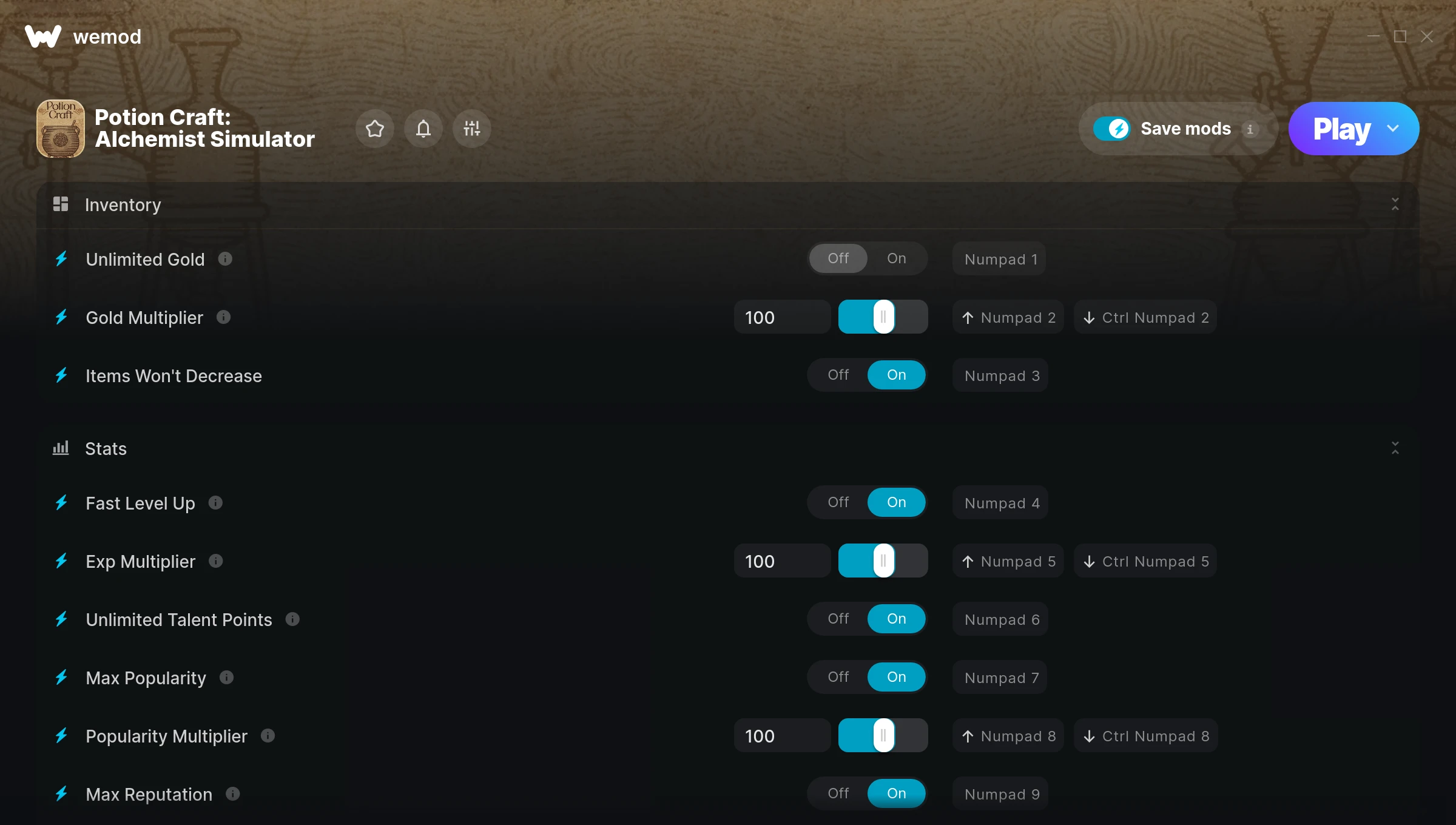
The Potion Craft Alchemist Simulator Trainer gives you access to 11 cheats that let you play the game however you want. Struggling with a tough section? Want to skip the grind? Just want to mess around? This trainer has you covered.
These cheats won’t break your save file. Toggle them on, have fun, toggle them off whenever you want.
There’s an Auto-Updating Version that syncs with game patches on its own, and a Standalone version for anyone who prefers a one-time download. Either way, every cheat in the list is included.
Some of the most popular cheats included in this trainer are Max Popularity, Unlimited Gold, Gold Multiplier, Items Won’t Decrease, and many more. These modifications let you customize difficulty, skip grinding, or simply experiment with the game in new ways.
Potion Craft Alchemist Simulator Trainer Cheats
This trainer includes 11 cheats covering resources, movement, experience, inventory, time.
| # | Cheat | Effect |
|---|---|---|
| 1 | Unlimited Gold | Gold for days – never worry about currency again |
| 2 | Gold Multiplier | Boost your gold earnings dramatically |
| 3 | Items Won’t Decrease | Tweak the items won’t decrease mechanic to your advantage |
| 4 | Fast Level Up | Tweak the fast level up mechanic to your advantage |
| 5 | Exp Multiplier | Earn experience way faster from everything you do |
| 6 | Unlimited Talent Points | Your talent points never runs out or depletes |
| 7 | Max Popularity | Max out your popularity in one go |
| 8 | Popularity Multiplier | Boost your popularity earnings dramatically |
| 9 | Max Reputation | Instantly push your reputation to the highest value |
| 10 | Reputation Multiplier | Boost your reputation earnings dramatically |
| 11 | Set Game Speed | Speed up or slow down the entire game to your liking |
What Can You Do With This Trainer?
Here are some of the standout cheats in this trainer – the ones that really change how you play:
- Unlimited Gold – Gold for days – never worry about currency again
- Gold Multiplier – Multiply your gold gains by a huge amount
- Items Won’t Decrease – Tweak the items won’t decrease mechanic to your advantage
- Fast Level Up – Tweak the fast level up mechanic to your advantage
- Exp Multiplier – Earn experience way faster from everything you do
And that’s just scratching the surface. The full cheat list above has everything you need to play the game completely on your own terms.
Recommended Cheat Presets
Not sure which cheats to enable? Here are some recommended preset combinations for different playstyles:
Farming Preset
Skip the grind entirely. Max out your loot, XP, and cash without spending hours farming the same enemies over and over.
- Unlimited Gold
- Gold Multiplier
- Exp Multiplier
Download Potion Craft Alchemist Simulator Trainer
Download the latest version of this trainer for PC below.
| Version | Creator | Platform | Date Added | Download |
|---|---|---|---|---|
| Auto-Updating Version (Latest) | FLiNG | Steam, Xbox | 2025-10-11 | Download |
| Standalone Version | FLiNG | Steam | 2025-08-24 | Download |
How to Use This Trainer
- Load Potion Craft Alchemist Simulator – Start the game and either load your existing save or begin a new one. The trainer connects to the running game process.
- Start the Trainer – Got WeMod? Search for “Potion Craft Alchemist Simulator” in the app and click Play. Using the FLiNG standalone? Run the .exe with Administrator privileges.
- Enable the Cheats You Want – Use the WeMod overlay to enable any combination of cheats. Everything activates in real-time while the game is running.
- Play and Enjoy – That’s it – jump back into the game and enjoy. You can toggle cheats on and off whenever you want. Half the fun is experimenting to find your perfect setup.
Tips & Known Issues
- Trainers are designed for single-player use only. Using them online or in multiplayer will result in a ban.
- If the trainer isn’t working, make sure your game is fully updated to the latest version.
- Cloud gaming services like GeForce NOW or Xbox Cloud Gaming are not compatible with trainers. You need the game running locally on PC.
- If cheats aren’t working, check for conflicting overlays. Discord, GeForce Experience, and similar tools can interfere.
- The WeMod version updates itself automatically after each game patch. No action needed on your end.
Frequently Asked Questions
Can I get banned for using this trainer?
As long as you stick to single-player, you’re fine. Using cheats in multiplayer or online modes is a completely different story – don’t do it.
How do I know which version to download?
Go with the Auto-Updating Version if you want something that stays current automatically. The Standalone version is better if you prefer a fixed release or are running an older game version.
Can I customise how much health or money I get?
Yes – many cheats have edit or set options that let you type in the exact value you want. Perfect for dialling things in without going completely overboard.
Will this trainer affect my save files?
It won’t corrupt your saves. The trainer works in memory only – but keep in mind that any progress made with cheats enabled will be saved normally.
Will the trainer work with the latest game version?
If you’re using the Auto-Updating Version, yes – it patches itself after every game update. The Standalone build may lag behind slightly after major patches.
Does this trainer work with Steam?
Yes, it works with Steam, Xbox. Check the download table above for specific platform details.



