Powerwash Simulator Trainer
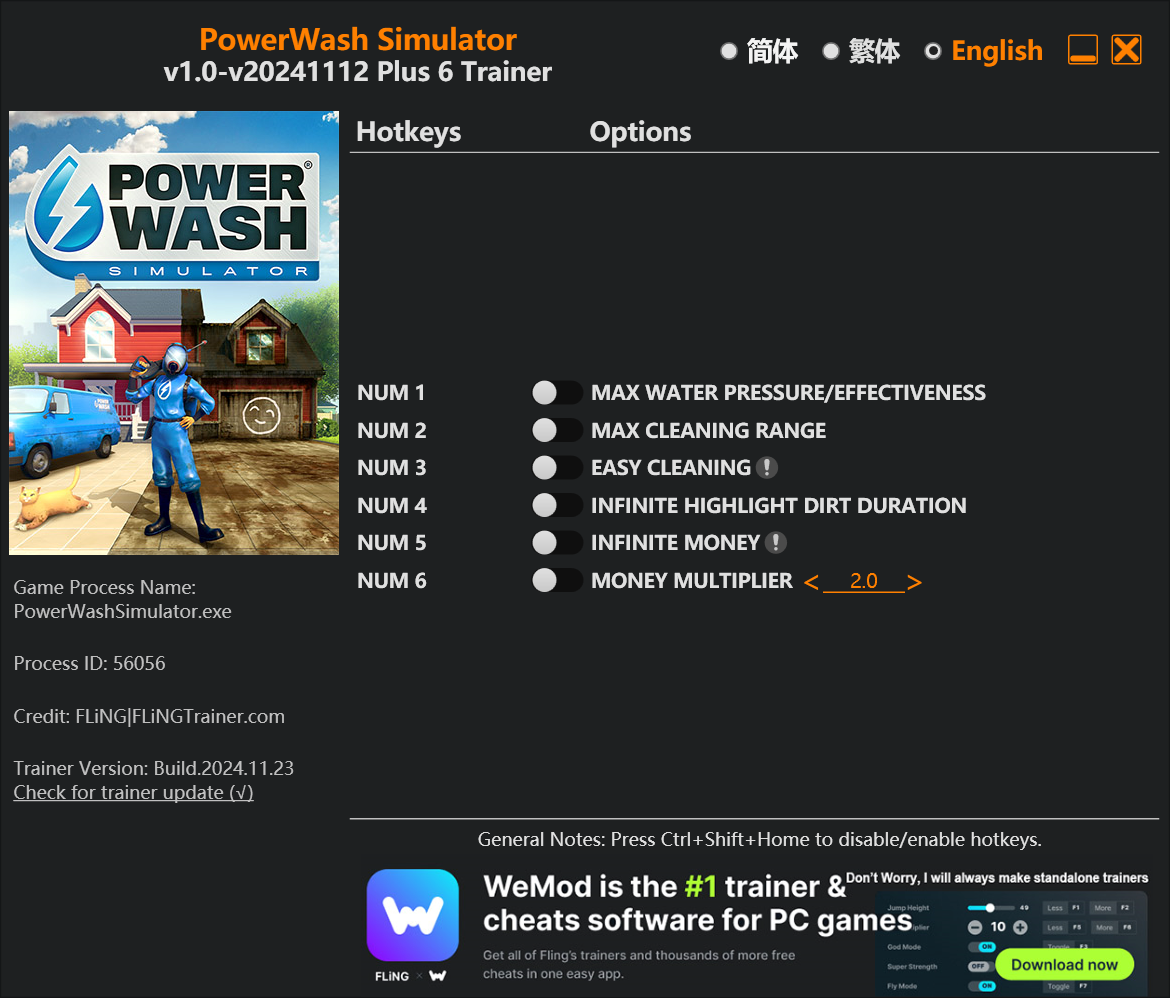
The Powerwash Simulator Trainer gives you access to 6 cheats that let you play the game however you want. Struggling with a tough section? Want to skip the grind? Just want to mess around? This trainer has you covered.
Unlimited money removes the grind entirely – just buy what you want and get back to the fun parts. These cheats let you get past the frustrating parts and actually enjoy the game at your own pace.
Pro tip: start with one or two cheats and see how it feels. Or turn them all on. Your call.
Powerwash Simulator first launched in 2022 as a simulator and indie title and still has a strong community of players today.
You get two download options here. The Auto-Updating Version stays current automatically whenever the game is patched – zero effort on your part. Or grab the Standalone version if you want a specific build that won’t change.
Some of the most popular cheats included in this trainer are Max Water Pressure/Effectiveness, Unlimited Money, Max Cleaning Range, Easy Cleaning, and many more. These modifications let you customize difficulty, skip grinding, or simply experiment with the game in new ways.
Powerwash Simulator Trainer Cheats
This trainer includes 6 cheats covering resources.
| # | Cheat | Effect |
|---|---|---|
| 1 | Max Water Pressure/Effectiveness | Max out your water pressure/effectiveness in one go |
| 2 | Max Cleaning Range | Set your cleaning range to the absolute maximum |
| 3 | Easy Cleaning | Tweak the easy cleaning mechanic to your advantage |
| 4 | Unlimited Highlight Dirt Duration | Your highlight dirt duration never runs out or depletes |
| 5 | Unlimited Money | Buy anything you want without thinking about cost |
| 6 | Money Multiplier | Multiply your money gains by a huge amount |
What Can You Do With This Trainer?
Here are some of the standout cheats in this trainer – the ones that really change how you play:
- Max Water Pressure/Effectiveness – Max out your water pressure/effectiveness in one go
- Max Cleaning Range – Instantly push your cleaning range to the highest value
- Easy Cleaning – Tweak the easy cleaning mechanic to your advantage
- Unlimited Highlight Dirt Duration – Remove all limits on your highlight dirt duration
- Unlimited Money – Buy anything you want without thinking about cost
And that’s just scratching the surface. The full cheat list above has everything you need to play the game completely on your own terms.
Recommended Cheat Presets
Not sure which cheats to enable? Here are some recommended preset combinations for different playstyles:
Farming Preset
Skip the grind entirely. Max out your loot, XP, and cash without spending hours farming the same enemies over and over.
- Unlimited Money
- Money Multiplier
Download Powerwash Simulator Trainer
Download the latest version of this trainer for PC below.
| Version | Creator | Platform | Date Added | Download |
|---|---|---|---|---|
| Auto-Updating Version (Latest) | FLiNG | Steam, Xbox | 2026-01-09 | Download |
| Standalone Version | FLiNG | Steam | 2025-10-29 | Download |
How to Use This Trainer
- Begin With Powerwash Simulator – Open the game first and let it fully load. You’ll activate the trainer in the next step once the game is up.
- Connect the Trainer – Using WeMod? Open the app, search “Powerwash Simulator”, and hit Play. Prefer FLiNG standalone? Right-click the .exe and run as Administrator. Either way, the trainer links to the running game.
- Flip On the Cheats – In the WeMod overlay, toggle the cheats you’re interested in. They apply immediately to your game session.
- Enjoy Your Playthrough – All done. Now play Powerwash Simulator however you want. You can tweak your active cheats at any point without restarting.
Tips & Known Issues
- Trainers are designed for single-player use only. Using them online or in multiplayer will result in a ban.
- The Steam Overlay can occasionally conflict with trainer software. Disable it in Steam settings if you notice problems.
- This trainer only works on PC. Console versions and cloud gaming platforms are not supported.
- If cheats toggle on but have no effect, your game version might be out of date. Update the game and try again.
- WeMod handles version compatibility automatically. When the game updates, the trainer follows shortly after.
Frequently Asked Questions
How often is this trainer updated?
Updates roll out shortly after game patches for the Auto-Updating Version. The Standalone build gets refreshed less frequently.
What should I do if the trainer stops working after an update?
The Auto-Updating Version handles this on its own – give it a day or two after a big patch. Standalone users should check for an updated download.
Will this trainer affect my save files?
It won’t corrupt your saves. The trainer works in memory only – but keep in mind that any progress made with cheats enabled will be saved normally.
Can I get banned for using this trainer?
As long as you stick to single-player, you’re fine. Using cheats in multiplayer or online modes is a completely different story – don’t do it.
Is this trainer compatible with mods?
In most cases they work fine together. Conflicts only happen when a mod alters the exact same memory values the trainer is trying to modify.
Does this trainer work with Steam?
It does. The trainer is compatible with Steam, Xbox.