Ranch Simulator Trainer
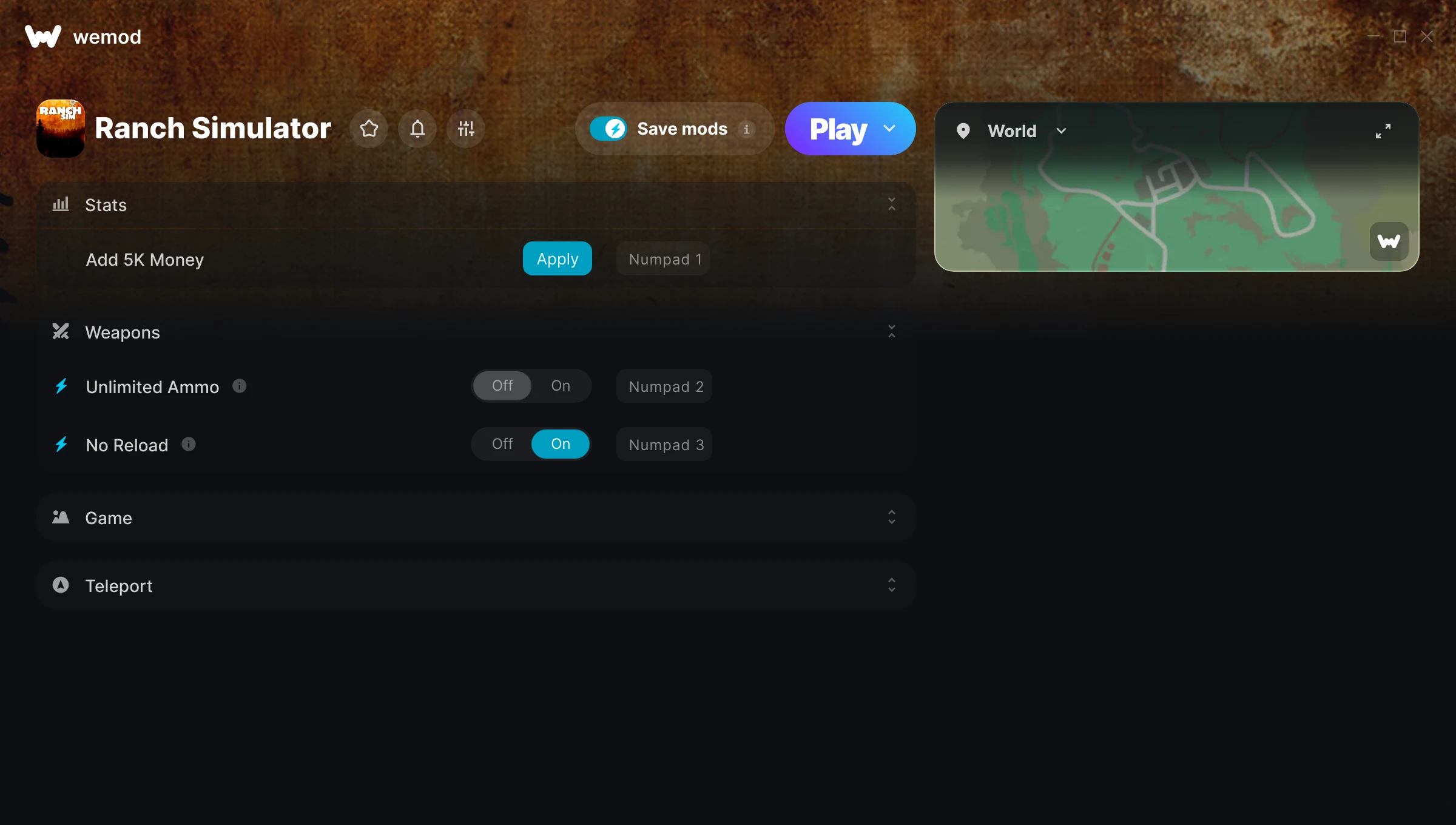
The Ranch Simulator Trainer gives you access to 7 cheats that let you play the game however you want. Struggling with a tough section? Want to skip the grind? Just want to mess around? This trainer has you covered.
No reload means nonstop firepower. Seriously, it changes how you approach every fight. These cheats let you get past the frustrating parts and actually enjoy the game at your own pace.
Pro tip: start with one or two cheats and see how it feels. Or turn them all on. Your call.
If you missed Ranch Simulator when it launched in 2023, now is a great time to jump into this simulator title.
Not sure which version to grab? The Auto-Updating Version keeps itself in sync with game patches automatically. The Standalone is a fixed release – great if you’re running an older game version.
Some of the most popular cheats included in this trainer are Unlimited Ammo, No Reload, Add 5K Money, Set Game Speed, and many more. These modifications let you customize difficulty, skip grinding, or simply experiment with the game in new ways.
Ranch Simulator Trainer Cheats
This trainer includes 7 cheats covering ammo, resources, movement, time.
| # | Cheat | Effect |
|---|---|---|
| 1 | Add 5K Money | Add extra 5k money whenever you need it |
| 2 | Unlimited Ammo | Fire away without ever worrying about running dry |
| 3 | No Reload | Skip reload animations entirely and keep firing nonstop |
| 4 | Set Game Speed | Speed up or slow down the entire game to your liking |
| 5 | Save Location | Tweak the save location mechanic to your advantage |
| 6 | Teleport to Saved Location | Jump to any spot on the map in an instant |
| 7 | Undo Teleport | Your undo teleport, your rules |
What Can You Do With This Trainer?
Here are some of the standout cheats in this trainer – the ones that really change how you play:
- Add 5K Money – Add extra 5k money whenever you need it
- Unlimited Ammo – Fire away without ever worrying about running dry
- No Reload – Skip reload animations entirely and keep firing nonstop
- Set Game Speed – Speed up or slow down the entire game to your liking
- Save Location – Tweak the save location mechanic to your advantage
And that’s just scratching the surface. The full Ranch Simulator cheat list above has everything you need to play completely on your own terms.
Recommended Cheat Presets
Not sure which cheats to enable? Here are some recommended preset combinations for different playstyles:
Easy Mode
Turn the difficulty down to nothing. Perfect for enjoying the story, or for a second playthrough where you just want to feel unstoppable.
- Unlimited Ammo
- No Reload
Exploration Mode
Explore every corner of the map with zero restrictions. No stamina bar holding you back, no invisible walls – just pure freedom.
- Teleport to Saved Location
- Undo Teleport
Download Ranch Simulator Trainer
Download the latest version of this trainer for PC below.
| Version | Creator | Platform | Date Added | Download |
|---|---|---|---|---|
| Auto-Updating Version (Latest) | STiNGERR | Steam | 2026-01-09 | Download |
| Standalone Version | FLiNG | Steam | 2025-11-24 | Download |
How to Use This Trainer
- Open Ranch Simulator – Launch the game and wait until you’re in-game or at the main menu. The trainer needs the game process running to hook into it.
- Start the Trainer – Got WeMod? Search for “Ranch Simulator” in the app and click Play. Using the FLiNG standalone? Run the .exe with Administrator privileges.
- Activate Cheats – Toggle the cheats you want using the WeMod overlay or press the assigned hotkeys. Cheats activate in real-time while you play.
- Enjoy the Game – You’re all set. Play the game with your cheats active and switch them around as you go. Try different combinations to see what’s the most fun.
Tips & Known Issues
- Keep this trainer offline. Single-player only – any online or multiplayer use risks a permanent ban from the game.
- Having issues on Steam? Try disabling the Steam Overlay under Settings > In-Game. It can sometimes clash with trainers.
- If cheats aren’t working, check for conflicting overlays. Discord, GeForce Experience, and similar tools can interfere.
- For the trainer to work properly, make sure you launch it with Administrator privileges.
- Using WeMod? The trainer stays current on its own – it auto-patches after every game update.
Frequently Asked Questions
Can I customise how much health or money I get?
Where available, yes. Look for cheats labelled ‘Set’ or ‘Edit’ – these let you punch in a custom value instead of going straight to infinite.
What should I do if the trainer stops working after an update?
For the Auto-Updating Version, just wait – it patches itself after game updates. Standalone users may need to grab a fresh download.
Is this trainer free to download?
Yep, completely free. Just grab it from the download links above and you’re good to go.
How do I use this trainer?
It’s straightforward: download, run the trainer while the game is open, and press the hotkeys to activate whichever cheats you want.
How do I know which version to download?
Most people should grab the Auto-Updating Version since it takes care of patches automatically. The Standalone is there if you need a fixed, offline-friendly build.
Will this trainer affect my save files?
No damage to saves. The trainer tweaks memory values on the fly, not your save data. That said, if you earn a million gold with cheats on, that gold saves too.
Does this trainer work with Steam?
It does. This trainer is built to work with the Steam version.