
RoadCraft Trainer
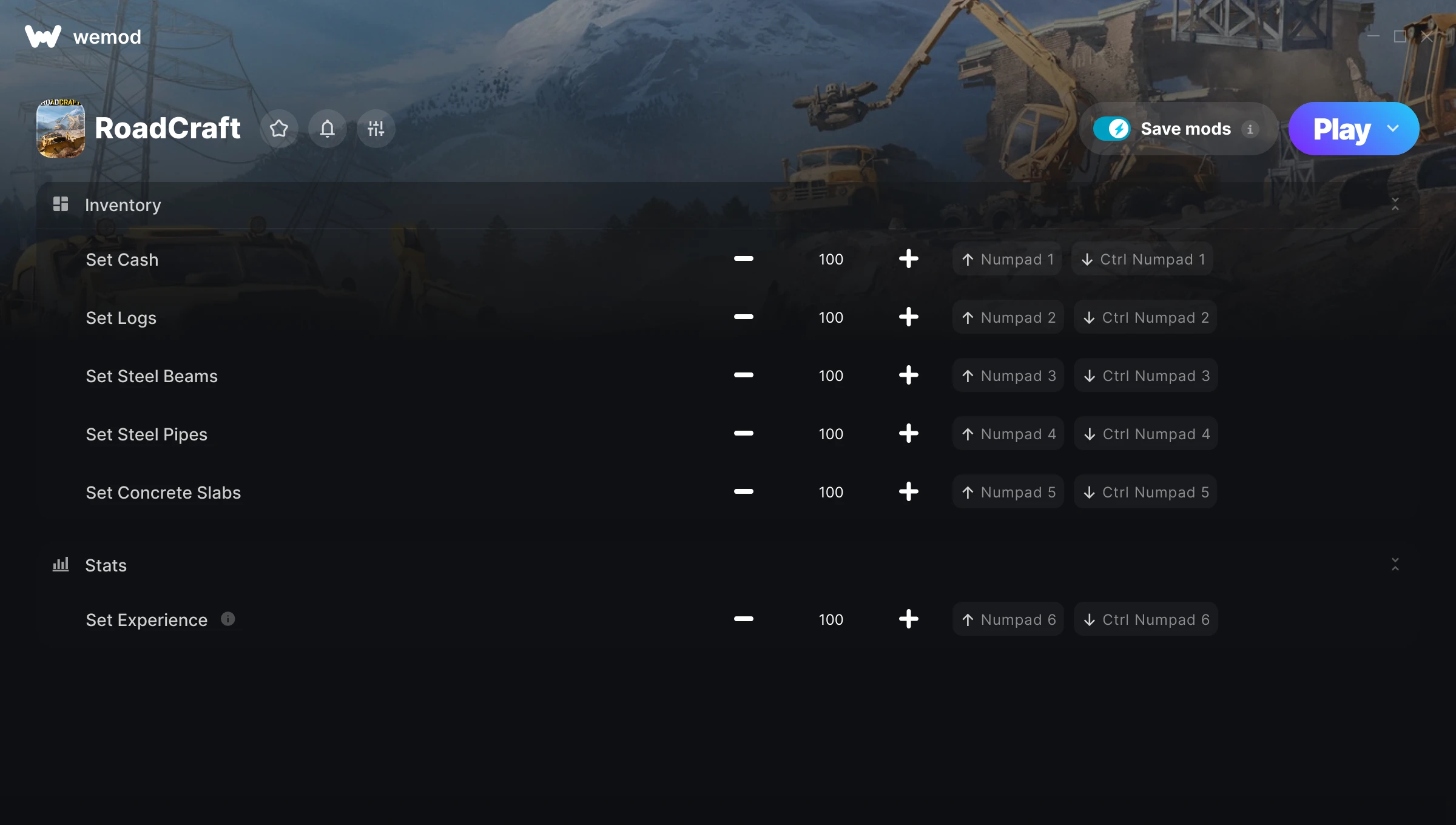
The RoadCraft Trainer gives you access to 6 cheats that let you play the game however you want. Struggling with a tough section? Want to skip the grind? Just want to mess around? This trainer has you covered.
These cheats won’t break your save file. Toggle them on, have fun, toggle them off whenever you want.
Since its 2025 release, RoadCraft has built a loyal following among simulator and adventure fans looking to customize their playthrough.
The best part? This PC trainer auto-updates whenever the game is patched. Zero effort on your part – it stays compatible in the background so you can just play.
Some of the most popular cheats included in this trainer are Set Cash, Set Logs, Set Steel Beams, Set Steel Pipes, and many more. These modifications let you customize difficulty, skip grinding, or simply experiment with the game in new ways.
RoadCraft Trainer Cheats
This trainer includes 6 cheats covering experience.
| # | Cheat | Effect |
|---|---|---|
| 1 | Set Cash | Pick your own value for cash |
| 2 | Set Logs | Adjust logs to whatever feels right |
| 3 | Set Steel Beams | Adjust steel beams to whatever feels right |
| 4 | Set Steel Pipes | Adjust steel pipes to whatever feels right |
| 5 | Set Concrete Slabs | Pick your own value for concrete slabs |
| 6 | Set Experience | Pick your own value for experience |
What Can You Do With This Trainer?
Here are some of the standout cheats in this trainer – the ones that really change how you play:
- Set Cash – Pick your own value for cash
- Set Logs – Choose exactly how much logs you want
- Set Steel Beams – Pick your own value for steel beams
- Set Steel Pipes – Choose exactly how much steel pipes you want
- Set Concrete Slabs – Choose exactly how much concrete slabs you want
And that’s just scratching the surface. The full RoadCraft cheat list above has everything you need to play completely on your own terms.
Download RoadCraft Trainer
Download the latest version of this trainer for PC below.
| Version | Creator | Platform | Date Added | Download |
|---|---|---|---|---|
| Auto-Updating Version (Latest) | GreenHouse | Steam, Xbox | 2026-01-09 | Download |
How to Use This Trainer
- Launch RoadCraft – Start the game and load into your save file or start a new game. Make sure it’s running before activating the trainer.
- Open the Trainer – Open the WeMod app and search for “RoadCraft”. Click Play to launch the overlay. WeMod will detect the game and enable all available cheats.
- Switch On Your Cheats – Browse the cheat list in the WeMod overlay and toggle on whatever you want. Effects are instant and reversible.
- Game On – You’re set. Head back into RoadCraft and have fun. Remember, you can toggle cheats at any time – find the combination that works best for you.
Tips & Known Issues
- Only use this trainer in single-player. Online and multiplayer modes have anti-cheat systems that will detect and ban you.
- Always match your game version to the trainer version. An outdated game build can cause cheats to fail silently.
- If this is your primary save, consider making a backup first. Cheats won’t corrupt data, but it’s good to have a safety net.
- This trainer is for the PC version of the game only. PlayStation, Xbox, and Switch are not supported.
- No need to check for updates manually with WeMod. The trainer patches itself whenever the game is updated.
Frequently Asked Questions
How do I use this trainer?
Grab the download, launch the game, then fire up the trainer. Toggle cheats with the hotkeys or the overlay – done.
Will this trainer affect my save files?
It won’t corrupt your saves. The trainer works in memory only – but keep in mind that any progress made with cheats enabled will be saved normally.
Can I use multiple cheats at the same time?
Yes – enable as many as you like simultaneously. Combining cheats is where things get really fun.
Is this trainer compatible with mods?
In most cases they work fine together. Conflicts only happen when a mod alters the exact same memory values the trainer is trying to modify.
Will the trainer work with the latest game version?
The auto-updating trainer stays compatible with new patches on its own. If you grabbed the Standalone version, you might need to check for a newer release after big updates.
Can I get banned for using this trainer?
Single-player? No risk at all. Online or multiplayer? Do not even think about it. Anti-cheat systems will catch you and you will be banned.
Does this trainer work with Steam?
Yes. The trainer hooks into the game process regardless of whether you launch through Steam, Xbox.



