Sundered Eldritch Edition Trainer
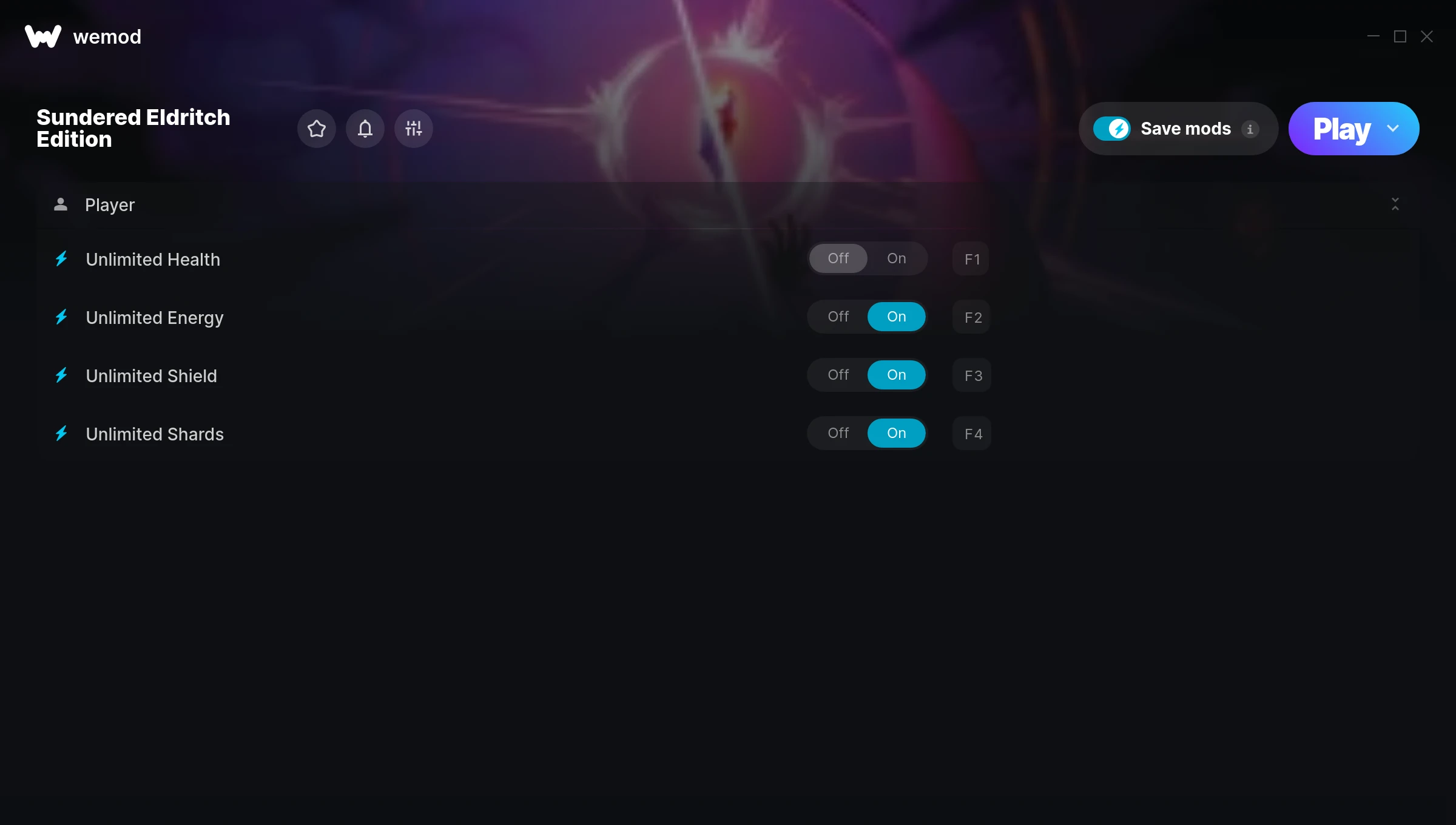
The Sundered Eldritch Edition Trainer gives you access to 4 cheats that let you play the game however you want. Struggling with a tough section? Want to skip the grind? Just want to mess around? This trainer has you covered.
You already bought the game. Might as well play it exactly the way you want to.
Originally a 2018 release, Sundered Eldritch Edition carved out a solid spot in the platform and role-playing (rpg) space and players keep coming back.
This is an auto-updating trainer that keeps pace with every game patch automatically. No need to manually grab new versions after updates.
Sundered Eldritch Edition Trainer Cheats
This trainer includes 4 cheats covering health, defense.
| # | Cheat | Effect |
|---|---|---|
| 1 | Unlimited Health | Your health stays maxed out no matter what hits you |
| 2 | Unlimited Energy | Use your energy as much as you want without limits |
| 3 | Unlimited Shield | Your shield never runs out or depletes |
| 4 | Unlimited Shards | Remove all limits on your shards |
What Can You Do With This Trainer?
Here are some of the standout cheats in this trainer – the ones that really change how you play:
- Unlimited Health – Your health stays maxed out no matter what hits you
- Unlimited Energy – Remove all limits on your energy
- Unlimited Shield – Your shield never runs out or depletes
- Unlimited Shards – Remove all limits on your shards
And that’s just scratching the surface. The full Sundered Eldritch Edition cheat list above has everything you need to play completely on your own terms.
Download Sundered Eldritch Edition Trainer
Download the latest version of this trainer for PC below.
| Version | Creator | Platform | Date Added | Download |
|---|---|---|---|---|
| Auto-Updating Version (Latest) | MrAntiFun | Epic Games | 2025-07-14 | Download |
How to Use This Trainer
- Get Sundered Eldritch Edition Running – Launch the game through your usual platform. Wait until you’re past any intro screens and into the menu or gameplay.
- Start the Trainer – Open WeMod, type “Sundered Eldritch Edition” in the search bar, and click Play. The overlay pops up in-game and you’re ready to go.
- Select and Activate – Choose your cheats from the WeMod overlay and flip them on. Every toggle takes effect right away with no need to reload.
- Start Playing – That’s all there is to it. Dive back in and enjoy Sundered Eldritch Edition with your cheats running. Feel free to adjust them anytime mid-game.
Tips & Known Issues
- Keep this trainer offline. Single-player only – any online or multiplayer use risks a permanent ban from the game.
- For the trainer to work properly, make sure you launch it with Administrator privileges.
- Having issues on Steam? Try disabling the Steam Overlay under Settings > In-Game. It can sometimes clash with trainers.
- Antivirus software may detect the trainer as suspicious. This is normal for game trainers – add an exclusion to proceed.
- WeMod auto-updates the trainer after game patches, so you never have to manually download a new version.
Frequently Asked Questions
Will the trainer work with the latest game version?
If you’re using the Auto-Updating Version, yes – it patches itself after every game update.
Is this trainer free to download?
Yep, completely free. Just grab it from the download links above and you’re good to go.
Can I use multiple cheats at the same time?
You can run every single cheat at once if you want. Mix and match until you find a combination you enjoy.
Will this trainer affect my save files?
It won’t corrupt your saves. The trainer works in memory only – but keep in mind that any progress made with cheats enabled will be saved normally.
Is this trainer compatible with mods?
They’re typically fine together. The rare exception is when a mod overwrites the same values the trainer hooks into, but that’s uncommon.
How do I use this trainer?
Grab the download, launch the game, then fire up the trainer. Toggle cheats with the hotkeys or the overlay – done.
Does this trainer work with Epic Games?
Yes, it works with the Epic Games version of the game.