Surviving the Abyss Trainer
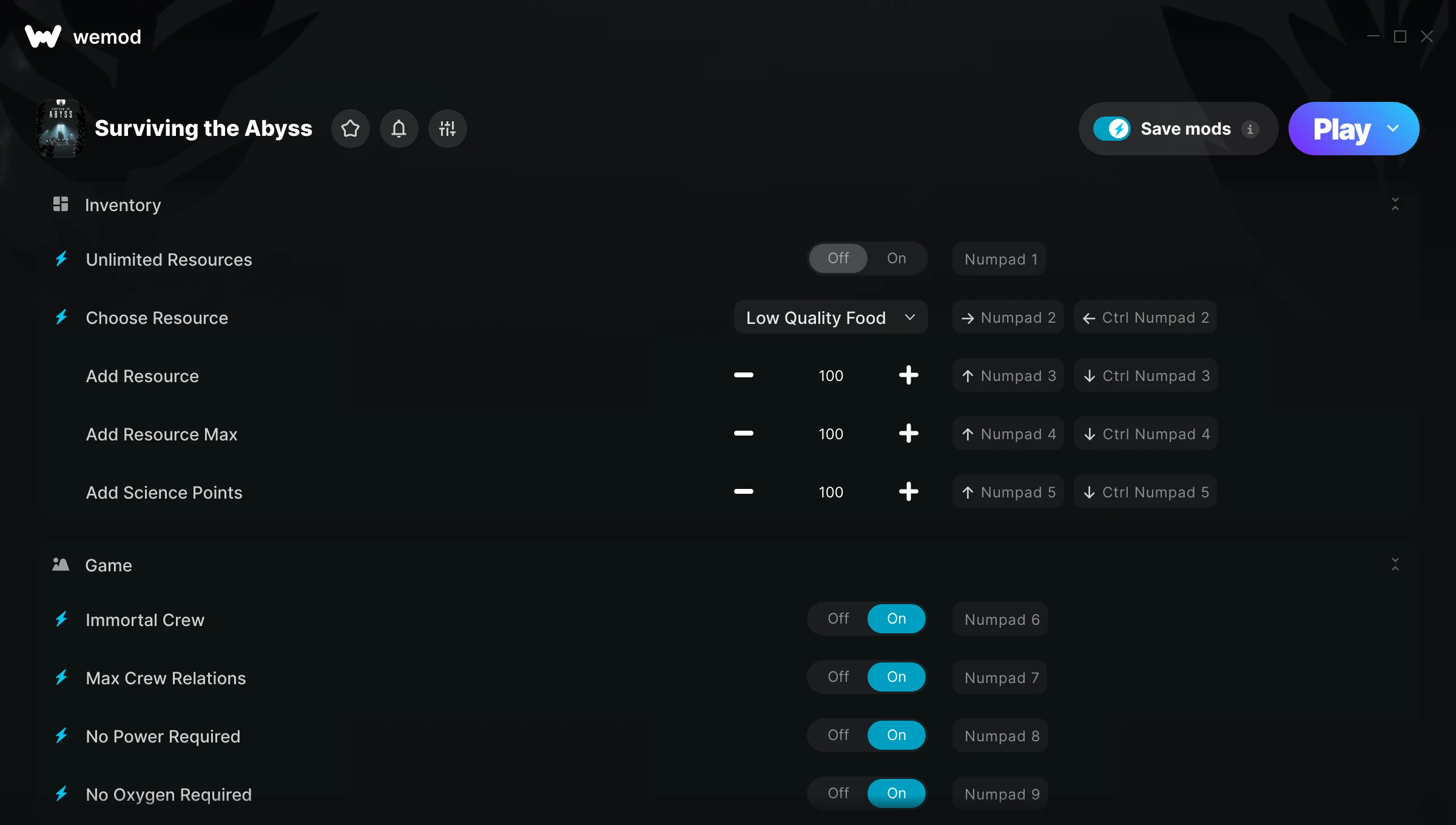
The Surviving the Abyss Trainer gives you access to 17 cheats that let you play the game however you want. Struggling with a tough section? Want to skip the grind? Just want to mess around? This trainer has you covered.
Some of these cheats are subtle quality-of-life tweaks. Others are straight-up game-breaking. Both are great.
Out since 2024, this simulator and strategy title is still going strong with players who want to shape the experience on their own terms.
The best part? This PC trainer auto-updates whenever the game is patched. Zero effort on your part – it stays compatible in the background so you can just play.
Some of the most popular cheats included in this trainer are Unlimited Resources, Add Resource Max, Choose Resource, Add Resource, and many more. These modifications let you customize difficulty, skip grinding, or simply experiment with the game in new ways.
Surviving the Abyss Trainer Cheats
This trainer includes 17 cheats covering resources, crafting, inventory.
| # | Cheat | Effect |
|---|---|---|
| 1 | Unlimited Resources | Gather and spend resources without worrying about running low |
| 2 | Choose Resource | Tweak the choose resource mechanic to your advantage |
| 3 | Add Resource | Add extra resource whenever you need it |
| 4 | Add Resource Max | Max out your resource max in one go |
| 5 | Add Science Points | Give yourself more science points on demand |
| 6 | Immortal Crew | Tweak the immortal crew mechanic to your advantage |
| 7 | Max Crew Relations | Max out your crew relations in one go |
| 8 | No Power Required | Completely disable power required |
| 9 | No Oxygen Required | Turn off oxygen required entirely for easier gameplay |
| 10 | Instantly Repair Buildings | Tweak the instantly repair buildings mechanic to your advantage |
| 11 | Instant Building | Get building immediately with no waiting |
| 12 | Buildings Placeable in Darkness | Tweak the buildings placeable in darkness mechanic to your advantage |
| 13 | Enable Developer Console | Turn on developer console to unlock new possibilities |
| 14 | Change Console Key to TAB | Tweak the change console key to tab mechanic to your advantage |
| 15 | Choose Crew Type | Tweak the choose crew type mechanic to your advantage |
| 16 | Add Crew | Add extra crew whenever you need it |
| 17 | Unlock All Tech Tree Items | Instantly unlock every piece of content in the game |
What Can You Do With This Trainer?
Here are some of the standout cheats in this trainer – the ones that really change how you play:
- Unlimited Resources – Gather and spend resources without worrying about running low
- Choose Resource – Tweak the choose resource mechanic to your advantage
- Add Resource – Give yourself more resource on demand
- Add Resource Max – Set your resource max to the absolute maximum
- Add Science Points – Give yourself more science points on demand
And that’s just scratching the surface. The full Surviving the Abyss cheat list above has everything you need to play completely on your own terms.
Download Surviving the Abyss Trainer
Download the latest version of this trainer for PC below.
| Version | Creator | Platform | Date Added | Download |
|---|---|---|---|---|
| Auto-Updating Version (Latest) | GreenHouse | Steam | 2025-07-13 | Download |
How to Use This Trainer
- Run Surviving the Abyss – Get the game running first – load a save or start fresh. The trainer won’t work unless the game is already open.
- Open the Trainer – Open the WeMod app and search for “Surviving the Abyss”. Click Play to launch the overlay. WeMod will detect the game and enable all available cheats.
- Select and Activate – Choose your cheats from the WeMod overlay and flip them on. Every toggle takes effect right away with no need to reload.
- Have Fun – Done! Get back to playing and enjoy the ride. Mix and match cheats whenever you want – there’s no wrong way to use them.
Tips & Known Issues
- Trainers are designed for single-player use only. Using them online or in multiplayer will result in a ban.
- Trainers need direct access to the game’s memory on your PC. They won’t work with console editions or streamed versions.
- Trainer compatibility depends on game version. If cheats aren’t activating, check that your game is up to date.
- Always run the trainer as Administrator for best compatibility.
- One of the perks of WeMod is automatic updates. The trainer syncs with game patches behind the scenes.
Frequently Asked Questions
Will this trainer affect my save files?
Your save files are safe. Cheats only change values in RAM while you play. Just be aware that anything you accomplish with cheats active gets saved like normal progress.
Can I customise how much health or money I get?
Certain cheats let you choose exact amounts instead of just toggling unlimited. Check for any ‘set’ or ‘edit’ options in the cheat list.
Can I use multiple cheats at the same time?
You can run every single cheat at once if you want. Mix and match until you find a combination you enjoy.
How do I use this trainer?
It’s straightforward: download, run the trainer while the game is open, and press the hotkeys to activate whichever cheats you want.
Does this trainer work with Steam?
It does. This trainer is built to work with the Steam version.