
Team Sonic Racing Trainer
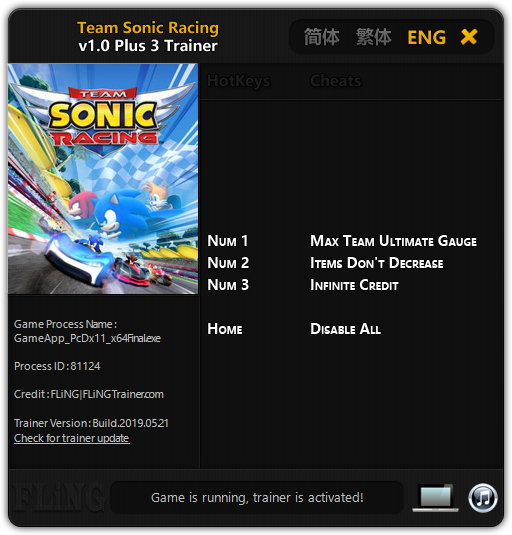
The Team Sonic Racing Trainer gives you access to 3 cheats that let you play the game however you want. Struggling with a tough section? Want to skip the grind? Just want to mess around? This trainer has you covered.
Skip the grind, skip the frustration, and get straight to the fun part.
Released in 2019, this racing and arcade title continues to pull in players who want to get more out of it.
Team Sonic Racing Trainer Cheats
This trainer includes 3 cheats covering inventory.
| # | Cheat | Effect |
|---|---|---|
| 1 | Num 1 – Max Team Ultimate Gauge | Set your team ultimate gauge to the absolute maximum |
| 2 | Num 2 – Items Don’t Decrease | Tweak the items don’t decrease mechanic to your advantage |
| 3 | Num 3 – Infinite Credit | Manually adjust your credit to whatever you need |
What Can You Do With This Trainer?
Here are some of the standout cheats in this trainer – the ones that really change how you play:
- Num 1 – Max Team Ultimate Gauge – Set your team ultimate gauge to the absolute maximum
- Num 2 – Items Don’t Decrease – Tweak the items don’t decrease mechanic to your advantage
- Num 3 – Infinite Credit – Manually adjust your credit to whatever you need
And that’s just scratching the surface. The full cheat list above has everything you need to play the game completely on your own terms.
Download Team Sonic Racing Trainer
Download the latest version of this trainer for PC below.
| Version | Creator | Platform | Date Added | Download |
|---|---|---|---|---|
| Standalone Version | FLiNG | PC (Windows) | 2019-05-21 | Download |
How to Use This Trainer
- Get Into Team Sonic Racing – Launch the game, get past the splash screens, and load into gameplay. Once you can see your character or the main menu, move to step 2.
- Open the FLiNG Trainer – Run the downloaded .exe file with Administrator rights. The trainer window pops up with every cheat and its corresponding hotkey listed.
- Trigger Cheats with Hotkeys – Each cheat is mapped to a keyboard shortcut shown in the trainer. Press the key to toggle the cheat on, press again to turn it off.
- Play Your Way – That’s the full setup. Get back into Team Sonic Racing and play on your own terms. Adjust cheats whenever the mood strikes.
Tips & Known Issues
- Never activate this trainer during online play. It’s built for single-player only and multiplayer anti-cheat will catch it.
- The Steam Overlay can occasionally conflict with trainer software. Disable it in Steam settings if you notice problems.
- Don’t be alarmed if Windows Defender or your antivirus flags the download. Trainers are routinely flagged as false positives.
- Running into problems? Other overlay software (Discord, NVIDIA ShadowPlay) can conflict with trainers. Try turning them off.
Frequently Asked Questions
What cheats are included in this trainer?
The trainer comes loaded with 3 cheats. Everything from combat tweaks to resource mods – the full list is in the table above.
Will this trainer affect my save files?
No damage to saves. The trainer tweaks memory values on the fly, not your save data. That said, if you earn a million gold with cheats on, that gold saves too.
What should I do if the trainer stops working after an update?
Sit tight. The auto-updating trainer usually fixes itself within a day or so after a patch. If you’re on the Standalone version, look for a newer build.
How do I know which version to download?
Most people should grab the Auto-Updating Version since it takes care of patches automatically. The Standalone is there if you need a fixed, offline-friendly build.
Do I need to restart the game after activating cheats?
No restart needed. Cheats take effect the moment you activate them – toggle freely while you play.
Can I get banned for using this trainer?
Single-player? No risk at all. Online or multiplayer? Do not even think about it. Anti-cheat systems will catch you and you will be banned.



