Teamfight Manager Trainer
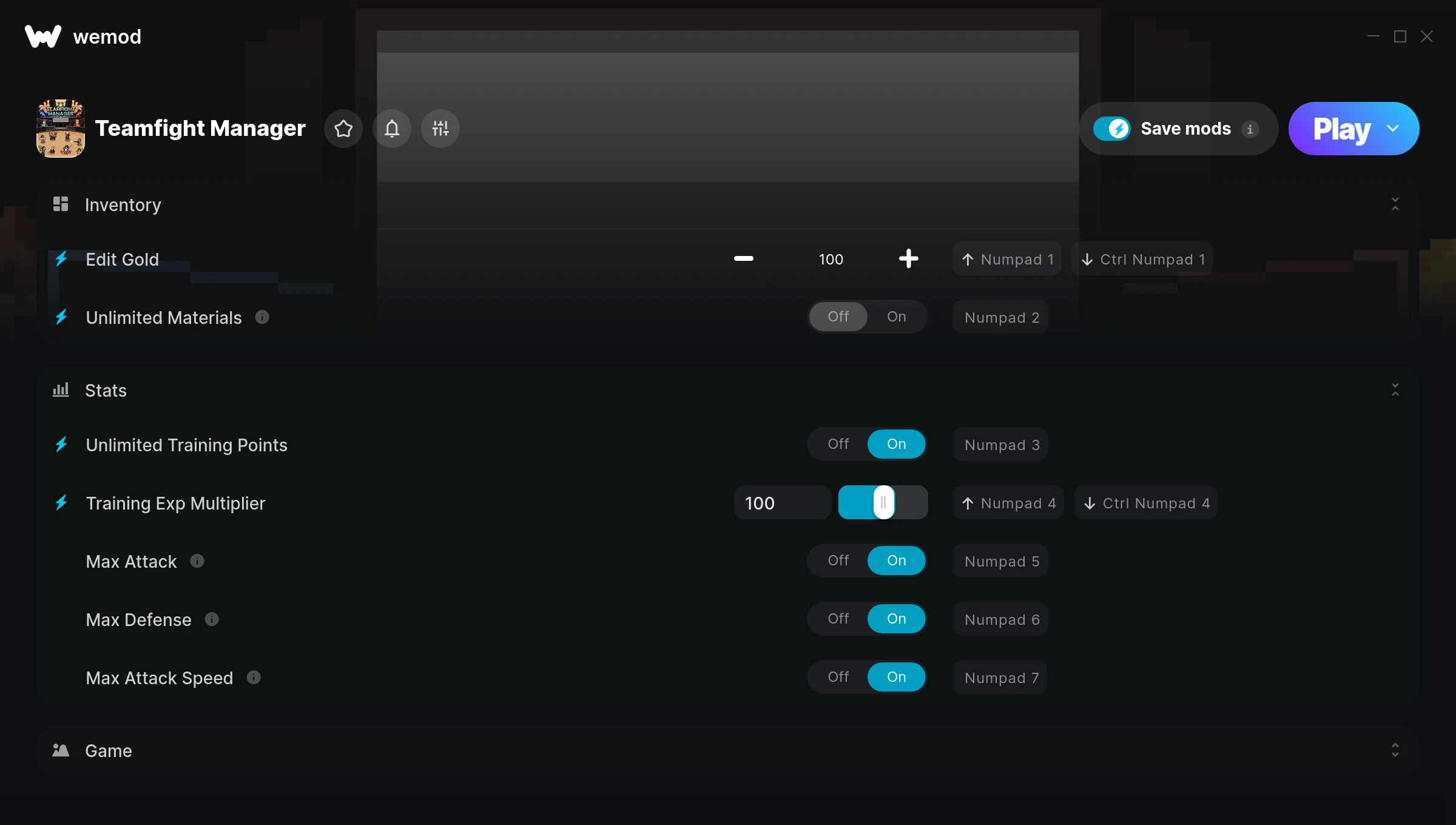
The Teamfight Manager Trainer gives you access to 8 cheats that let you play the game however you want. Struggling with a tough section? Want to skip the grind? Just want to mess around? This trainer has you covered.
First playthrough? Maybe hold off. Second playthrough? Go nuts.
This one goes back to 2021. As far as fighting and simulator titles go, Teamfight Manager holds up and the community is still active.
Once you’ve got this trainer installed, it takes care of itself. Every time the game gets a patch, the trainer updates automatically so your cheats keep working.
Some of the most popular cheats included in this trainer are Max Attack, Edit Gold, Unlimited Materials, Unlimited Training Points, and many more. These modifications let you customize difficulty, skip grinding, or simply experiment with the game in new ways.
Teamfight Manager Trainer Cheats
This trainer includes 8 cheats covering resources, combat, movement, experience, defense.
| # | Cheat | Effect |
|---|---|---|
| 1 | Edit Gold | Dial in the exact gold you want |
| 2 | Unlimited Materials | Remove all limits on your materials |
| 3 | Unlimited Training Points | Use your training points as much as you want without limits |
| 4 | Training Exp Multiplier | Earn experience way faster from everything you do |
| 5 | Max Attack | Set your attack to the absolute maximum |
| 6 | Max Defense | Set your defense to the absolute maximum |
| 7 | Max Attack Speed | Max out your attack speed in one go |
| 8 | Max Match Score | Set your match score to the absolute maximum |
What Can You Do With This Trainer?
Here are some of the standout cheats in this trainer – the ones that really change how you play:
- Edit Gold – Set your gold to any value you choose
- Unlimited Materials – Remove all limits on your materials
- Unlimited Training Points – Remove all limits on your training points
- Training Exp Multiplier – Earn experience way faster from everything you do
- Max Attack – Instantly push your attack to the highest value
And that’s just scratching the surface. The full Teamfight Manager cheat list above has everything you need to play completely on your own terms.
Recommended Cheat Presets
Not sure which cheats to enable? Here are some recommended preset combinations for different playstyles:
Farming Preset
Skip the grind entirely. Max out your loot, XP, and cash without spending hours farming the same enemies over and over.
- Edit Gold
- Training Exp Multiplier
Download Teamfight Manager Trainer
Download the latest version of this trainer for PC below.
| Version | Creator | Platform | Date Added | Download |
|---|---|---|---|---|
| Auto-Updating Version (Latest) | FLiNG | Steam | 2025-12-10 | Download |
How to Use This Trainer
- Boot Up Teamfight Manager – Start the game like you normally would. Once you’re at the main menu or loaded into your save, you’re ready for the next step.
- Open the Trainer – Open the WeMod app and search for “Teamfight Manager”. Click Play to launch the overlay. WeMod will detect the game and enable all available cheats.
- Enable the Cheats You Want – Use the WeMod overlay to enable any combination of cheats. Everything activates in real-time while the game is running.
- Game On – You’re set. Head back into Teamfight Manager and have fun. Remember, you can toggle cheats at any time – find the combination that works best for you.
Tips & Known Issues
- Keep this trainer offline. Single-player only – any online or multiplayer use risks a permanent ban from the game.
- If cheats toggle on but have no effect, your game version might be out of date. Update the game and try again.
- This trainer only works on PC. Console versions and cloud gaming platforms are not supported.
- Third-party overlays like Discord or GeForce Experience can sometimes interfere with trainers. Disable them if you have issues.
- No need to check for updates manually with WeMod. The trainer patches itself whenever the game is updated.
Frequently Asked Questions
Is this trainer free to download?
Free as it gets. The download links are right above this section, pick whichever version suits you.
Is this trainer compatible with mods?
They’re typically fine together. The rare exception is when a mod overwrites the same values the trainer hooks into, but that’s uncommon.
What should I do if the trainer stops working after an update?
If a game patch breaks things, the auto-updating trainer will fix itself automatically – usually within a day or two.
Will the trainer work with the latest game version?
The auto-updating trainer stays compatible with new patches on its own. If you grabbed the Standalone version, you might need to check for a newer release after big updates.
Does this trainer work with Steam?
Yes, it works with the Steam version of the game.