Terrible Lizards Trainer
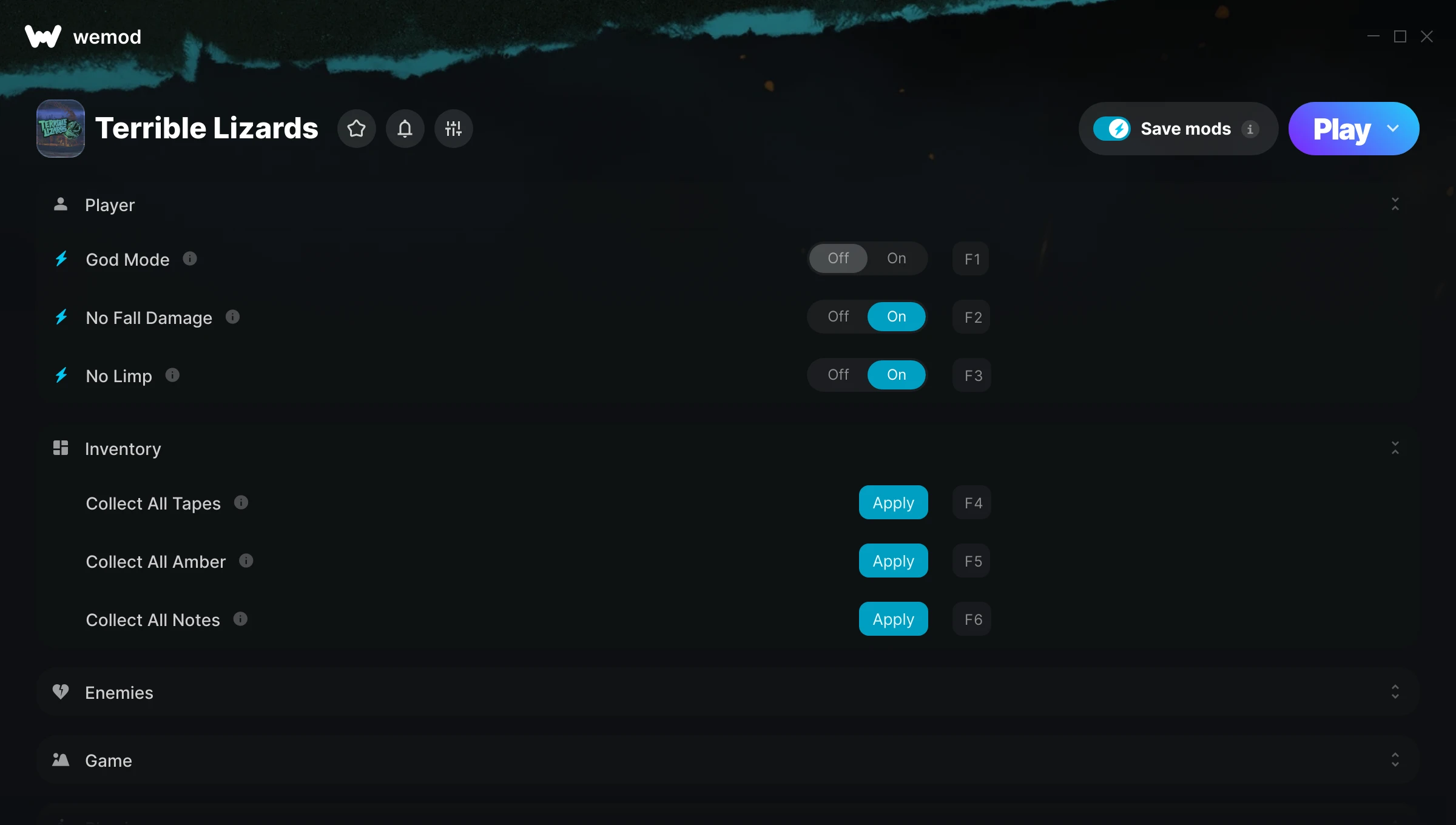
The Terrible Lizards Trainer gives you access to 22 cheats that let you play the game however you want. Struggling with a tough section? Want to skip the grind? Just want to mess around? This trainer has you covered.
God mode lets you take on anything the game throws at you without breaking a sweat. Boss fights become victory laps. These cheats let you get past the frustrating parts and actually enjoy the game at your own pace.
There’s a reason trainers have been around since the DOS era. They just make games more fun.
Originally a 2026 release, Terrible Lizards carved out a solid spot in the adventure and indie space and players keep coming back.
The best part? This PC trainer auto-updates whenever the game is patched. Zero effort on your part – it stays compatible in the background so you can just play.
Some of the most popular cheats included in this trainer are God Mode, Freeze Enemies, Max Movement Speed, No Fall Damage, and many more. These modifications let you customize difficulty, skip grinding, or simply experiment with the game in new ways.
Terrible Lizards Trainer Cheats
This trainer includes 22 cheats covering health, ammo, combat, movement, stealth.
| # | Cheat | Effect |
|---|---|---|
| 1 | God Mode | Become completely invincible – nothing in the game can hurt you |
| 2 | No Fall Damage | Leap off any height and land without a scratch |
| 3 | No Limp | Remove limp from the equation |
| 4 | Collect All Tapes | Tweak the collect all tapes mechanic to your advantage |
| 5 | Collect All Amber | Tweak the collect all amber mechanic to your advantage |
| 6 | Collect All Notes | Tweak the collect all notes mechanic to your advantage |
| 7 | Invisible to Enemies | Enemies literally cannot see you – walk right past them |
| 8 | Freeze Enemies | Lock every enemy in place – they can’t move or fight back |
| 9 | Skip Lever Events | Tweak the skip lever events mechanic to your advantage |
| 10 | Game Speed | Speed up or slow down the entire game to your liking |
| 11 | Max Movement Speed | Max out your movement speed in one go |
| 12 | Movement Speed Multiplier | Boost your movement speed earnings dramatically |
| 13 | Max Jump Height | Set your jump height to the absolute maximum |
| 14 | Jump Height Multiplier | Multiply your jump height gains by a huge amount |
| 15 | Unlimited Jumps | Your jumps never runs out or depletes |
| 16 | Low Gravity | Tweak the low gravity mechanic to your advantage |
| 17 | Full Air Control | Tweak the full air control mechanic to your advantage |
| 18 | No Clip | Phase through walls and explore anywhere on the map |
| 19 | No Clip Speed | Your clip speed, your rules |
| 20 | Perfect Balance | Tweak the perfect balance mechanic to your advantage |
| 21 | Save Position | Tweak the save position mechanic to your advantage |
| 22 | Load Position | Tweak the load position mechanic to your advantage |
What Can You Do With This Trainer?
Here are some of the standout cheats in this trainer – the ones that really change how you play:
- God Mode – Become completely invincible – nothing in the game can hurt you
- No Fall Damage – Leap off any height and land without a scratch
- No Limp – Turn off limp entirely for easier gameplay
- Collect All Tapes – Tweak the collect all tapes mechanic to your advantage
- Collect All Amber – Tweak the collect all amber mechanic to your advantage
And that’s just scratching the surface. The full Terrible Lizards cheat list above has everything you need to play completely on your own terms.
Recommended Cheat Presets
Not sure which cheats to enable? Here are some recommended preset combinations for different playstyles:
Exploration Mode
Explore every corner of the map with zero restrictions. No stamina bar holding you back, no invisible walls – just pure freedom.
- No Fall Damage
- Invisible to Enemies
- No Clip
- No Clip Speed
Download Terrible Lizards Trainer
Download the latest version of this trainer for PC below.
| Version | Creator | Platform | Date Added | Download |
|---|---|---|---|---|
| Auto-Updating Version (Latest) | Switchyyyy | Steam | 2026-04-05 | Download |
How to Use This Trainer
- Get Into Terrible Lizards – Launch the game, get past the splash screens, and load into gameplay. Once you can see your character or the main menu, move to step 2.
- Open the Trainer – Open the WeMod app and search for “Terrible Lizards”. Click Play to launch the overlay. WeMod will detect the game and enable all available cheats.
- Choose Your Cheats – Scroll through the WeMod overlay and enable the cheats that interest you. All changes happen live while you play.
- Game On – You’re set. Head back into Terrible Lizards and have fun. Remember, you can toggle cheats at any time – find the combination that works best for you.
Tips & Known Issues
- Only use this trainer in single-player. Online and multiplayer modes have anti-cheat systems that will detect and ban you.
- The Steam Overlay can occasionally conflict with trainer software. Disable it in Steam settings if you notice problems.
- Make a copy of your save data before experimenting with cheats. Better safe than sorry.
- Trainer hooks are version-specific. Make sure your copy of the game is on the latest patch for full compatibility.
- One of the perks of WeMod is automatic updates. The trainer syncs with game patches behind the scenes.
Frequently Asked Questions
Do I need to restart the game after activating cheats?
Nope. Cheats kick in immediately while the game is running. Just toggle them on and off whenever you want.
Is this trainer free to download?
It is. No hidden fees, no sign-up walls – just download it from the links above and start playing.
How do I use this trainer?
It’s straightforward: download, run the trainer while the game is open, and press the hotkeys to activate whichever cheats you want.
Can I customise how much health or money I get?
Certain cheats let you choose exact amounts instead of just toggling unlimited. Check for any ‘set’ or ‘edit’ options in the cheat list.
Will the trainer work with the latest game version?
The auto-updating trainer stays compatible with new patches on its own. If you grabbed the Standalone version, you might need to check for a newer release after big updates.
Does this trainer work with Steam?
Yes. The trainer hooks into the game process when launched through Steam.