Thief Simulator 2: Prologue Trainer
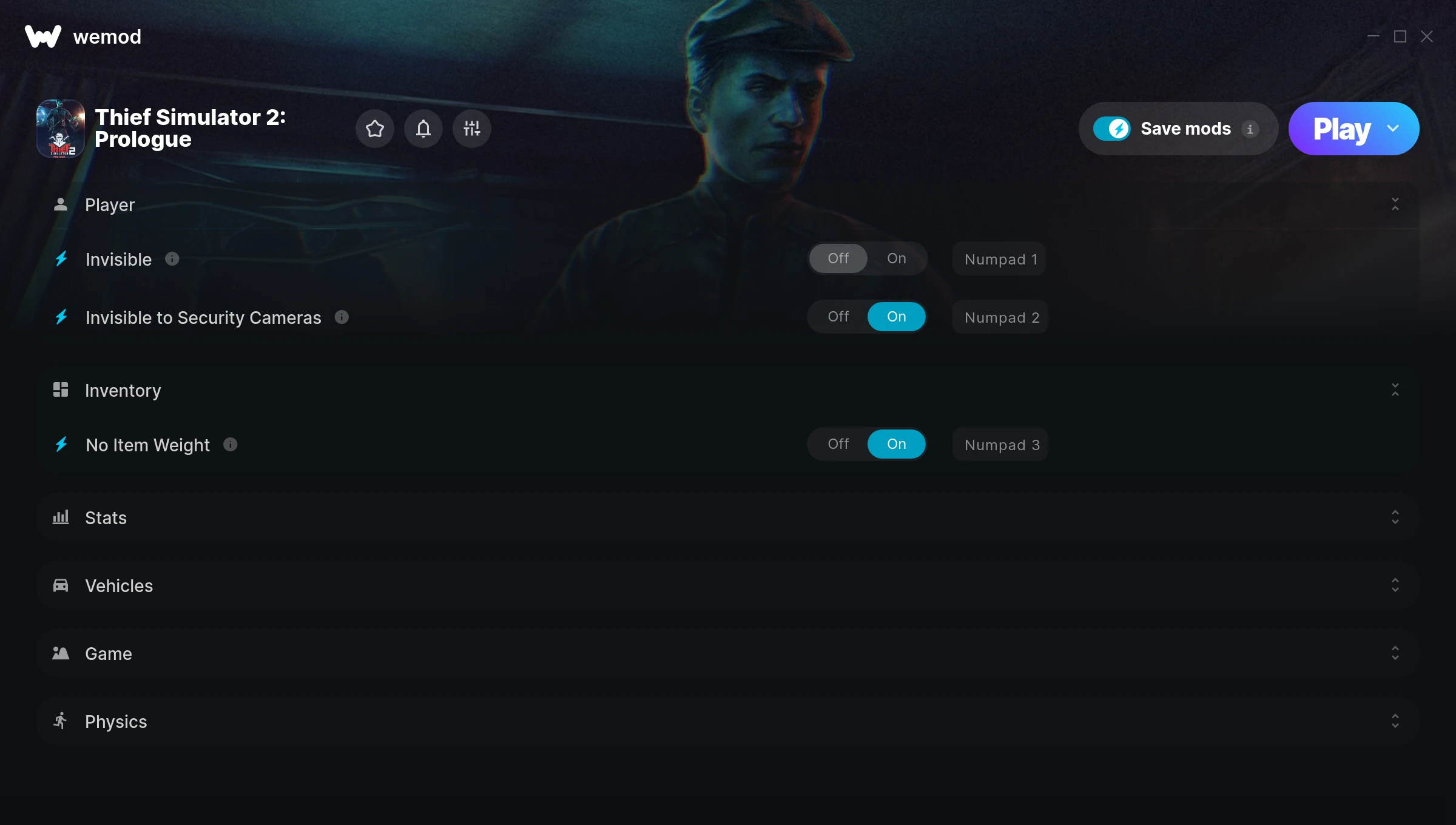
The Thief Simulator 2: Prologue Trainer gives you access to 20 cheats that let you play the game however you want. Struggling with a tough section? Want to skip the grind? Just want to mess around? This trainer has you covered.
These cheats won’t break your save file. Toggle them on, have fun, toggle them off whenever you want.
Originally a 2023 release, Thief Simulator 2: Prologue carved out a solid spot in the role-playing (rpg) and simulator space and players keep coming back.
The best part? This PC trainer auto-updates whenever the game is patched. Zero effort on your part – it stays compatible in the background so you can just play.
Some of the most popular cheats included in this trainer are Freeze Power Off Timer, Invisible, Invisible to Security Cameras, No Item Weight, and many more. These modifications let you customize difficulty, skip grinding, or simply experiment with the game in new ways.
Thief Simulator 2: Prologue Trainer Cheats
This trainer includes 20 cheats covering resources, movement, experience, stealth, inventory.
| # | Cheat | Effect |
|---|---|---|
| 1 | Invisible | Enemies literally cannot see you – walk right past them |
| 2 | Invisible to Security Cameras | Gives you full control over your invisible to security cameras |
| 3 | No Item Weight | Turn off item weight entirely for easier gameplay |
| 4 | Set Money | Pick your own value for money |
| 5 | Set Debt | Manually set your debt to any number |
| 6 | Set Current Skill Points | Pick your own value for current skill points |
| 7 | Set Current Experience | Choose exactly how much current experience you want |
| 8 | Set Experience Needed for Next Level | Choose exactly how much experience needed for next level you want |
| 9 | Infinite Drone Battery | Bottomless drone battery – it never runs dry |
| 10 | Infinite Drone Distance | Bottomless drone distance – it never runs dry |
| 11 | Auto Lockpicking | Tweak the auto lockpicking mechanic to your advantage |
| 12 | Auto Pickpocketing | Tweak the auto pickpocketing mechanic to your advantage |
| 13 | Freeze Power Off Timer | Keep your power off timer frozen at its current value |
| 14 | Stop Time | Freeze the game world while you plan your next move |
| 15 | Add 10 Minutes to Current Time | Add extra 10 minutes to current time whenever you need it |
| 16 | Subtract 10 Minutes to Current Time | Tweak the subtract 10 minutes to current time mechanic to your advantage |
| 17 | Allow Running While Carrying Objects | Tweak the allow running while carrying objects mechanic to your advantage |
| 18 | Set Walking Speed Multiplier | Adjust walking speed to whatever feels right |
| 19 | Set Running Speed Multiplier | Manually set your running speed to any number |
| 20 | Set Jump Height Multiplier | Adjust jump height to whatever feels right |
What Can You Do With This Trainer?
Here are some of the standout cheats in this trainer – the ones that really change how you play:
- Invisible – Enemies literally cannot see you – walk right past them
- Invisible to Security Cameras – Tweak the invisible to security cameras mechanic to your advantage
- No Item Weight – Completely disable item weight
- Set Money – Choose exactly how much money you want
- Set Debt – Choose exactly how much debt you want
And that’s just scratching the surface. The full Thief Simulator 2: Prologue cheat list above has everything you need to play completely on your own terms.
Recommended Cheat Presets
Not sure which cheats to enable? Here are some recommended preset combinations for different playstyles:
Farming Preset
Skip the grind entirely. Max out your loot, XP, and cash without spending hours farming the same enemies over and over.
- Set Money
- Set Current Skill Points
- Set Current Experience
- Set Experience Needed for Next Level
Exploration Mode
Explore every corner of the map with zero restrictions. No stamina bar holding you back, no invisible walls – just pure freedom.
- Invisible
- Invisible to Security Cameras
Download Thief Simulator 2: Prologue Trainer
Download the latest version of this trainer for PC below.
| Version | Creator | Platform | Date Added | Download |
|---|---|---|---|---|
| Auto-Updating Version (Latest) | GreenHouse | Steam | 2025-10-12 | Download |
How to Use This Trainer
- Open Thief Simulator 2: Prologue – Launch the game and wait until you’re in-game or at the main menu. The trainer needs the game process running to hook into it.
- Start the Trainer – Open WeMod, type “Thief Simulator 2: Prologue” in the search bar, and click Play. The overlay pops up in-game and you’re ready to go.
- Switch On Your Cheats – Browse the cheat list in the WeMod overlay and toggle on whatever you want. Effects are instant and reversible.
- Play and Enjoy – That’s it – jump back into the game and enjoy. You can toggle cheats on and off whenever you want. Half the fun is experimenting to find your perfect setup.
Tips & Known Issues
- Trainers are designed for single-player use only. Using them online or in multiplayer will result in a ban.
- Running the trainer as Admin avoids most permission-related issues. Right-click and choose Run as Administrator.
- While trainers are safe to use, backing up your save file beforehand is always a smart precaution.
- The Steam Overlay can occasionally conflict with trainer software. Disable it in Steam settings if you notice problems.
- Using WeMod? The trainer stays current on its own – it auto-patches after every game update.
Frequently Asked Questions
How do I know which version to download?
This trainer auto-updates whenever the game is patched, so you always have the latest compatible version. Just download it once and you’re set.
How do I use this trainer?
Just download the trainer and open it while the game is running. Each cheat has a toggle – flip them on or off as you play.
Do I need to restart the game after activating cheats?
No. Cheats are live the instant you toggle them. You can switch them on and off mid-gameplay without interruption.
What should I do if the trainer stops working after an update?
If a game patch breaks things, the auto-updating trainer will fix itself automatically – usually within a day or two.
What cheats are included in this trainer?
The trainer comes loaded with 20 cheats. Everything from combat tweaks to resource mods – the full list is in the table above.
How often is this trainer updated?
This trainer auto-updates shortly after each game patch, so it stays compatible without you having to do anything.
Does this trainer work with Steam?
It does. This trainer is built to work with the Steam version.