Thriving City: Song Trainer
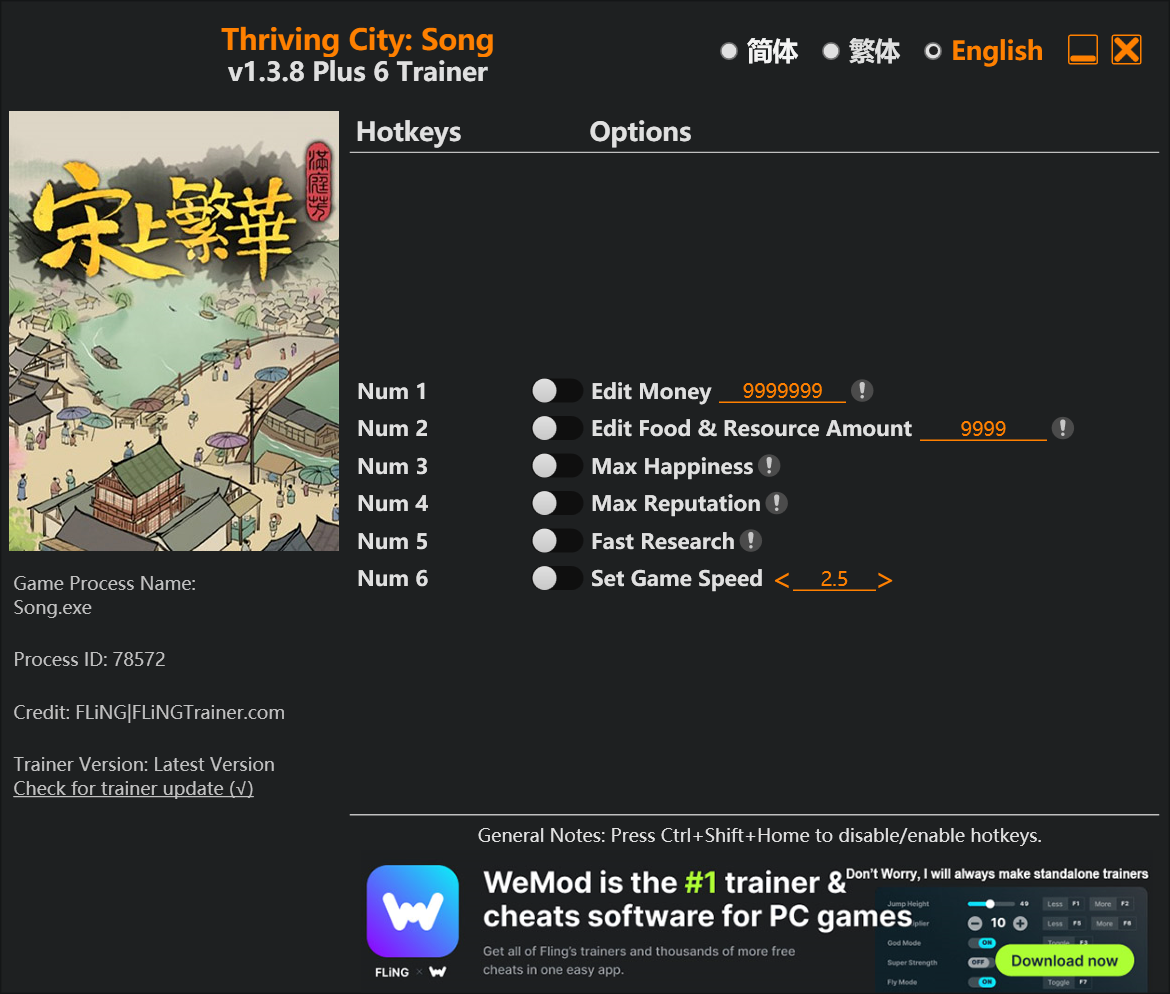
The Thriving City: Song Trainer gives you access to 5 cheats that let you play the game however you want. Struggling with a tough section? Want to skip the grind? Just want to mess around? This trainer has you covered.
If you’re the type who reads every tooltip and explores every corner, infinite health makes that a lot more relaxing.
A simulator and strategy title that first dropped in 2024, Thriving City: Song still draws players who want to tweak the experience to their liking.
Some of the most popular cheats included in this trainer are Num 3 – Max Happiness, Num 1 – Edit Money, Num 2 – Edit Food & Resource Amount, Num 4 – Max Reputation, and many more. These modifications let you customize difficulty, skip grinding, or simply experiment with the game in new ways.
Thriving City: Song Trainer Cheats
This trainer includes 5 cheats covering resources, movement, time.
| # | Cheat | Effect |
|---|---|---|
| 1 | Num 1 – Edit Money | Set your money to any value you choose |
| 2 | Num 2 – Edit Food & Resource Amount | Fine-tune your food & resource amount to the perfect amount |
| 3 | Num 3 – Max Happiness | Instantly push your happiness to the highest value |
| 4 | Num 4 – Max Reputation | Set your reputation to the absolute maximum |
| 5 | Num 6 – Set Game Speed | Speed up or slow down the entire game to your liking |
What Can You Do With This Trainer?
Here are some of the standout cheats in this trainer – the ones that really change how you play:
- Num 1 – Edit Money – Manually adjust your money to whatever you need
- Num 2 – Edit Food & Resource Amount – Dial in the exact food & resource amount you want
- Num 3 – Max Happiness – Max out your happiness in one go
- Num 4 – Max Reputation – Set your reputation to the absolute maximum
- Num 6 – Set Game Speed – Speed up or slow down the entire game to your liking
And that’s just scratching the surface. The full cheat list above has everything you need to play the game completely on your own terms.
Download Thriving City: Song Trainer
Download the latest version of this trainer for PC below.
| Version | Creator | Platform | Date Added | Download |
|---|---|---|---|---|
| Standalone Version | FLiNG | PC (Windows) | 2025-07-27 | Download |
How to Use This Trainer
- Begin With Thriving City: Song – Open the game first and let it fully load. You’ll activate the trainer in the next step once the game is up.
- Launch the Trainer – Right-click the FLiNG trainer .exe and select Run as Administrator. A window will open showing all the cheats and their hotkeys.
- Trigger Cheats with Hotkeys – Each cheat is mapped to a keyboard shortcut shown in the trainer. Press the key to toggle the cheat on, press again to turn it off.
- Get Back to the Game – Everything is set up. Continue playing Thriving City: Song with your chosen cheats active. Experiment freely – you can change things at any time.
Tips & Known Issues
- Trainers are designed for single-player use only. Using them online or in multiplayer will result in a ban.
- If cheats toggle on but have no effect, your game version might be out of date. Update the game and try again.
- For the trainer to work properly, make sure you launch it with Administrator privileges.
- If this is your primary save, consider making a backup first. Cheats won’t corrupt data, but it’s good to have a safety net.
Frequently Asked Questions
What cheats are included in this trainer?
The trainer comes loaded with 5 cheats. Everything from combat tweaks to resource mods – the full list is in the table above.
How do I use this trainer?
Download the trainer, run it alongside the game, and use the hotkeys to toggle cheats on and off. It really is that simple.
How do I know which version to download?
Most people should grab the Auto-Updating Version since it takes care of patches automatically. The Standalone is there if you need a fixed, offline-friendly build.
Is this trainer compatible with mods?
They’re typically fine together. The rare exception is when a mod overwrites the same values the trainer hooks into, but that’s uncommon.