Tom Clancys Ghost Recon Wildlands Trainer
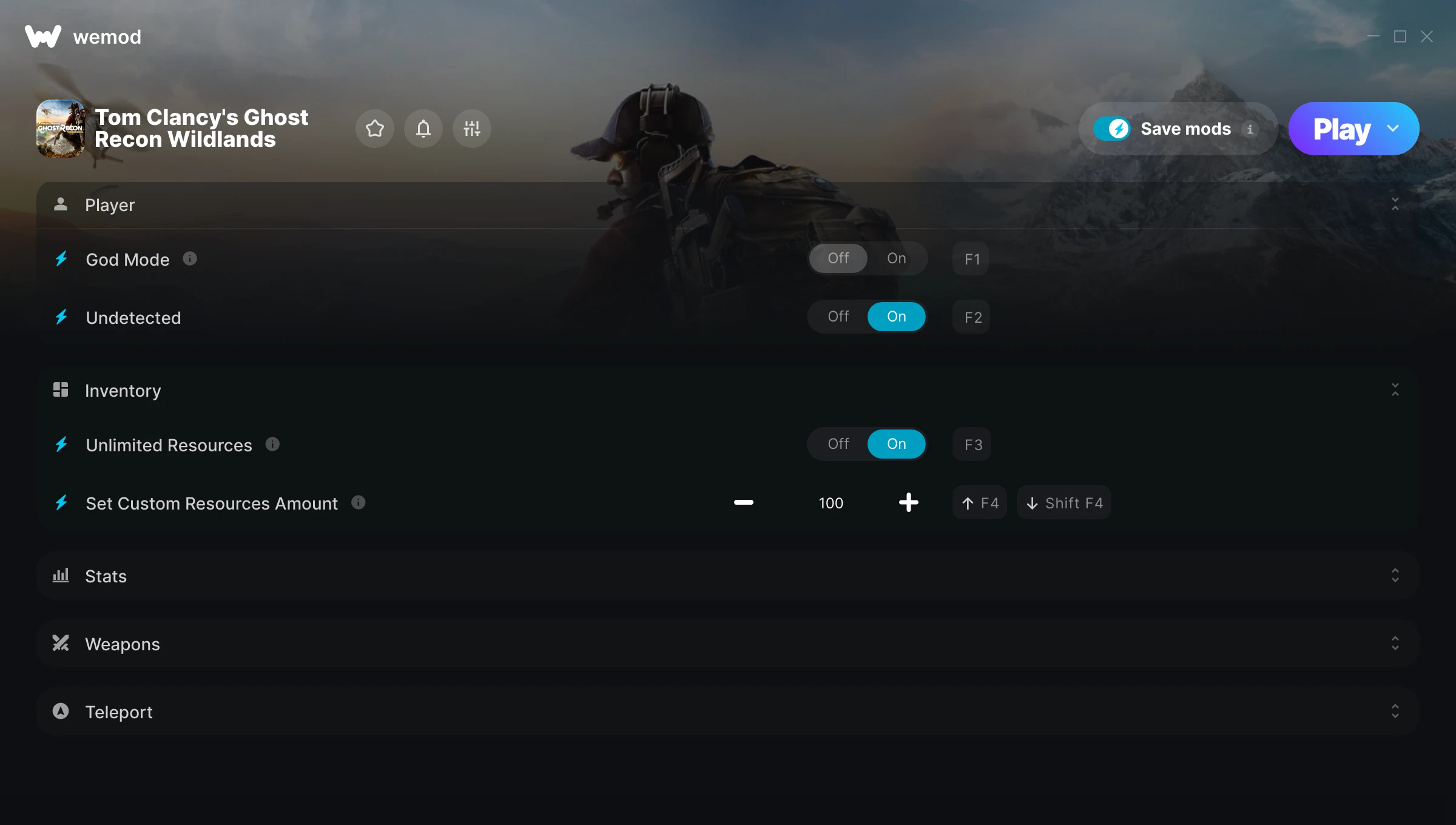
The Tom Clancys Ghost Recon Wildlands Trainer gives you access to 11 cheats that let you play the game however you want. Struggling with a tough section? Want to skip the grind? Just want to mess around? This trainer has you covered.
God mode lets you take on anything the game throws at you without breaking a sweat. Boss fights become victory laps. These cheats let you get past the frustrating parts and actually enjoy the game at your own pace.
If you’re the type who reads every tooltip and explores every corner, infinite health makes that a lot more relaxing.
Tom Clancys Ghost Recon Wildlands first launched in 2017 as a shooter and tactical title and still has a strong community of players today.
The best part? This PC trainer auto-updates whenever the game is patched. Zero effort on your part – it stays compatible in the background so you can just play.
Some of the most popular cheats included in this trainer are God Mode, Unlimited Resources, No Reload, Unlimited Ammo, and many more. These modifications let you customize difficulty, skip grinding, or simply experiment with the game in new ways.
Tom Clancys Ghost Recon Wildlands Trainer Cheats
This trainer includes 11 cheats covering health, ammo, resources, movement, experience.
| # | Cheat | Effect |
|---|---|---|
| 1 | God Mode | Become completely invincible – nothing in the game can hurt you |
| 2 | Undetected | Tweak the undetected mechanic to your advantage |
| 3 | Unlimited Resources | Gather and spend resources without worrying about running low |
| 4 | Set Custom Resources Amount | Choose exactly how much custom resources amount you want |
| 5 | Unlimited Skill Points | Max out every skill tree without having to choose |
| 6 | No Reload | Skip reload animations entirely and keep firing nonstop |
| 7 | Unlimited Ammo | Fire away without ever worrying about running dry |
| 8 | Unlimited Grenades | Use your grenades as much as you want without limits |
| 9 | No Recoil | Eliminate all weapon recoil for laser-accurate shots |
| 10 | Better Accuracy | Tweak the better accuracy mechanic to your advantage |
| 11 | Teleport to Waypoint | Jump to any spot on the map in an instant |
What Can You Do With This Trainer?
Here are some of the standout cheats in this trainer – the ones that really change how you play:
- God Mode – Become completely invincible – nothing in the game can hurt you
- Undetected – Tweak the undetected mechanic to your advantage
- Unlimited Resources – Gather and spend resources without worrying about running low
- Set Custom Resources Amount – Choose exactly how much custom resources amount you want
- Unlimited Skill Points – Max out every skill tree without having to choose
And that’s just scratching the surface. The full cheat list above has everything you need to play the game completely on your own terms.
Recommended Cheat Presets
Not sure which cheats to enable? Here are some recommended preset combinations for different playstyles:
Easy Mode
Turn the difficulty down to nothing. Perfect for enjoying the story, or for a second playthrough where you just want to feel unstoppable.
- God Mode
- No Reload
- Unlimited Ammo
Farming Preset
Skip the grind entirely. Max out your loot, XP, and cash without spending hours farming the same enemies over and over.
- Unlimited Resources
- Set Custom Resources Amount
- Unlimited Skill Points
Download Tom Clancys Ghost Recon Wildlands Trainer
Download the latest version of this trainer for PC below.
| Version | Creator | Platform | Date Added | Download |
|---|---|---|---|---|
| Auto-Updating Version (Latest) | MrAntiFun | Steam, Ubisoft Connect, Epic Games, EA | 2025-05-14 | Download |
How to Use This Trainer
- Boot Up Tom Clancys Ghost Recon Wildlands – Start the game like you normally would. Once you’re at the main menu or loaded into your save, you’re ready for the next step.
- Open WeMod Overlay – Search for “Tom Clancys Ghost Recon Wildlands” in WeMod and click Play. The in-game overlay will appear with toggles for every available cheat.
- Toggle Your Cheats – Flip on whichever cheats you want from the WeMod overlay. Each one takes effect immediately – no restart needed.
- Enjoy the Game – You’re all set. Play the game with your cheats active and switch them around as you go. Try different combinations to see what’s the most fun.
Tips & Known Issues
- This is a single-player trainer only. Do not use it in online or multiplayer modes – you will get banned.
- Having issues on Steam? Try disabling the Steam Overlay under Settings > In-Game. It can sometimes clash with trainers.
- If your antivirus blocks the trainer, add it to your exception list. Memory-editing tools are commonly flagged as false positives.
- It’s good practice to back up your saves before activating cheats. That way you can revert if anything feels off.
- The WeMod version updates itself automatically after each game patch. No action needed on your end.
Frequently Asked Questions
What should I do if the trainer stops working after an update?
If a game patch breaks things, the auto-updating trainer will fix itself automatically – usually within a day or two.
How often is this trainer updated?
This trainer auto-updates shortly after each game patch, so it stays compatible without you having to do anything.
Is this trainer compatible with mods?
In most cases they work fine together. Conflicts only happen when a mod alters the exact same memory values the trainer is trying to modify.
Can I customise how much health or money I get?
Certain cheats let you choose exact amounts instead of just toggling unlimited. Check for any ‘set’ or ‘edit’ options in the cheat list.
Will this trainer affect my save files?
The trainer only modifies values in memory while the game is running. Your save files stay intact, though any progress you make with cheats on will save as normal.
How do I use this trainer?
It’s straightforward: download, run the trainer while the game is open, and press the hotkeys to activate whichever cheats you want.
Does this trainer work with Steam?
Fully compatible. This trainer works with Steam, Ubisoft Connect, Epic Games, EA – just launch the game through whichever launcher you use.