
Until Dawn Trainer
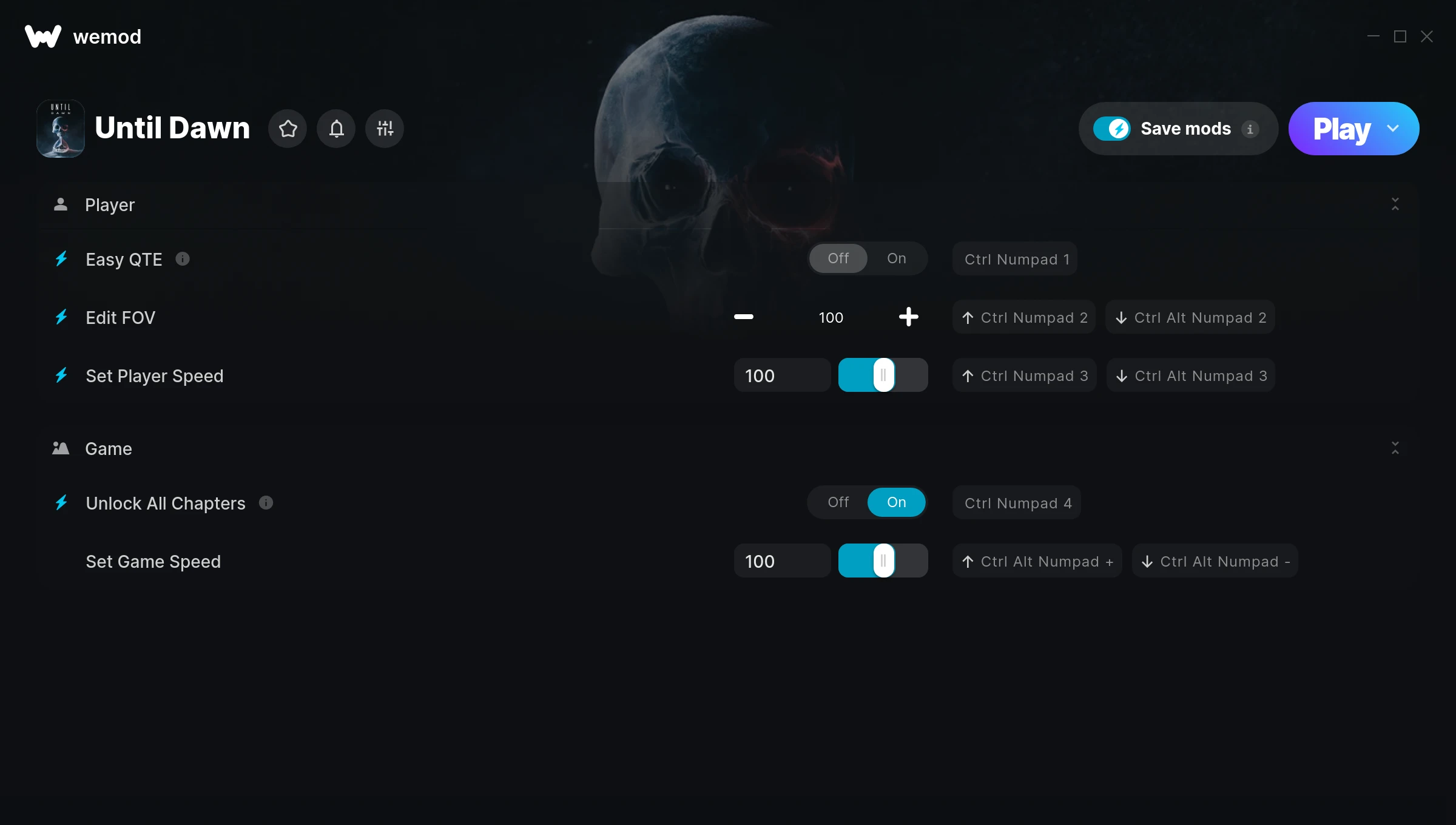
The Until Dawn Trainer gives you access to 5 cheats that let you play the game however you want. Struggling with a tough section? Want to skip the grind? Just want to mess around? This trainer has you covered.
Pro tip: start with one or two cheats and see how it feels. Or turn them all on. Your call.
A adventure title that first dropped in 2015, Until Dawn still draws players who want to tweak the experience to their liking.
This trainer stays in sync with game patches automatically. You’ll never have to worry about downloading a new version after an update – it handles everything behind the scenes.
Some of the most popular cheats included in this trainer are Easy QTE, Edit FOV, Set Player Speed, Unlock All Chapters, and many more. These modifications let you customize difficulty, skip grinding, or simply experiment with the game in new ways.
Until Dawn Trainer Cheats
This trainer includes 5 cheats covering movement, time.
| # | Cheat | Effect |
|---|---|---|
| 1 | Easy QTE | Tweak the easy qte mechanic to your advantage |
| 2 | Edit FOV | Dial in the exact fov you want |
| 3 | Set Player Speed | Manually set your player speed to any number |
| 4 | Unlock All Chapters | Instantly unlock every piece of content in the game |
| 5 | Set Game Speed | Speed up or slow down the entire game to your liking |
What Can You Do With This Trainer?
Here are some of the standout cheats in this trainer – the ones that really change how you play:
- Easy QTE – Tweak the easy qte mechanic to your advantage
- Edit FOV – Set your fov to any value you choose
- Set Player Speed – Pick your own value for player speed
- Unlock All Chapters – Instantly unlock every piece of content in the game
- Set Game Speed – Speed up or slow down the entire game to your liking
And that’s just scratching the surface. The full Until Dawn cheat list above has everything you need to play completely on your own terms.
Download Until Dawn Trainer
Download the latest version of this trainer for PC below.
| Version | Creator | Platform | Date Added | Download |
|---|---|---|---|---|
| Auto-Updating Version (Latest) | FLiNG | Steam | 2025-04-15 | Download |
How to Use This Trainer
- Launch Until Dawn – Start the game and load into your save file or start a new game. Make sure it’s running before activating the trainer.
- Start the Trainer – Open WeMod, type “Until Dawn” in the search bar, and click Play. The overlay pops up in-game and you’re ready to go.
- Select and Activate – Choose your cheats from the WeMod overlay and flip them on. Every toggle takes effect right away with no need to reload.
- Jump Back In – You’re good to go. Return to the game and enjoy your modified experience. Toggle cheats on or off anytime as you play.
Tips & Known Issues
- Trainers are designed for single-player use only. Using them online or in multiplayer will result in a ban.
- Trainers modify game memory, which can trigger antivirus warnings. These are false positives – add an exception if needed.
- Overlay apps from Discord, NVIDIA, or Razer can occasionally clash with trainer hooks. Disable them as a troubleshooting step.
- Always match your game version to the trainer version. An outdated game build can cause cheats to fail silently.
- WeMod handles version compatibility automatically. When the game updates, the trainer follows shortly after.
Frequently Asked Questions
How do I use this trainer?
Grab the download, launch the game, then fire up the trainer. Toggle cheats with the hotkeys or the overlay – done.
Is this trainer free to download?
It is. No hidden fees, no sign-up walls – just download it from the links above and start playing.
Can I get banned for using this trainer?
Single-player? No risk at all. Online or multiplayer? Do not even think about it. Anti-cheat systems will catch you and you will be banned.
Can I customise how much health or money I get?
Where available, yes. Look for cheats labelled ‘Set’ or ‘Edit’ – these let you punch in a custom value instead of going straight to infinite.
Will the trainer work with the latest game version?
The auto-updating trainer stays compatible with new patches on its own. If you grabbed the Standalone version, you might need to check for a newer release after big updates.
Does this trainer work with Steam?
Fully compatible with Steam. Just launch the game through Steam and run the trainer alongside it.



