Wanderstop Trainer
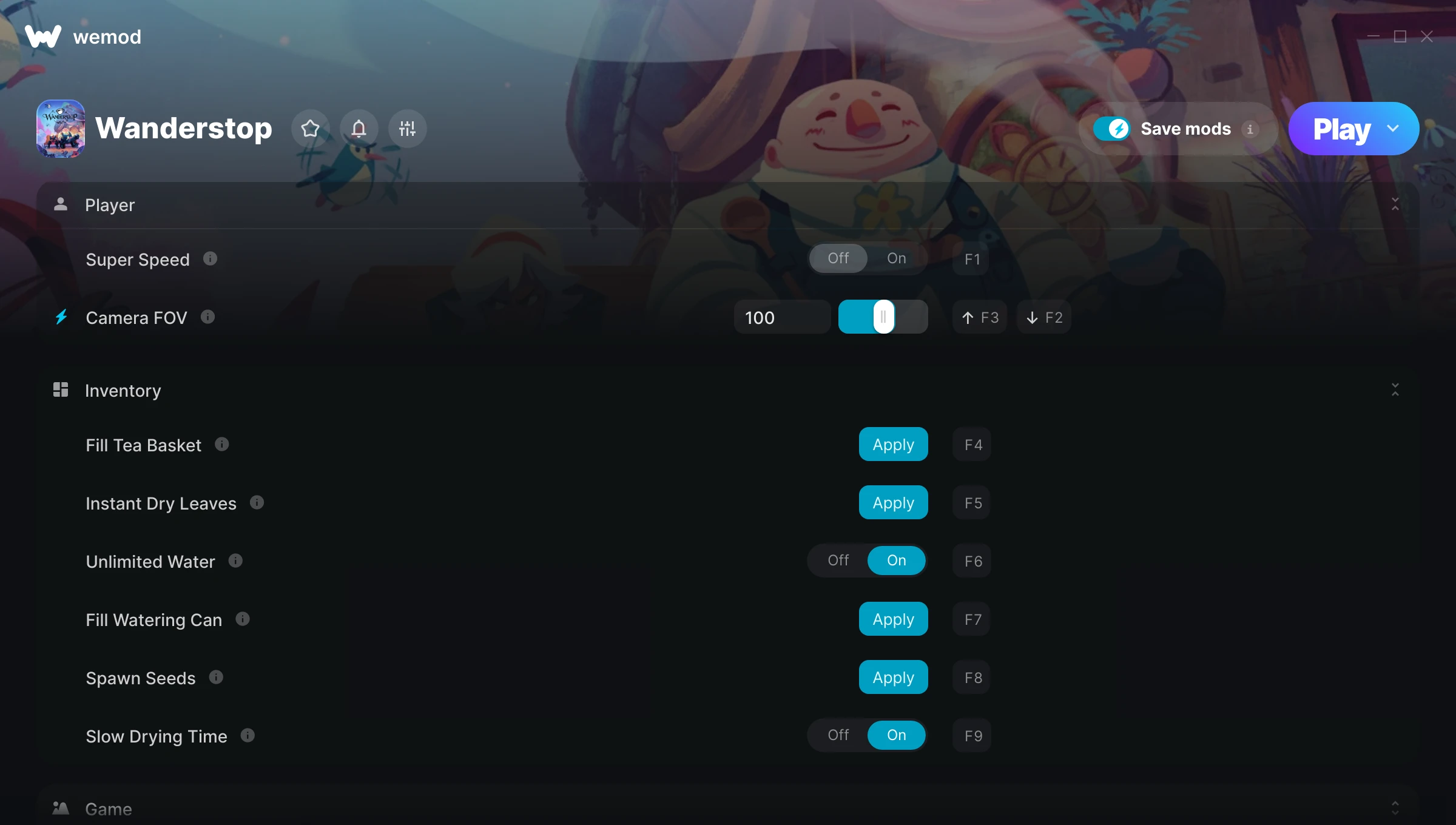
The Wanderstop Trainer gives you access to 12 cheats that let you play the game however you want. Struggling with a tough section? Want to skip the grind? Just want to mess around? This trainer has you covered.
Super speed makes exploration a breeze and lets you outrun anything the game throws at you. These cheats let you get past the frustrating parts and actually enjoy the game at your own pace.
Consider this your shortcut past every annoying difficulty spike in the game.
A simulator and adventure title that first dropped in 2025, Wanderstop still draws players who want to tweak the experience to their liking.
This is an auto-updating trainer that keeps pace with every game patch automatically. No need to manually grab new versions after updates.
Some of the most popular cheats included in this trainer are Super Speed, Camera FOV, Fill Tea Basket, Instant Dry Leaves, and many more. These modifications let you customize difficulty, skip grinding, or simply experiment with the game in new ways.
Wanderstop Trainer Cheats
This trainer includes 12 cheats covering movement, time.
| # | Cheat | Effect |
|---|---|---|
| 1 | Super Speed | Move through the game world at blazing speed |
| 2 | Camera FOV | Tweak the camera fov mechanic to your advantage |
| 3 | Fill Tea Basket | Tweak the fill tea basket mechanic to your advantage |
| 4 | Instant Dry Leaves | Skip the wait and trigger dry leaves right away |
| 5 | Unlimited Water | Use your water as much as you want without limits |
| 6 | Fill Watering Can | Tweak the fill watering can mechanic to your advantage |
| 7 | Spawn Seeds | Tweak the spawn seeds mechanic to your advantage |
| 8 | Slow Drying Time | Tweak the slow drying time mechanic to your advantage |
| 9 | High Res Screenshot | Tweak the high res screenshot mechanic to your advantage |
| 10 | Game Speed | Speed up or slow down the entire game to your liking |
| 11 | Fly Mode | Take to the skies and fly freely through the game world |
| 12 | Fly Speed | Tweak the fly speed mechanic to your advantage |
What Can You Do With This Trainer?
Here are some of the standout cheats in this trainer – the ones that really change how you play:
- Super Speed – Move through the game world at blazing speed
- Camera FOV – Tweak the camera fov mechanic to your advantage
- Fill Tea Basket – Tweak the fill tea basket mechanic to your advantage
- Instant Dry Leaves – Skip the wait and trigger dry leaves right away
- Unlimited Water – Use your water as much as you want without limits
And that’s just scratching the surface. The full Wanderstop cheat list above has everything you need to play completely on your own terms.
Recommended Cheat Presets
Not sure which cheats to enable? Here are some recommended preset combinations for different playstyles:
Exploration Mode
Explore every corner of the map with zero restrictions. No stamina bar holding you back, no invisible walls – just pure freedom.
- Super Speed
- Fly Mode
Download Wanderstop Trainer
Download the latest version of this trainer for PC below.
| Version | Creator | Platform | Date Added | Download |
|---|---|---|---|---|
| Auto-Updating Version (Latest) | milapesa | Steam | 2026-01-22 | Download |
How to Use This Trainer
- Load Wanderstop – Start the game and either load your existing save or begin a new one. The trainer connects to the running game process.
- Open the Trainer – Open the WeMod app and search for “Wanderstop”. Click Play to launch the overlay. WeMod will detect the game and enable all available cheats.
- Switch On Your Cheats – Browse the cheat list in the WeMod overlay and toggle on whatever you want. Effects are instant and reversible.
- Play and Enjoy – That’s it – jump back into the game and enjoy. You can toggle cheats on and off whenever you want. Half the fun is experimenting to find your perfect setup.
Tips & Known Issues
- Trainers are designed for single-player use only. Using them online or in multiplayer will result in a ban.
- If cheats aren’t activating, check that the trainer is running with Administrator rights.
- Third-party overlays like Discord or GeForce Experience can sometimes interfere with trainers. Disable them if you have issues.
- Not on PC? Unfortunately, trainers don’t work on console or cloud gaming platforms – they require direct memory access.
- One of the perks of WeMod is automatic updates. The trainer syncs with game patches behind the scenes.
Frequently Asked Questions
How do I know which version to download?
This trainer auto-updates whenever the game is patched, so you always have the latest compatible version. Just download it once and you’re set.
Can I get banned for using this trainer?
Not in single-player – that’s what trainers are designed for. Never use them in online or multiplayer though, that will get you banned.
Will this trainer affect my save files?
The trainer only modifies values in memory while the game is running. Your save files stay intact, though any progress you make with cheats on will save as normal.
Will the trainer work with the latest game version?
The auto-updating trainer stays compatible with new patches on its own. If you grabbed the Standalone version, you might need to check for a newer release after big updates.
Can I use multiple cheats at the same time?
You can run every single cheat at once if you want. Mix and match until you find a combination you enjoy.
Do I need to restart the game after activating cheats?
Not at all. Everything applies in real-time. Turn cheats on, turn them off, no restarts required at any point.
Does this trainer work with Steam?
Yes, it works with the Steam version of the game.