Welcome to the Game III Trainer
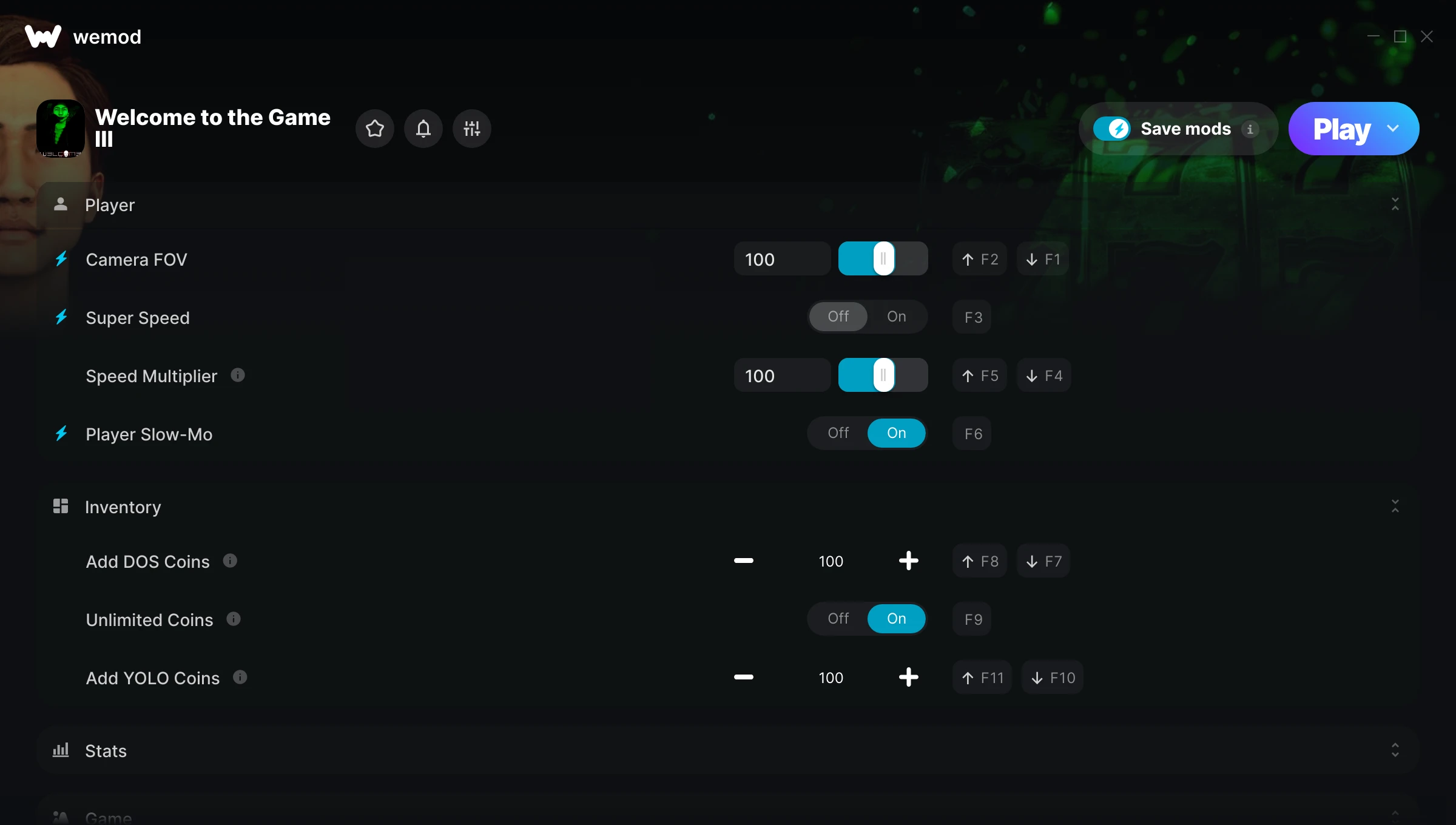
The Welcome to the Game III Trainer gives you access to 11 cheats that let you play the game however you want. Struggling with a tough section? Want to skip the grind? Just want to mess around? This trainer has you covered.
Super speed makes exploration a breeze and lets you outrun anything the game throws at you. These cheats let you get past the frustrating parts and actually enjoy the game at your own pace.
Some people call it cheating. We call it playing on your own terms.
First hitting the scene in 2026, this puzzle and simulator title keeps attracting players who want more control over their run.
Once you’ve got this trainer installed, it takes care of itself. Every time the game gets a patch, the trainer updates automatically so your cheats keep working.
Some of the most popular cheats included in this trainer are Super Speed, Max Reputation, Camera FOV, Speed Multiplier, and many more. These modifications let you customize difficulty, skip grinding, or simply experiment with the game in new ways.
Welcome to the Game III Trainer Cheats
This trainer includes 11 cheats covering resources, movement, time.
| # | Cheat | Effect |
|---|---|---|
| 1 | Camera FOV | Tweak the camera fov mechanic to your advantage |
| 2 | Super Speed | Move through the game world at blazing speed |
| 3 | Speed Multiplier | Multiply your speed gains by a huge amount |
| 4 | Player Slow-Mo | Tweak the player slow mo mechanic to your advantage |
| 5 | Add DOS Coins | Give yourself more dos coins on demand |
| 6 | Unlimited Coins | Remove all limits on your coins |
| 7 | Add YOLO Coins | Give yourself more yolo coins on demand |
| 8 | Max Reputation | Max out your reputation in one go |
| 9 | Game Speed | Speed up or slow down the entire game to your liking |
| 10 | Slow Motion | Tweak the slow motion mechanic to your advantage |
| 11 | High-Res Screenshot | Tweak the high res screenshot mechanic to your advantage |
What Can You Do With This Trainer?
Here are some of the standout cheats in this trainer – the ones that really change how you play:
- Camera FOV – Tweak the camera fov mechanic to your advantage
- Super Speed – Move through the game world at blazing speed
- Speed Multiplier – Boost your speed earnings dramatically
- Player Slow-Mo – Tweak the player slow mo mechanic to your advantage
- Add DOS Coins – Add extra dos coins whenever you need it
And that’s just scratching the surface. The full Welcome to the Game III cheat list above has everything you need to play completely on your own terms.
Recommended Cheat Presets
Not sure which cheats to enable? Here are some recommended preset combinations for different playstyles:
Farming Preset
Skip the grind entirely. Max out your loot, XP, and cash without spending hours farming the same enemies over and over.
- Add DOS Coins
- Unlimited Coins
- Add YOLO Coins
Download Welcome to the Game III Trainer
Download the latest version of this trainer for PC below.
| Version | Creator | Platform | Date Added | Download |
|---|---|---|---|---|
| Auto-Updating Version (Latest) | milapesa | Steam | 2026-07-14 | Download |
How to Use This Trainer
- Open Welcome to the Game III – Launch the game and wait until you’re in-game or at the main menu. The trainer needs the game process running to hook into it.
- Connect WeMod – Launch the WeMod application and find “Welcome to the Game III” in the library. Press Play and WeMod will hook into the running game automatically.
- Turn On Cheats – Pick the cheats you want from the WeMod overlay and switch them on. They kick in instantly and you can toggle them off anytime.
- Have Fun – Done! Get back to playing and enjoy the ride. Mix and match cheats whenever you want – there’s no wrong way to use them.
Tips & Known Issues
- This trainer is strictly for single-player gameplay. Anti-cheat software in online modes will flag and ban your account.
- While trainers are safe to use, backing up your save file beforehand is always a smart precaution.
- Antivirus software may detect the trainer as suspicious. This is normal for game trainers – add an exclusion to proceed.
- If using Steam, consider disabling the Steam Overlay (Steam > Settings > In-Game) to avoid conflicts with the trainer.
- Using WeMod? The trainer stays current on its own – it auto-patches after every game update.
Frequently Asked Questions
How often is this trainer updated?
This trainer auto-updates shortly after each game patch, so it stays compatible without you having to do anything.
Is this trainer free to download?
Yep, completely free. Just grab it from the download links above and you’re good to go.
Will this trainer affect my save files?
The trainer only modifies values in memory while the game is running. Your save files stay intact, though any progress you make with cheats on will save as normal.
Can I use multiple cheats at the same time?
Yes – enable as many as you like simultaneously. Combining cheats is where things get really fun.
How do I use this trainer?
It’s straightforward: download, run the trainer while the game is open, and press the hotkeys to activate whichever cheats you want.
Does this trainer work with Steam?
Yes. The trainer hooks into the game process when launched through Steam.