Zombeer Trainer
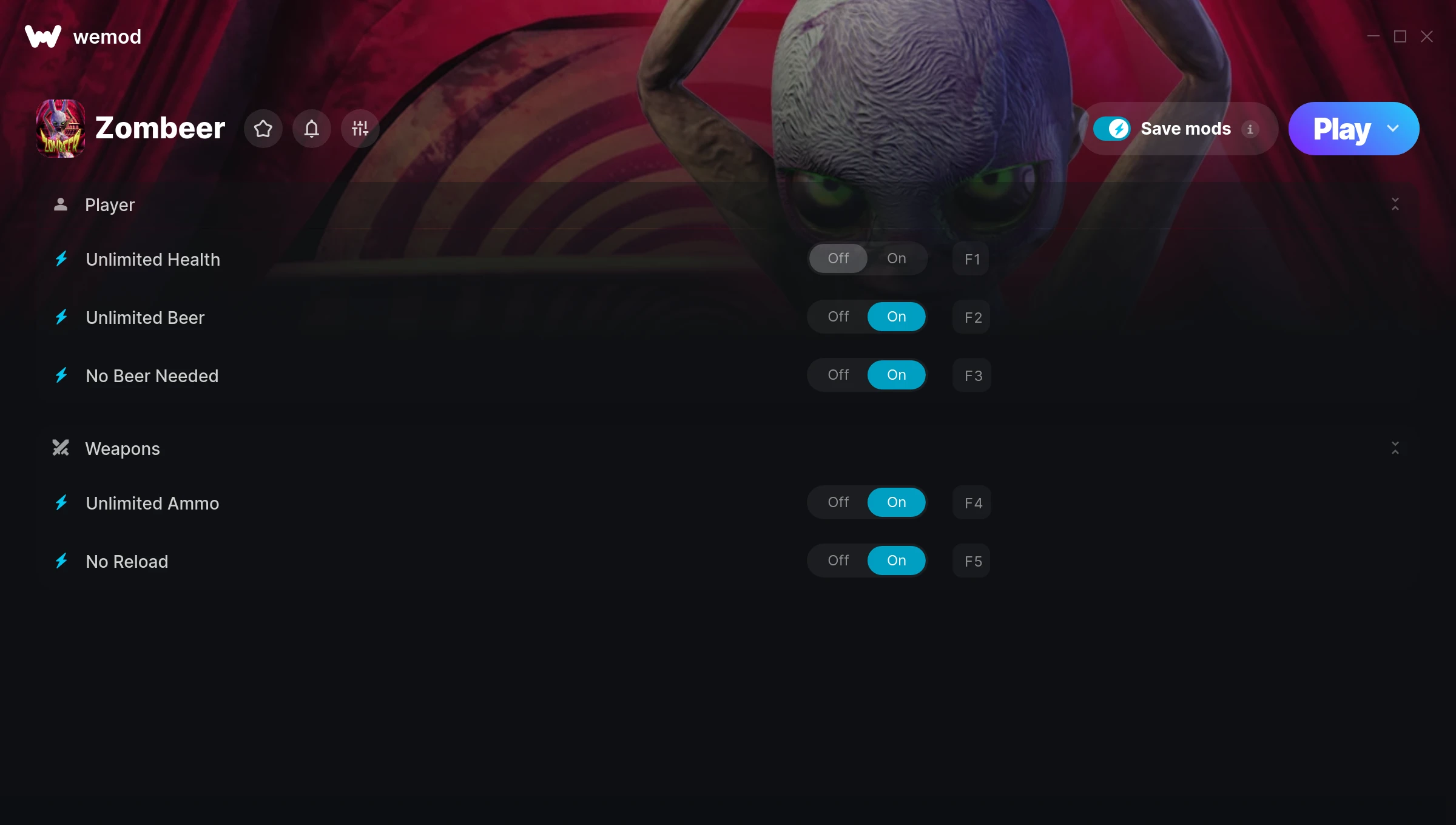
The Zombeer Trainer gives you access to 5 cheats that let you play the game however you want. Struggling with a tough section? Want to skip the grind? Just want to mess around? This trainer has you covered.
No reload means nonstop firepower. Seriously, it changes how you approach every fight. These cheats let you get past the frustrating parts and actually enjoy the game at your own pace.
Turn on god mode and play the game like a walking cutscene. No shame in it.
It’s been a while since Zombeer first hit in 2014, but this shooter and indie title still has plenty to offer.
This trainer is auto-updating – it patches itself every time the game gets an update, so you never have to hunt for a new download. Just install it once and you’re set.
Some of the most popular cheats included in this trainer are Unlimited Health, Unlimited Ammo, No Reload, Unlimited Beer, and many more. These modifications let you customize difficulty, skip grinding, or simply experiment with the game in new ways.
Zombeer Trainer Cheats
This trainer includes 5 cheats covering health, ammo.
| # | Cheat | Effect |
|---|---|---|
| 1 | Unlimited Health | Your health stays maxed out no matter what hits you |
| 2 | Unlimited Beer | Your beer never runs out or depletes |
| 3 | No Beer Needed | Remove beer needed from the equation |
| 4 | Unlimited Ammo | Fire away without ever worrying about running dry |
| 5 | No Reload | Skip reload animations entirely and keep firing nonstop |
What Can You Do With This Trainer?
Here are some of the standout cheats in this trainer – the ones that really change how you play:
- Unlimited Health – Your health stays maxed out no matter what hits you
- Unlimited Beer – Use your beer as much as you want without limits
- No Beer Needed – Remove beer needed from the equation
- Unlimited Ammo – Fire away without ever worrying about running dry
- No Reload – Skip reload animations entirely and keep firing nonstop
And that’s just scratching the surface. The full Zombeer cheat list above has everything you need to play completely on your own terms.
Recommended Cheat Presets
Not sure which cheats to enable? Here are some recommended preset combinations for different playstyles:
Easy Mode
Turn the difficulty down to nothing. Perfect for enjoying the story, or for a second playthrough where you just want to feel unstoppable.
- Unlimited Health
- Unlimited Ammo
- No Reload
Download Zombeer Trainer
Download the latest version of this trainer for PC below.
| Version | Creator | Platform | Date Added | Download |
|---|---|---|---|---|
| Auto-Updating Version (Latest) | MrAntiFun | Steam | 2025-11-12 | Download |
How to Use This Trainer
- Start the Game First – Always start Zombeer before the trainer. Load your save or start a new game – the trainer needs an active game process.
- Connect WeMod – Launch the WeMod application and find “Zombeer” in the library. Press Play and WeMod will hook into the running game automatically.
- Activate Cheats – Toggle the cheats you want using the WeMod overlay or press the assigned hotkeys. Cheats activate in real-time while you play.
- Enjoy the Game – You’re all set. Play the game with your cheats active and switch them around as you go. Try different combinations to see what’s the most fun.
Tips & Known Issues
- This trainer is strictly for single-player gameplay. Anti-cheat software in online modes will flag and ban your account.
- Always run the trainer as Administrator for best compatibility.
- Running an older game version? The trainer may not work correctly. Update your game to the latest patch first.
- Trainers are PC-only. If you’re playing on console or through a cloud streaming service, the trainer won’t work.
- WeMod auto-updates the trainer after game patches, so you never have to manually download a new version.
Frequently Asked Questions
Can I customise how much health or money I get?
Some cheats include an edit mode where you can set a specific value rather than just maxing things out. Great for keeping things balanced if you want.
What should I do if the trainer stops working after an update?
If a game patch breaks things, the auto-updating trainer will fix itself automatically – usually within a day or two.
Can I use multiple cheats at the same time?
You can run every single cheat at once if you want. Mix and match until you find a combination you enjoy.
How do I use this trainer?
It’s straightforward: download, run the trainer while the game is open, and press the hotkeys to activate whichever cheats you want.
Does this trainer work with Steam?
Fully compatible with Steam. Just launch the game through Steam and run the trainer alongside it.