Zompiercer Trainer
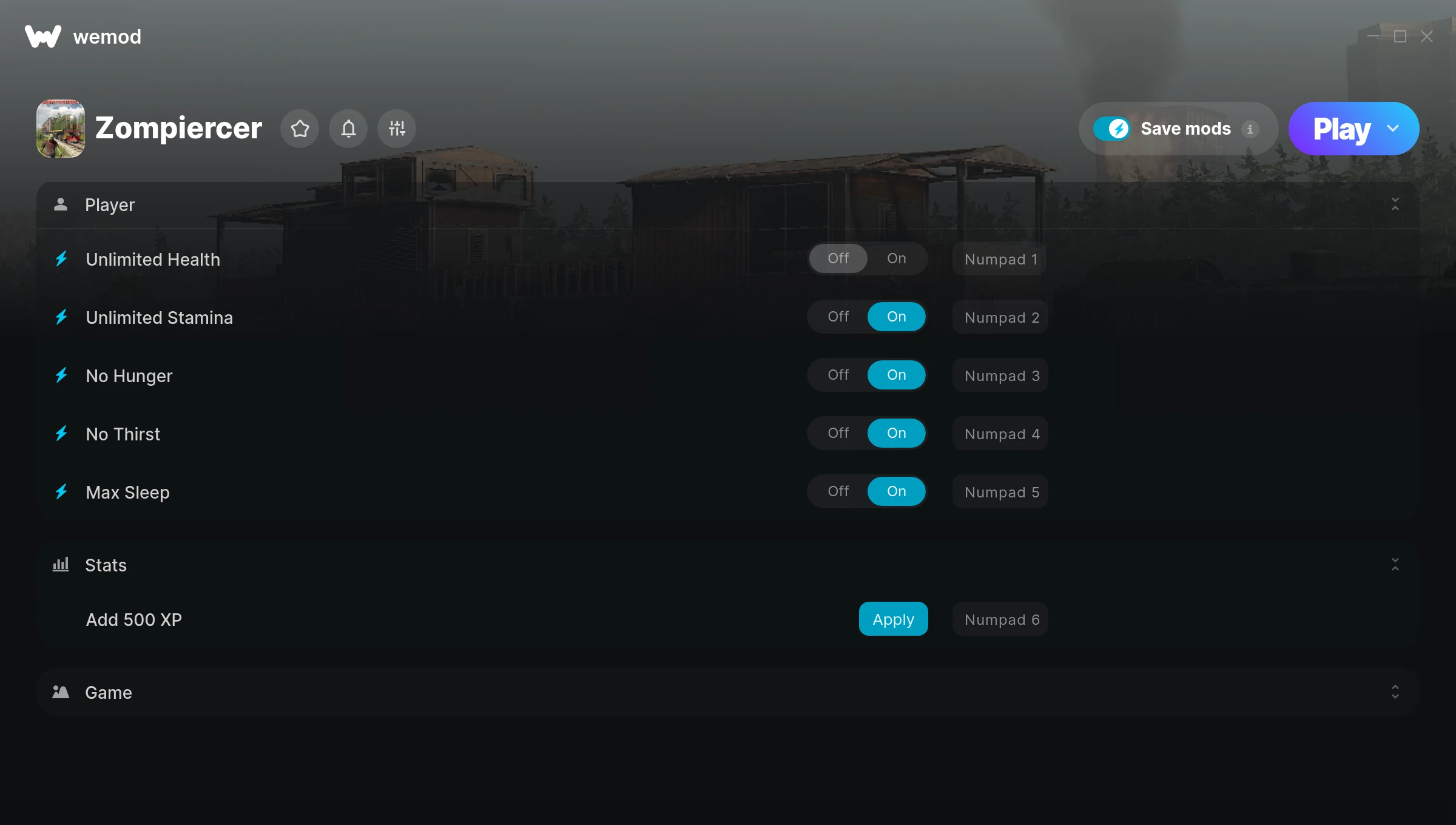
The Zompiercer Trainer gives you access to 7 cheats that let you play the game however you want. Struggling with a tough section? Want to skip the grind? Just want to mess around? This trainer has you covered.
Unlimited stamina means you can sprint, dodge, and fight nonstop without that annoying stamina bar slowing you down. These cheats let you get past the frustrating parts and actually enjoy the game at your own pace.
If you’re the type who reads every tooltip and explores every corner, infinite health makes that a lot more relaxing.
It’s been a while since Zompiercer first hit in 2020, but this adventure and indie title still has plenty to offer.
This is an auto-updating trainer that keeps pace with every game patch automatically. No need to manually grab new versions after updates.
Some of the most popular cheats included in this trainer are Unlimited Health, Unlimited Stamina, Max Sleep, No Hunger, and many more. These modifications let you customize difficulty, skip grinding, or simply experiment with the game in new ways.
Zompiercer Trainer Cheats
This trainer includes 7 cheats covering health, movement, experience, time.
| # | Cheat | Effect |
|---|---|---|
| 1 | Unlimited Health | Your health stays maxed out no matter what hits you |
| 2 | Unlimited Stamina | Sprint, dodge, and fight without ever getting winded |
| 3 | No Hunger | Turn off hunger entirely for easier gameplay |
| 4 | No Thirst | Remove thirst from the equation |
| 5 | Max Sleep | Instantly push your sleep to the highest value |
| 6 | Add 500 XP | Give yourself more 500 xp on demand |
| 7 | Set Game Speed | Speed up or slow down the entire game to your liking |
What Can You Do With This Trainer?
Here are some of the standout cheats in this trainer – the ones that really change how you play:
- Unlimited Health – Your health stays maxed out no matter what hits you
- Unlimited Stamina – Sprint, dodge, and fight without ever getting winded
- No Hunger – Turn off hunger entirely for easier gameplay
- No Thirst – Remove thirst from the equation
- Max Sleep – Set your sleep to the absolute maximum
And that’s just scratching the surface. The full Zompiercer cheat list above has everything you need to play completely on your own terms.
Download Zompiercer Trainer
Download the latest version of this trainer for PC below.
| Version | Creator | Platform | Date Added | Download |
|---|---|---|---|---|
| Auto-Updating Version (Latest) | STiNGERR | Steam | 2025-12-10 | Download |
How to Use This Trainer
- Open Zompiercer – Launch the game and wait until you’re in-game or at the main menu. The trainer needs the game process running to hook into it.
- Activate WeMod – Run the WeMod app, locate “Zompiercer”, and hit Play. WeMod attaches to the game and shows you the full cheat list in the overlay.
- Choose Your Cheats – Scroll through the WeMod overlay and enable the cheats that interest you. All changes happen live while you play.
- Get Back to the Game – Everything is set up. Continue playing Zompiercer with your chosen cheats active. Experiment freely – you can change things at any time.
Tips & Known Issues
- Only use this trainer in single-player. Online and multiplayer modes have anti-cheat systems that will detect and ban you.
- Your antivirus might quarantine the trainer file. This is a known false positive – whitelist the trainer in your security software.
- If cheats aren’t working, check for conflicting overlays. Discord, GeForce Experience, and similar tools can interfere.
- Having issues on Steam? Try disabling the Steam Overlay under Settings > In-Game. It can sometimes clash with trainers.
- One of the perks of WeMod is automatic updates. The trainer syncs with game patches behind the scenes.
Frequently Asked Questions
Will this trainer affect my save files?
The trainer only modifies values in memory while the game is running. Your save files stay intact, though any progress you make with cheats on will save as normal.
Can I customise how much health or money I get?
Yes – many cheats have edit or set options that let you type in the exact value you want. Perfect for dialling things in without going completely overboard.
What should I do if the trainer stops working after an update?
If a game patch breaks things, the auto-updating trainer will fix itself automatically – usually within a day or two.
How do I use this trainer?
Just download the trainer and open it while the game is running. Each cheat has a toggle – flip them on or off as you play.
Is this trainer compatible with mods?
In most cases they work fine together. Conflicts only happen when a mod alters the exact same memory values the trainer is trying to modify.
Does this trainer work with Steam?
Yes. The trainer hooks into the game process when launched through Steam.