Azur Lane: Crosswave Trainer
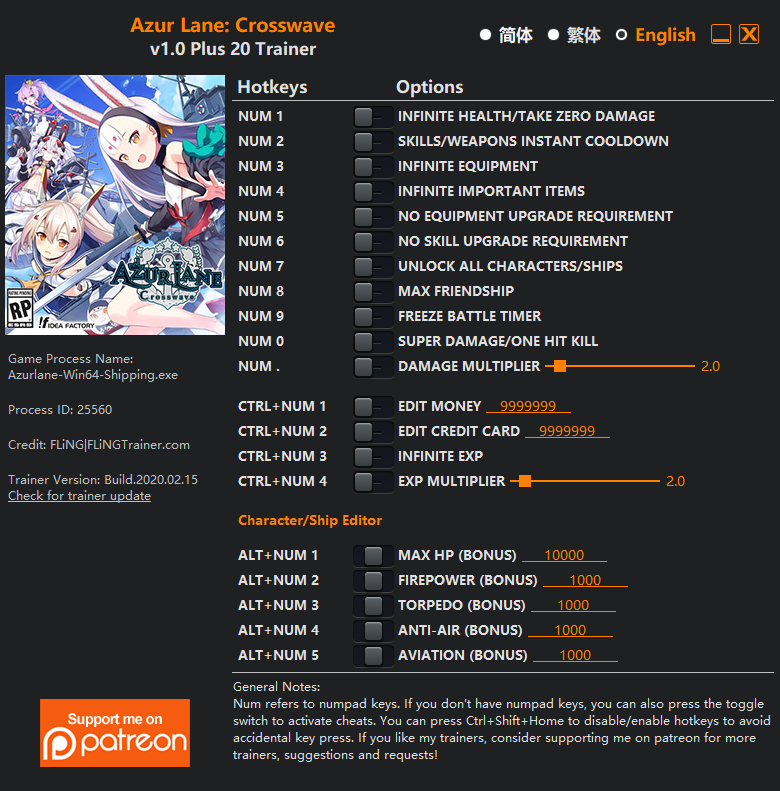
The Azur Lane: Crosswave Trainer gives you access to 15 cheats that let you play the game however you want. Struggling with a tough section? Want to skip the grind? Just want to mess around? This trainer has you covered.
Infinite health means you can charge headfirst into anything without consequences. It’s as liberating as it sounds. These cheats let you get past the frustrating parts and actually enjoy the game at your own pace.
Whether you’ve already beaten it legit or just want to cause some chaos, you’re in the right place.
Azur Lane: Crosswave first launched in 2019 as a shooter and role-playing (rpg) title and still has a strong community of players today.
Some of the most popular cheats included in this trainer are Num 1 – Infinite Health/Take Zero Damage, Num 8 – Max Friendship, Num 9 – Freeze Battle Timer, Num 0 – Super Damage/One Hit Kill, and many more. These modifications let you customize difficulty, skip grinding, or simply experiment with the game in new ways.
Azur Lane: Crosswave Trainer Cheats
This trainer includes 15 cheats covering health, resources, combat, experience, inventory.
| # | Cheat | Effect |
|---|---|---|
| 1 | Num 1 – Infinite Health/Take Zero Damage | Health that never drops – charge into anything without worry |
| 2 | Num 2 – Skills/Weapons Instant Cooldown | Skip the wait and trigger skills/weapons cooldown right away |
| 3 | Num 3 – Infinite Equipment | Bottomless equipment – it never runs dry |
| 4 | Num 4 – Infinite Important Items | Your important items supply becomes endless |
| 5 | Num 8 – Max Friendship | Max out your friendship in one go |
| 6 | Num 9 – Freeze Battle Timer | Prevent your battle timer from going up or down |
| 7 | Num 0 – Super Damage/One Hit Kill | Drop any enemy with a single hit, no matter their health bar |
| 8 | Num . – Damage Multiplier | Hit harder – multiply the damage on every attack you land |
| 9 | Ctrl+Num 1 – Edit Money | Dial in the exact money you want |
| 10 | Ctrl+Num 2 – Edit Credit Card | Set your crcard to any value you choose |
| 11 | Ctrl+Num 3 – Infinite Exp | Gain XP endlessly and level up as fast as you want |
| 12 | Ctrl+Num 4 – Exp Multiplier | Earn experience way faster from everything you do |
| 13 | Character/Ship Editor | Tweak the character/ship editor mechanic to your advantage |
| 14 | Alt+Num 1 – Max Hp (Bonus) | Set your hp (bonus) to the absolute maximum |
| 15 | “Max Friendship” and “Infinite Exp” take effect after winning a battle. | Adjust your “friendship” and “exp” take effect after winning a battle. however you see fit |
What Can You Do With This Trainer?
Here are some of the standout cheats in this trainer – the ones that really change how you play:
- Num 1 – Infinite Health/Take Zero Damage – Health that never drops – charge into anything without worry
- Num 2 – Skills/Weapons Instant Cooldown – Get skills/weapons cooldown immediately with no waiting
- Num 3 – Infinite Equipment – Bottomless equipment – it never runs dry
- Num 4 – Infinite Important Items – Never worry about running out of important items again
- Num 8 – Max Friendship – Max out your friendship in one go
And that’s just scratching the surface. The full cheat list above has everything you need to play the game completely on your own terms.
Recommended Cheat Presets
Not sure which cheats to enable? Here are some recommended preset combinations for different playstyles:
Easy Mode
Turn the difficulty down to nothing. Perfect for enjoying the story, or for a second playthrough where you just want to feel unstoppable.
- Num 1 – Infinite Health/Take Zero Damage
- Num 0 – Super Damage/One Hit Kill
Farming Preset
Skip the grind entirely. Max out your loot, XP, and cash without spending hours farming the same enemies over and over.
- Ctrl+Num 1 – Edit Money
- Ctrl+Num 3 – Infinite Exp
- Ctrl+Num 4 – Exp Multiplier
- “Max Friendship” and “Infinite Exp” take effect after winning a battle.
Download Azur Lane: Crosswave Trainer
Download the latest version of this trainer for PC below.
| Version | Creator | Platform | Date Added | Download |
|---|---|---|---|---|
| Standalone Version | FLiNG | PC (Windows) | 2020-02-15 | Download |
How to Use This Trainer
- Launch the Game – Open Azur Lane: Crosswave and get to the point where you’re actually playing. The trainer hooks into the game while it’s running.
- Fire Up the Trainer – Launch the FLiNG .exe with Administrator privileges. The trainer window shows up with hotkey mappings for each cheat.
- Trigger Cheats with Hotkeys – Each cheat is mapped to a keyboard shortcut shown in the trainer. Press the key to toggle the cheat on, press again to turn it off.
- Game On – You’re set. Head back into Azur Lane: Crosswave and have fun. Remember, you can toggle cheats at any time – find the combination that works best for you.
Tips & Known Issues
- Only use this trainer in single-player. Online and multiplayer modes have anti-cheat systems that will detect and ban you.
- Always match your game version to the trainer version. An outdated game build can cause cheats to fail silently.
- A quick save backup takes seconds and gives you peace of mind when experimenting with trainer cheats.
- For the trainer to work properly, make sure you launch it with Administrator privileges.
Frequently Asked Questions
Will the trainer work with the latest game version?
The auto-updating trainer stays compatible with new patches on its own. If you grabbed the Standalone version, you might need to check for a newer release after big updates.
How often is this trainer updated?
Updates roll out shortly after game patches for the Auto-Updating Version. The Standalone build gets refreshed less frequently.
Is this trainer compatible with mods?
Usually, yes. Trainers and mods can run side by side without issues. The only time you might hit a snag is if a mod changes the same values the trainer is targeting.
Can I customise how much health or money I get?
Yes – many cheats have edit or set options that let you type in the exact value you want. Perfect for dialling things in without going completely overboard.
How do I know which version to download?
Go with the Auto-Updating Version if you want something that stays current automatically. The Standalone version is better if you prefer a fixed release or are running an older game version.