Dohna Dohna Trainer
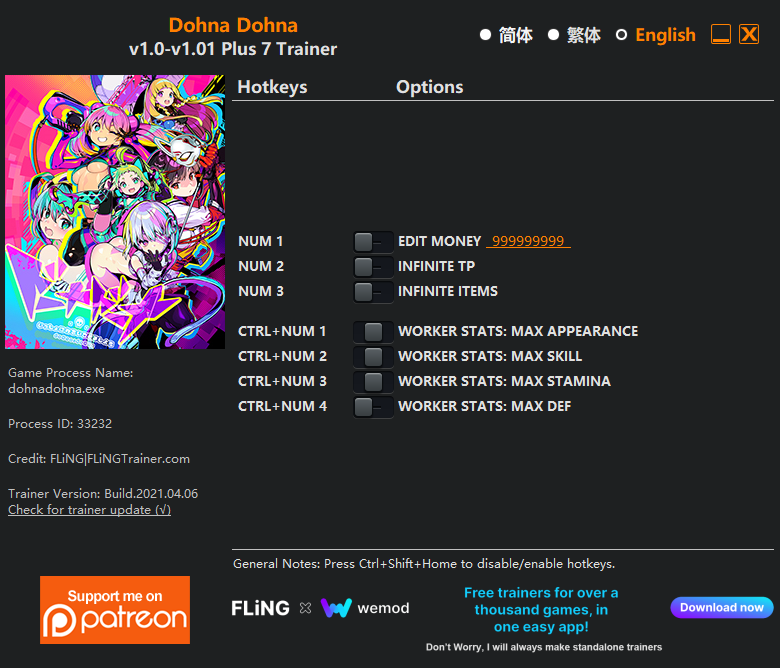
The Dohna Dohna Trainer gives you access to 7 cheats that let you play the game however you want. Struggling with a tough section? Want to skip the grind? Just want to mess around? This trainer has you covered.
Perfect for a second playthrough where you just want to mess around and have fun.
Some of the most popular cheats included in this trainer are Ctrl+Num 1 – Worker Stats: Max Appearance, Num 1 – Edit Money, Num 2 – Infinite TP, Num 3 – Infinite Items, and many more. These modifications let you customize difficulty, skip grinding, or simply experiment with the game in new ways.
Dohna Dohna Trainer Cheats
This trainer includes 7 cheats covering resources, movement, inventory.
| # | Cheat | Effect |
|---|---|---|
| 1 | Num 1 – Edit Money | Manually adjust your money to whatever you need |
| 2 | Num 2 – Infinite TP | Your tp supply becomes endless |
| 3 | Num 3 – Infinite Items | Items never deplete no matter how many times you use them |
| 4 | Ctrl+Num 1 – Worker Stats: Max Appearance | Max out your worker stats: appearance in one go |
| 5 | Ctrl+Num 2 – Worker Stats: Max Skill | Max out your worker stats: skill in one go |
| 6 | Ctrl+Num 3 – Worker Stats: Max Stamina | Instantly refill your stamina to full capacity |
| 7 | Ctrl+Num 4 – Worker Stats: Max Def | Max out your worker stats: def in one go |
What Can You Do With This Trainer?
Here are some of the standout cheats in this trainer – the ones that really change how you play:
- Num 1 – Edit Money – Dial in the exact money you want
- Num 2 – Infinite TP – Your tp supply becomes endless
- Num 3 – Infinite Items – Items never deplete no matter how many times you use them
- Ctrl+Num 1 – Worker Stats: Max Appearance – Instantly push your worker stats: appearance to the highest value
- Ctrl+Num 2 – Worker Stats: Max Skill – Instantly push your worker stats: skill to the highest value
And that’s just scratching the surface. The full cheat list above has everything you need to play the game completely on your own terms.
Download Dohna Dohna Trainer
Download the latest version of this trainer for PC below.
| Version | Creator | Platform | Date Added | Download |
|---|---|---|---|---|
| Standalone Version | FLiNG | PC (Windows) | 2021-04-07 | Download |
How to Use This Trainer
- Start the Game First – Always start Dohna Dohna before the trainer. Load your save or start a new game – the trainer needs an active game process.
- Start the FLiNG .exe – Double-click the FLiNG trainer file (run as Admin if prompted). The trainer window displays all hotkeys for activating cheats.
- Activate Cheats via Hotkeys – Press the hotkeys shown in the trainer window to toggle cheats on and off. Each cheat has its own keyboard shortcut.
- Have Fun – Done! Get back to playing and enjoy the ride. Mix and match cheats whenever you want – there’s no wrong way to use them.
Tips & Known Issues
- This is a single-player trainer only. Do not use it in online or multiplayer modes – you will get banned.
- Steam users may want to turn off the Steam Overlay to prevent it from interfering with the trainer.
- Some antivirus software may flag the trainer as a false positive. You may need to add an exception for it.
- It’s good practice to back up your saves before activating cheats. That way you can revert if anything feels off.
Frequently Asked Questions
What should I do if the trainer stops working after an update?
If a game patch breaks things, the Auto-Updating Version will fix itself automatically. For the Standalone version, check back for a new release.
Can I use multiple cheats at the same time?
Of course. There’s no limit to how many you can have active. Layer them however you want.
Can I customise how much health or money I get?
Yes – many cheats have edit or set options that let you type in the exact value you want. Perfect for dialling things in without going completely overboard.
How often is this trainer updated?
The Auto-Updating Version syncs with game patches within a day or two. Standalone releases come out as needed.
How do I know which version to download?
The Auto-Updating Version is the easiest choice – it handles compatibility on its own. Pick the Standalone if you want a specific build that won’t change.