
Doom the Dark Ages Trainer
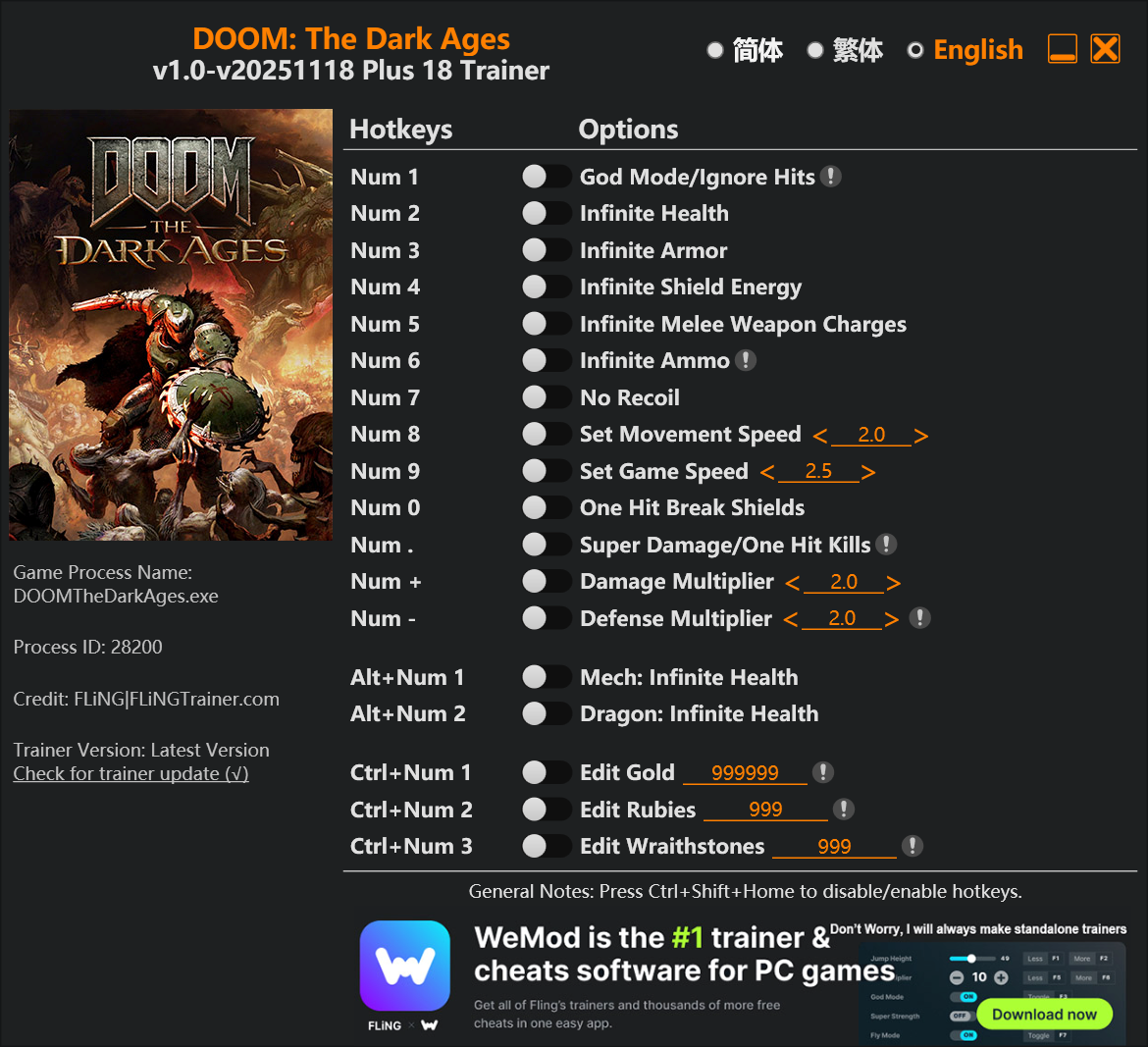
The Doom the Dark Ages Trainer gives you access to 18 cheats that let you play the game however you want. Struggling with a tough section? Want to skip the grind? Just want to mess around? This trainer has you covered.
God mode lets you take on anything the game throws at you without breaking a sweat. Boss fights become victory laps. These cheats let you get past the frustrating parts and actually enjoy the game at your own pace.
Honestly, half the fun is seeing what happens when you turn everything on at once.
A shooter title that first dropped in 2025, Doom the Dark Ages still draws players who want to tweak the experience to their liking.
Not sure which version to grab? The Auto-Updating Version keeps itself in sync with game patches automatically. The Standalone is a fixed release – great if you’re running an older game version.
Some of the most popular cheats included in this trainer are God Mode/Ignore Hits, Infinite Health, Infinite Ammo, Defense Multiplier, and many more. These modifications let you customize difficulty, skip grinding, or simply experiment with the game in new ways.
Doom the Dark Ages Trainer Cheats
This trainer includes 18 cheats covering health, ammo, resources, combat, movement.
| # | Cheat | Effect |
|---|---|---|
| 1 | God Mode/Ignore Hits | Become completely invincible – nothing in the game can hurt you |
| 2 | Infinite Health | Health that never drops – charge into anything without worry |
| 3 | Defense Multiplier | Shrug off more damage with massively boosted defense |
| 4 | Infinite Armor | Armor that never breaks down or wears out |
| 5 | Infinite Shield Energy | Bottomless shield energy – it never runs dry |
| 6 | Infinite Melee Weapon Charges | Bottomless melee weapon charges – it never runs dry |
| 7 | Infinite Ammo | Your ammo count never drops no matter how much you shoot |
| 8 | No Recoil | Eliminate all weapon recoil for laser-accurate shots |
| 9 | Set Movement Speed | Adjust movement speed to whatever feels right |
| 10 | Mech: Infinite Health | Override the default mech: health behaviour completely |
| 11 | Dragon: Infinite Health | Gives you full control over your dragon: health |
| 12 | Edit Gold | Fine-tune your gold to the perfect amount |
| 13 | Edit Rubies | Set your rubies to any value you choose |
| 14 | Edit Wraithstones | Fine-tune your wraithstones to the perfect amount |
| 15 | One Hit Break Shields | Tweak the one hit break shields mechanic to your advantage |
| 16 | Super Damage/One-Hit Kills | Crank your damage/one-hit kills up to ridiculous levels |
| 17 | Damage Multiplier | Hit harder – multiply the damage on every attack you land |
| 18 | Set Game Speed | Speed up or slow down the entire game to your liking |
What Can You Do With This Trainer?
Here are some of the standout cheats in this trainer – the ones that really change how you play:
- God Mode/Ignore Hits – Become completely invincible – nothing in the game can hurt you
- Infinite Health – Health that never drops – charge into anything without worry
- Defense Multiplier – Shrug off more damage with massively boosted defense
- Infinite Armor – Armor that never breaks down or wears out
- Infinite Shield Energy – Never worry about running out of shield energy again
And that’s just scratching the surface. The full cheat list above has everything you need to play the game completely on your own terms.
Recommended Cheat Presets
Not sure which cheats to enable? Here are some recommended preset combinations for different playstyles:
Easy Mode
Turn the difficulty down to nothing. Perfect for enjoying the story, or for a second playthrough where you just want to feel unstoppable.
- God Mode/Ignore Hits
- Infinite Health
- Infinite Armor
- Infinite Ammo
- Mech: Infinite Health
Combat Specialist
Stack every combat cheat and dominate every fight. Fair? Not even close. Fun? Absolutely.
- No Recoil
- Damage Multiplier
Download Doom the Dark Ages Trainer
Download the latest version of this trainer for PC below.
| Version | Creator | Platform | Date Added | Download |
|---|---|---|---|---|
| Auto-Updating Version (Latest) | FLiNG | Steam, Xbox | 2025-12-10 | Download |
| Standalone Version | FLiNG | Steam | 2025-09-28 | Download |
How to Use This Trainer
- Load Doom the Dark Ages – Start the game and either load your existing save or begin a new one. The trainer connects to the running game process.
- Run Your Chosen Trainer – For the auto-updating version, open WeMod and find “Doom the Dark Ages”. For the standalone version, run the FLiNG .exe file as Administrator. Both connect to the game automatically.
- Switch On Your Cheats – Browse the cheat list in the WeMod overlay and toggle on whatever you want. Effects are instant and reversible.
- Start Playing – That’s all there is to it. Dive back in and enjoy Doom the Dark Ages with your cheats running. Feel free to adjust them anytime mid-game.
Tips & Known Issues
- Never activate this trainer during online play. It’s built for single-player only and multiplayer anti-cheat will catch it.
- Not on PC? Unfortunately, trainers don’t work on console or cloud gaming platforms – they require direct memory access.
- It’s good practice to back up your saves before activating cheats. That way you can revert if anything feels off.
- If cheats aren’t working, check for conflicting overlays. Discord, GeForce Experience, and similar tools can interfere.
- The WeMod version updates itself automatically after each game patch. No action needed on your end.
Frequently Asked Questions
Is this trainer free to download?
100% free. Hit one of the download buttons above and you can be up and running in seconds.
Will the trainer work with the latest game version?
The Auto-Updating Version keeps itself current automatically after each game patch. The Standalone version might need a manual update after big patches.
Can I customise how much health or money I get?
Certain cheats let you choose exact amounts instead of just toggling unlimited. Check for any ‘set’ or ‘edit’ options in the cheat list.
What cheats are included in this trainer?
You get 18 cheats to play with. Scroll up to the cheat list to see exactly what’s available.
Does this trainer work with Steam?
Fully compatible. This trainer works with Steam, Xbox – just launch the game through whichever launcher you use.



