Halo: The Master Chief Collection (Halo 2: Anniversary) Trainer
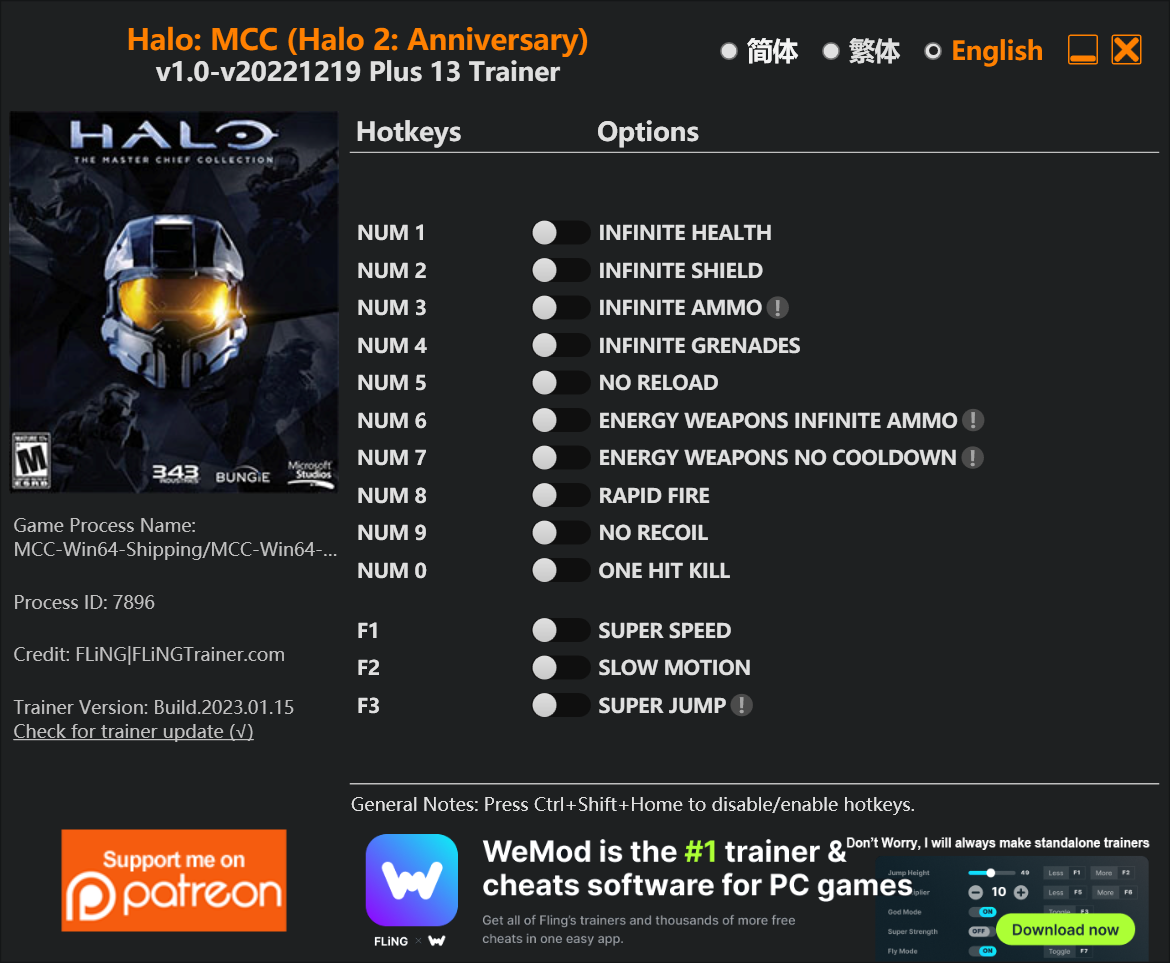
The Halo: The Master Chief Collection (Halo 2: Anniversary) Trainer gives you access to 8 cheats that let you play the game however you want. Struggling with a tough section? Want to skip the grind? Just want to mess around? This trainer has you covered.
No reload means nonstop firepower. Seriously, it changes how you approach every fight. These cheats let you get past the frustrating parts and actually enjoy the game at your own pace.
The cheat list below covers basically everything you’d want to tweak. Health, resources, speed – all of it.
Released in 2007, this shooter and adventure title continues to pull in players who want to get more out of it.
There’s an Auto-Updating Version that syncs with game patches on its own, and a Standalone version for anyone who prefers a one-time download. Either way, every cheat in the list is included.
Some of the most popular cheats included in this trainer are Unlimited Health, Unlimited Ammo, No Reload, Unlimited Shield, and many more. These modifications let you customize difficulty, skip grinding, or simply experiment with the game in new ways.
Halo: The Master Chief Collection (Halo 2: Anniversary) Trainer Cheats
This trainer includes 8 cheats covering health, ammo, defense, cooldowns.
| # | Cheat | Effect |
|---|---|---|
| 1 | Unlimited Health | Your health stays maxed out no matter what hits you |
| 2 | Unlimited Shield | Use your shield as much as you want without limits |
| 3 | Unlimited Ammo | Fire away without ever worrying about running dry |
| 4 | No Reload | Skip reload animations entirely and keep firing nonstop |
| 5 | No Spread | Every bullet goes exactly where you aim it |
| 6 | Unlimited Grenades | Your grenades never runs out or depletes |
| 7 | Unlimited Energy Ammo | Your energy ammo never runs out or depletes |
| 8 | No Cooldown Energy Weapon | Use abilities back-to-back with zero wait time between them |
What Can You Do With This Trainer?
Here are some of the standout cheats in this trainer – the ones that really change how you play:
- Unlimited Health – Your health stays maxed out no matter what hits you
- Unlimited Shield – Your shield never runs out or depletes
- Unlimited Ammo – Fire away without ever worrying about running dry
- No Reload – Skip reload animations entirely and keep firing nonstop
- No Spread – Every bullet goes exactly where you aim it
And that’s just scratching the surface. The full cheat list above has everything you need to play the game completely on your own terms.
Recommended Cheat Presets
Not sure which cheats to enable? Here are some recommended preset combinations for different playstyles:
Easy Mode
Turn the difficulty down to nothing. Perfect for enjoying the story, or for a second playthrough where you just want to feel unstoppable.
- Unlimited Health
- Unlimited Ammo
- No Reload
Combat Specialist
Stack every combat cheat and dominate every fight. Fair? Not even close. Fun? Absolutely.
- No Spread
- No Cooldown Energy Weapon
Download Halo: The Master Chief Collection (Halo 2: Anniversary) Trainer
Download the latest version of this trainer for PC below.
| Version | Creator | Platform | Date Added | Download |
|---|---|---|---|---|
| Auto-Updating Version (Latest) | MrAntiFun | Steam | 2026-01-30 | Download |
| Standalone Version | FLiNG | Steam | 2025-12-15 | Download |
How to Use This Trainer
- Get Into Halo: The Master Chief Collection (Halo 2: Anniversary) – Launch the game, get past the splash screens, and load into gameplay. Once you can see your character or the main menu, move to step 2.
- Start the Trainer – Got WeMod? Search for “Halo: The Master Chief Collection (Halo 2: Anniversary)” in the app and click Play. Using the FLiNG standalone? Run the .exe with Administrator privileges.
- Choose Your Cheats – Scroll through the WeMod overlay and enable the cheats that interest you. All changes happen live while you play.
- Game On – You’re set. Head back into Halo: The Master Chief Collection (Halo 2: Anniversary) and have fun. Remember, you can toggle cheats at any time – find the combination that works best for you.
Tips & Known Issues
- This is a single-player trainer only. Do not use it in online or multiplayer modes – you will get banned.
- Running the trainer as Admin avoids most permission-related issues. Right-click and choose Run as Administrator.
- The Steam Overlay can occasionally conflict with trainer software. Disable it in Steam settings if you notice problems.
- Multiple overlays running at once can cause issues. If the trainer isn’t responding, close any unnecessary overlay software.
- No need to check for updates manually with WeMod. The trainer patches itself whenever the game is updated.
Frequently Asked Questions
Will this trainer affect my save files?
It won’t corrupt your saves. The trainer works in memory only – but keep in mind that any progress made with cheats enabled will be saved normally.
Will the trainer work with the latest game version?
The auto-updating trainer stays compatible with new patches on its own. If you grabbed the Standalone version, you might need to check for a newer release after big updates.
How do I know which version to download?
The Auto-Updating Version is the easiest choice – it handles compatibility on its own. Pick the Standalone if you want a specific build that won’t change.
Is this trainer free to download?
Yep, completely free. Just grab it from the download links above and you’re good to go.
Does this trainer work with Steam?
Yes. The trainer hooks into the game process when launched through Steam.